
Описание
Head Drop
## 🤝 Our Partner
Need a game server ? We're partnered with Voltra, one plan, every game, from $1.99/mo, with a 2 day free trial and no card charged today.
Use code GAB10 at checkout, or just click the banner above, either way you get 10% off.
Clicking the banner above supports the development of this plugin at no extra cost to you ♥️
## 📌 About
This Minecraft plugin makes players drop their head upon death. Configure head drops, glowing effects, particles, broadcast messages, per-player statistics, and much more, all from a single `config.yml`
Runs natively on **Spigot, Paper, Purpur and Folia**, with no extra dependencies
## 💡 Features
- **PvP / PvE / All Drop Modes**
Choose when heads drop : on any death, only player kills (`pvp`), or only environmental deaths (`pve`)
- **Custom Drop Chance**
Configure the exact probability of a head dropping (0% → 100%)
- **Per-Player Drop Limit**
Optionally cap how many heads a single player can ever drop (great for farm prevention). Reset any player with a command
- **World Blacklist**
Disable head drops entirely in specific worlds
- **Invisibility Protection**
Optionally prevent head drops when the dying player is invisible
- **Drop as Item or Place on the Ground**
Choose whether heads drop as a normal item, or are placed directly on the ground as a head block, facing the direction the player was looking. When placing on the ground, HeadDrop searches nearby for a free, supported spot (with a configurable fallback to a normal drop if none is found)
- **Custom Head Item**
- Editable display name
- Single-line or multi-line lore
- 10 placeholders (player, killer, weapon, world, coordinates, XP, death cause, date & time…)
- Configurable date format **and timezone**
- Optional despawn timer
- Option to block renaming in anvils (only for plugin heads)
- Optional name & lore **persistence** : heads keep their identity even after being placed, mined, or blown up (TNT, creepers, end crystals…)
- **Hex & Legacy Colors**
Every text option (head name, lore, broadcast message) supports both legacy color codes (`&a`) and hex colors (`&#FF00AA`), so you're no longer limited to the 16 vanilla colors
- **Broadcast Messages**
Toggle a global chat message whenever a head drops, with full placeholder and color-code support
- **Optional Effects**
- Visual lightning bolt (no damage)
- Custom sound on drop
- Particles with **7 shapes** (upward, circle, burst, cycle, pulse, wave, spiral) and a configurable duration (or infinite)
- Colored glowing outline (**16 colors**, hex accepted and matched to the closest one, timed or infinite)
- **Statistics System**
An in-game GUI (`/head stats`) showing every player's head-drop count and last drop time, with :
- Global server stats (total heads, unique players, most recent & oldest drop)
- Sorting by count, last drop, or name (ascending / descending)
- Single-player view and live player skins
- Persistent storage that survives restarts
- **Give Command**
Hand out any player's head by username with `/head give`, styled with the exact same name and lore as a dropped head
- **Automatic Config Migration**
Updating the plugin never breaks your config : on startup, an outdated `config.yml` is automatically backed up and upgraded to the new version, keeping every setting you've already configured
- **Built-in Update Checker**
Get notified in the console when a new version is released on Modrinth
All these features can be fully configured in the `config.yml`
> **Default behavior :**
> If you don't modify the config, head drops function just like vanilla : no effects, no broadcasts, no special visuals
## 🛠️ Setup
1. Download the version of the plugin that matches your Minecraft server
2. Place the `.jar` file in your `plugins` folder
3. Restart your server to activate the plugin
Most settings can be customized in the `config.yml` file, make sure to review it for full configuration options
## 🎮 Commands & Permissions
| Command | Description | Permission (default) |
|---|---|---|
| `/head help` | Show the help menu | `head.command.help` *(everyone)* |
| `/head stats [player\|page]` | Open the statistics GUI | `head.command.stats` *(everyone)* |
| `/head give ` | Give a player's head to someone | `head.command.give` *(OP)* |
| `/head reset ` | Reset a player's drop counter | `head.command.reset` *(OP)* |
| `/head reload` | Reload the configuration | `head.command.reload` *(OP)* |
The `/head stats` command can be fully disabled from the config if you don't want it on your server
## 🏷️ Placeholders
Usable in the head name, lore and broadcast message :
`%head_player%` · `%head_player_uuid%` · `%head_killer%` · `%head_weapon%` · `%head_world%` · `%head_coordinates%` · `%head_datetime%` · `%head_xp%` · `%head_id%` · `%head_death_cause%`
## ⚙️ Config
After modifying your `config.yml`, use the command `/head reload` to apply your changes without restarting the server
_This command is only available to **OP** players_
When you update the plugin, an outdated `config.yml` is migrated automatically : a timestamped backup is saved to `plugins/HeadDrop/config-backups/` before anything changes, so nothing you configured is ever lost
## 🤝 Community & Support
Need help, found a bug, or just want to chat ?
Join our **[Discord community](https://discord.gg/zcFRqtynu2)**, we're always happy to hear your feedback and suggestions !
If you enjoy this plugin and want to support its development, consider buying me a coffee on **[Ko-fi](https://ko-fi.com/gab)** ❤️
## ❓ FAQ
**Q: Where can I find the `config.yml` file ?**
A: After the first launch, the file appears at : `/plugins/HeadDrop/config.yml`
**Q: Does this plugin work on Folia ?**
A: Yes ! HeadDrop runs natively on Folia, as well as Spigot, Paper and Purpur, no separate build required
**Q: How do I update the plugin to a newer version ?**
A: Download the latest release, replace the old `.jar` file in your `plugins` folder, then restart your server. Your `config.yml` is migrated automatically, with a backup saved first
**Q: How do I report bugs ?**
A: Join the **[Discord server](https://discord.gg/zcFRqtynu2)** and post the issue in the bug-reporting channel
**Q: What happens if I delete the `config.yml` file ?**
A: The plugin automatically regenerates a fresh default configuration file the next time the server starts
## 📊 Metrics
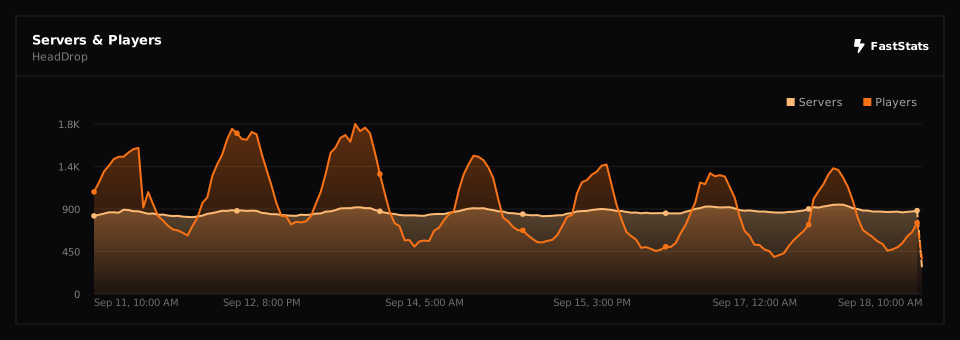
This plugin collects **anonymous** usage data (player and server counts, server software and version…) through two open statistics services : **[FastStats](https://faststats.dev)** and **[bStats](https://bstats.org)**
FastStats is privacy-first : it does **not** store IP addresses or any data that could identify you, and is fully GDPR-compliant. You can see the live numbers on the public **[project page](https://faststats.dev/project/headdrop/minecraft-plugin)**
bStats is open-source and equally anonymous. If you prefer to disable it, open `/plugins/bStats/config.yml` and set `enabled` to `false`
[](https://faststats.dev/project/headdrop/minecraft-plugin)