
Описание
# GUIShop v9.4.3c
### The Ultimate GUI-Based Shop Plugin for Minecraft Servers
*Fully compatible with Paper/Spigot/Folia/Bukkit 1.13 - 1.21.11*
[](https://github.com/pablo67340/GUIShop)
[](https://github.com/pablo67340/GUIShop/wiki)
[](https://discord.gg/wm6zMzdBwf)
---
## Overview
GUIShop is a powerful, feature-rich shop plugin that allows server owners to create beautiful GUI-based shops with extensive customization options. Say goodbye to confusing sign shops and chest-based systems. GUIShop provides players with an intuitive shopping experience while giving administrators complete control over pricing, items, and layout.
---
## Key Features
- **Easy-to-Use GUI System** - Players browse shops through clean, organized inventory menus
- **Multi-Page Shops** - Create shops with unlimited pages for large item catalogs
- **Dynamic Pricing** - Optional supply/demand based pricing system
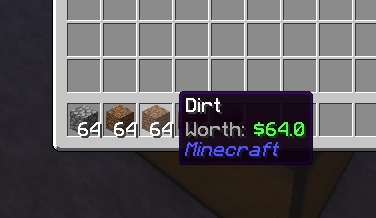
- **Worth Display System** - Shows item sell values directly in item lore (requires PacketEvents)
- **Full GUI-Based Item Editor** - Edit item prices, names, enchantments, and more through an intuitive GUI
- **Drag-and-Drop Shop Building** - Place and rearrange items in shops by simply dragging them
- **Command Items** - Sell commands that execute when purchased
- **Custom Items** - Full support for enchantments, potions, fireworks, and custom model data
- **Native Spawner Support** - Configure and sell mob spawners with any entity type
- **Native Player Head Support** - Use player UUIDs or Base64 skin textures for custom heads
- **PDC Support** - Uses Bukkit's Persistent Data Container API for reliable item identification
- **Per-Item Permissions** - Restrict specific items to certain player groups
- **PlaceholderAPI Support** - Use placeholders in shop names and lores
- **Vault Integration** - Works with any Vault-compatible economy plugin
- **Built-In Economy** - Optional internal economy system (no external economy plugin needed!)
- **Alternate Sell GUI** - Sell items without leaving the shop
- **Transaction Logging** - Track all purchases and sales
---
## Screenshots
Click to view screenshots
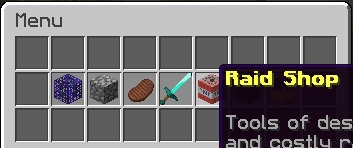
*Main Menu*
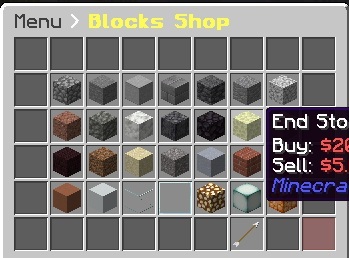
*Shop View*
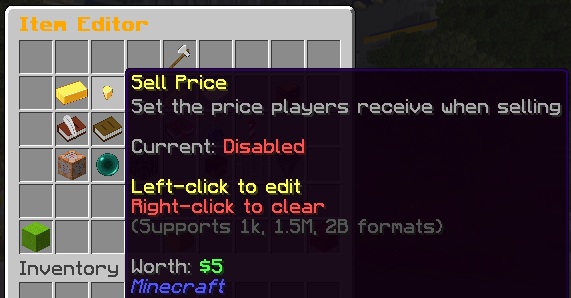
*Item Editor*
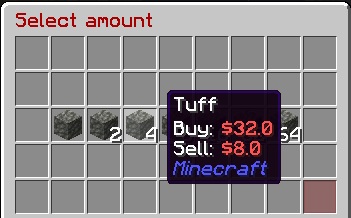
*Quantity Selector*
*Worth Display*
---
## Commands
### Player Commands
```
/shop, /buy - Open the shop menu
/sell - Open the sell GUI
/value, /val - Check the buy/sell value of held item
```
### Admin Commands
```
/gs reload - Reload all configuration files
/gs edit - Enter creator mode for the main menu
/gs edit menu - Enter creator mode for the main menu
/gs edit transaction - Enter creator mode for the transaction GUI
/gs edit [shop] - Enter creator mode for a specific shop
/gs edit [shop] [page] - Edit a specific page of a shop
/gs parsemob - Validate a mob type for spawners
/gs toggleworth - Toggle worth display for yourself (session only)
/gs iteminfo - Display comprehensive info about held item
```
### Economy Commands
(Only available when internal economy is enabled)
**Player Commands:**
```
/bal, /balance, /money - Check your balance
/bal - Check another player's balance
/pay - Send money to a player
/togglepay - Toggle payment notifications on/off
```
**Admin Commands:**
```
/gs eco give - Give money to a player
/gs eco take - Take money from a player
/gs eco set - Set a player's balance
/gs eco balance - Check a player's balance
/gs eco reset - Reset to starting balance
```
All amounts support abbreviations: 1k, 1.5M, 100B, etc.
### Item Info Command
The `/gs iteminfo` command is a powerful debugging and configuration helper. Hold any item and run the command to see:
- Material type and display name
- All lore lines
- Enchantments in config-ready format (e.g., `SHARPNESS:5 UNBREAKING:3`)
- Potion info in config-ready format (type, splash, extended, upgraded)
- Firework info in config-ready format (flight, explosions, colors)
- All PDC (Persistent Data Container) values
- Custom NBT data
This makes it easy to configure complex items - just create the item you want, then use `/gs iteminfo` to get the exact format needed for your `shops.yml`.
---
## Permissions
```
guishop.use - Access to the shop (default: op)
guishop.shop.* - Access to all shop items (default: op)
guishop.shop.. - Access to specific items
guishop.reload - Permission to reload the plugin (default: op)
guishop.creator - Access to the in-game shop editor (default: op)
guishop.value - Access to /value command (default: true)
guishop.sell - Access to /sell command (default: true)
guishop.admin - Full admin access (default: op)
```
---
## Configuration
GUIShop uses several configuration files for maximum flexibility:
- **config.yml** - General plugin settings, commands, titles, buttons
- **shops.yml** - Shop layouts and item definitions
- **menu.yml** - Main menu configuration
- **messages.yml** - All plugin messages (fully customizable)
- **worth.yml** - Worth display system configuration
Example Shop Item Configuration
```yaml
shops:
Blocks:
pages:
Page0:
'0':
type: SHOP # Item type (SHOP, COMMAND, SHOP_SHORTCUT, DUMMY, BLANK)
id: STONE # Material ID
buy-price: 10.0 # Price to buy (or 'false' to disable)
sell-price: 5.0 # Price to sell (or 'false' to disable)
shop-name: '&7Stone' # Display name in shop
buy-name: '&7Stone' # Name on purchased item
shop-lore: # Lore shown in shop
- '&fA basic building block'
enchantments: 'DURA:1 SHARP:2' # Enchantments (space separated)
quantity: 64 # Stack size to give
permission: 'shop.vip' # Required permission (optional)
```
---
## GUI-Based Item Editor
GUIShop features a powerful, fully GUI-based item editor that eliminates the need for manual config editing. Configure every aspect of shop items through intuitive click-based menus.
### How It Works
1. Enter creator mode with `/gs edit` (for menu) or `/gs edit ` (for shops)
2. **Left-click** to drag and drop items - move items within the shop, rearrange positions, or place new items from your inventory into the shop
3. **Right-click** or **Shift+click** any item to open the Item Editor GUI
4. Click on any setting to modify it through chat input or nested selection GUIs
5. Changes save automatically when you close the inventory
### Creator Mode Controls
```
Left-click - Pick up / place items (works between shop and your inventory)
Right-click - Open Item Editor for the clicked item
Shift+click - Open Item Editor for the clicked item
Navigation Buttons (pagination, back, balance):
Left-click - Pick up and move the button
Right-click - Open Item Editor for the button
Shift+click - Activate the button (navigate pages, go back, etc.)
```
### Item Editor Features
- **Buy/Sell Prices** - Set prices with support for abbreviated formats (1k, 1.5M, 100B)
- **Item Type** - Switch between SHOP, COMMAND, SHOP_SHORTCUT, and DUMMY types
- **Display Names** - Set shop display name and purchased item name
- **Custom Lore** - Add descriptive lore lines to items
- **Enchantments** - Add/remove enchantments through a visual enchantment picker
- **Potion Effects** - Configure potion type, duration, and amplifier via GUI
- **Firework Properties** - Set flight duration, explosion shapes, colors, and effects
- **Spawner Mob Type** - Select mob type from a visual entity picker
- **Commands** - Configure commands to run on purchase
- **Permissions** - Set required permissions per item
- **Quantity** - Set stack size given on purchase
Item Editor Screenshots
*Item Editor Main View*

*Enchantment Selector*

*Potion Editor*

---
## Worth Display System
GUIShop includes a powerful worth display feature that shows item sell values directly in the item lore. This uses packet manipulation to display worth client-side only, meaning your actual items are never modified.
**Requirements:** PacketEvents plugin
Worth Display Configuration (worth.yml)
```yaml
enabled: true
format: "&7Worth: &a%worth%"
position: BOTTOM
add-blank-line: true
only-show-sellable: true
not-sellable-format: "&7Worth: &cNot sellable"
# Hide worth in specific inventories
blacklisted-inventories:
- "Auction House"
- "Crate Preview"
# Hide worth on items with specific names
blacklisted-item-names:
- "Crate Key"
- "Vote Token"
# Hide worth on equipped armor
hide-armor-slots: true
```
---
## Advanced Item Types
### Command Items
Sell commands that execute when purchased. Use placeholders like `{PLAYER_NAME}`, `{PLAYER_UUID}`, `{PLAYER_WORLD}`, or any PlaceholderAPI placeholder:
```yaml
'19':
type: COMMAND
id: NETHER_STAR
shop-name: '&6VIP Rank'
buy-price: 10000
sudo: false # Run as console (default) or as player (true)
commands:
- 'lp user {PLAYER_NAME} parent set vip'
- 'broadcast {PLAYER_NAME} purchased VIP!'
```
**Available Placeholders:**
| Placeholder | Description |
|-------------|-------------|
| `{PLAYER_NAME}` | Player's name |
| `{PLAYER_UUID}` | Player's UUID |
| `{PLAYER_WORLD}` | Player's current world |
| `{PLAYER_BALANCE}` | Player's economy balance |
All placeholders also work in `%placeholder%` format. PlaceholderAPI placeholders are also supported if PAPI is installed.
**Sudo Mode:** Set `sudo: true` to run commands as the player instead of console. Useful for commands that check player permissions or are player-only.
### Enchanted Books
```yaml
'20':
type: SHOP
id: ENCHANTED_BOOK
buy-price: 1000
enchantments: 'SHARP:5 FIRE_ASPECT:2'
```
### Potions
Configure potions with the `potion-info` section. Supports regular, splash, and lingering potions.
```yaml
# Regular Potion (Extended Speed)
'21':
type: SHOP
id: POTION
buy-price: 500
potion-info:
type: SPEED
splash: false
lingering: false
extended: true
upgraded: false
# Splash Potion (Healing II)
'22':
type: SHOP
id: SPLASH_POTION
buy-price: 600
potion-info:
type: HEALING
splash: true
lingering: false
extended: false
upgraded: true
# Lingering Potion
'23':
type: SHOP
id: LINGERING_POTION
buy-price: 700
potion-info:
type: POISON
splash: false
lingering: true
extended: true
upgraded: false
```
**Potion Info Fields:**
| Field | Description |
|-------|-------------|
| `type` | Potion effect (SPEED, HEALING, STRENGTH, POISON, etc.) |
| `splash` | Whether it's a splash potion |
| `lingering` | Whether it's a lingering potion |
| `extended` | Extended duration version |
| `upgraded` | Level II/stronger effect version |
### Spawners
Native spawner support with any valid entity type (use `/gs parsemob ` to validate):
```yaml
'22':
type: SHOP
id: SPAWNER
buy-price: 50000
mob-type: ZOMBIE
shop-name: '&6Zombie Spawner'
```
### Fireworks
```yaml
'23':
type: SHOP
id: FIREWORK_ROCKET
buy-price: 100
firework-info:
flight: 2
explosions:
- shape: ball_large
flicker: true
trail: true
colors: [11743532, 2437522]
fade-colors: [1973019, 15790320]
```
### Player Heads
Support for player UUIDs or Base64 skin textures:
```yaml
# Using player UUID
'24':
type: SHOP
id: PLAYER_HEAD
buy-price: 1000
skull-uuid: 'player-uuid-here'
# Using Base64 skin texture (from minecraft-heads.com, etc.)
'25':
type: SHOP
id: PLAYER_HEAD
buy-price: 500
skull-uuid: 'eyJ0ZXh0dXJlcyI6eyJTS0lOIjp7InVybCI6Imh0dHA6Ly90ZXh0dXJlcy5taW5lY3JhZnQubmV0L3RleHR1cmUvYWJjMTIzIn19fQ=='
```
---
## Statistics & PlaceholderAPI
GUIShop tracks player shop statistics and integrates with PlaceholderAPI for use in scoreboards, holograms, and chat.
### Tracked Statistics
- Total money spent (buying from shops)
- Total money earned (selling items)
- Total items bought/sold
- Top 3 most bought items per player
- Top 3 most sold items per player
### Available Placeholders
```
%guishop_total_spent% - Money spent (with commas)
%guishop_total_spent_formatted% - Money spent (abbreviated: 1.5M)
%guishop_total_earned% - Money earned (with commas)
%guishop_total_earned_formatted% - Money earned (abbreviated)
%guishop_items_bought% - Items purchased count
%guishop_items_bought_formatted% - Items purchased (abbreviated)
%guishop_items_sold% - Items sold count
%guishop_items_sold_formatted% - Items sold (abbreviated)
%guishop_top_bought_1% - #1 most bought item (Material: Qty)
%guishop_top_sold_1% - #1 most sold item (Material: Qty)
```
Statistics are stored in SQLite (`plugins/GUIShop/Data/player_statistics.db`).
---
## Dynamic Pricing System
GUIShop includes a built-in supply/demand economy system that makes item prices fluctuate based on trading activity.
### How It Works
- When items are **bought**: Supply decreases → prices increase
- When items are **sold**: Supply increases → prices decrease
- Over time: Prices gradually normalize back to base values
### Configuration
Enable in `config.yml`:
```yaml
dynamic-pricing: true
```
Configure in `dynamicpricing.yml`:
```yaml
price-change-per-item: 0.01 # 1% change per item
max-price-multiplier: 2.0 # Up to 200% of base price
min-price-multiplier: 0.5 # Down to 50% of base price
normalization-rate: 0.001 # How fast prices return to normal
normalization-interval: 300 # Seconds between normalization ticks
```
### Per-Item Overrides
Configure different volatility settings for specific items:
```yaml
item-overrides:
DIAMOND:
price-change-per-item: 0.005 # More stable (0.5% per item)
max-price-multiplier: 1.5
min-price-multiplier: 0.75
```
### Linked Pricing
Make items affect other items' prices - perfect for crafting relationships:
```yaml
item-overrides:
DIAMOND_BLOCK:
affects:
DIAMOND: 9.0 # 1 block = 9 diamonds in crafting
DIAMOND_ORE: 1.0 # Also affects ore prices
BREAD:
affects:
WHEAT: 3.0 # 1 bread = 3 wheat in crafting
```
When a player buys 1 DIAMOND_BLOCK, DIAMOND prices change as if 9 diamonds were bought. This creates realistic economic relationships based on crafting recipes!
### Per-Item Control
Exempt specific items from dynamic pricing:
```yaml
'0':
id: DIAMOND
buy-price: 100
sell-price: 50
dynamic: false # Uses static pricing
```
### Admin Commands
| Command | Description |
|---------|-------------|
| `/gs market status` | View system status |
| `/gs market info ` | Check item's market status |
| `/gs market reset ` | Reset item to base price |
| `/gs market resetall` | Reset all prices |
---
## Developer API
GUIShop provides a comprehensive API for developers to integrate with:
API Examples
```java
// Check if an item can be sold
boolean canSell = GUIShopAPI.canBeSold(itemStack);
// Get buy/sell prices
BigDecimal buyPrice = GUIShopAPI.getBuyPrice(itemStack, quantity);
BigDecimal sellPrice = GUIShopAPI.getSellPrice(itemStack, quantity);
// Sell items programmatically
GUIShopAPI.sellItems(player, SellType.COMMAND, items);
// Worth Display API
BigDecimal worth = GUIShopAPI.getItemWorth(itemStack);
BigDecimal stackWorth = GUIShopAPI.getStackWorth(itemStack);
// Per-player worth toggle
GUIShopAPI.toggleWorthForPlayer(player);
GUIShopAPI.enableWorthForPlayer(player);
GUIShopAPI.disableWorthForPlayer(player);
// Hook for persistent per-player worth settings
GUIShopAPI.setExternalWorthCheck(player -> {
return myPlugin.hasWorthDisabled(player.getUniqueId());
});
```
Full API documentation available on the [Wiki](https://github.com/pablo67340/GUIShop/wiki).
---
## Dependencies
**Required:**
- Vault (for economy API)
**Optional:**
- Economy Plugin (EssentialsX, CMI, etc.) - OR use GUIShop's built-in economy!
- PacketEvents (for worth display feature)
**Folia Support:**
GUIShop fully supports [Folia](https://papermc.io/software/folia) - Paper's regionized multithreading fork for improved performance on large servers. No additional configuration required!
- PlaceholderAPI (for placeholder support)
> **Note:** GUIShop includes its own economy system! Enable it in `economy.yml` to use GUIShop as your server's economy without needing EssentialsX or similar plugins.
---
## Installation
1. Download GUIShop and place it in your plugins folder
2. Install Vault and an economy plugin (EssentialsX, CMI, etc.) - OR enable GUIShop's internal economy
3. (Optional) Install PacketEvents for worth display
4. (Optional) Install PlaceholderAPI for placeholder support
5. Restart your server
6. Configure shops in `plugins/GUIShop/shops.yml`
7. Use `/gs reload` to apply changes
---
## Support
- [Wiki Documentation](https://github.com/pablo67340/GUIShop/wiki)
- [GitHub Issues](https://github.com/pablo67340/GUIShop/issues)
- [Discord Server](https://discord.gg/wm6zMzdBwf)
---
Developed by **pablo67340**
If you enjoy GUIShop, please consider leaving a review!