
Описание
# Full Slabs
[](https://modrinth.com/mod/full-slabs)
[](https://www.curseforge.com/minecraft/mc-mods/full-slabs)





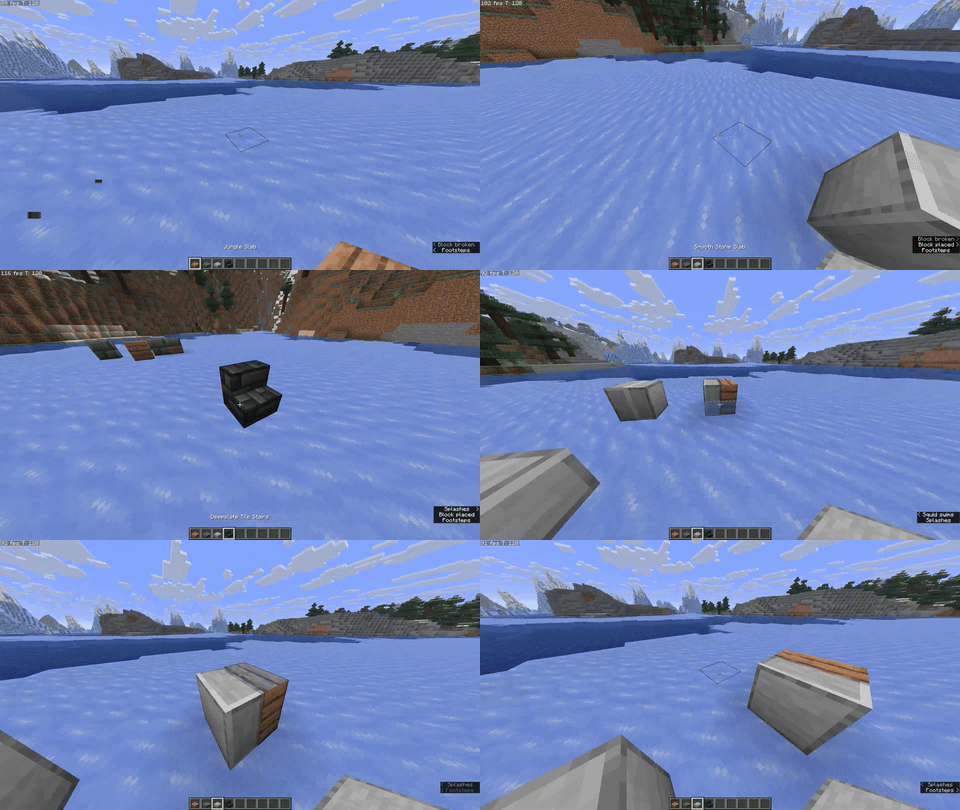
Vertical slabs and mixed slabs for modern Minecraft.
---
## Features
- Vertical slabs that **just work** — no new recipes or crafting steps.
- Mixed slabs: two different slabs in one block space, with per-half breaking (KleeSlabs-style).
- Single codebase for both loaders through Architectury.
- Additional compatibility added for Mo Glass and Blockus.
> Note: Mo Glass slabs cannot be mixed.
---
## Gallery
---
## How it plays
- **Placement modes:** cycle between three placement modes to control how halves place.
Bind in **Controls → Key Binds → Full Slabs → Cycle Placement Mode**.
- **Overlay:** a lightweight overlay shows which halves will be placed or broken.
Bind in **Controls → Key Binds → Full Slabs → Toggle Overlay**.
If you’ve used “vertical slab only” mods before, Full Slabs maintains that simplicity and adds mixing and interaction affordances on top, without recipe clutter.
---
## Compatibility
- **Minecraft:** 1.21.10
- **Loaders:** Fabric, NeoForge (via Architectury)
- **Required:** Architectury API, MidnightLib
- **Optional notes:**
- **Mo Glass:** supported, but Mo Glass slabs cannot be mixed.
- **Blockus:** extra variants and behavior where appropriate.
- **Not supported:** OptiFine / OptiFabric
---
## Install
**Recommended:** Install via the **Modrinth App** — open the [Full Slabs page](https://modrinth.com/mod/full-slabs) and click **Install**. It will bring the mod in with dependencies and keep it updated.
---
## Links
- Modrinth: https://modrinth.com/mod/full-slabs
- CurseForge: https://www.curseforge.com/minecraft/mc-mods/full-slabs
- Source: https://github.com/Micalobia/Full-Slabs
- Issues: https://github.com/Micalobia/Full-Slabs/issues
_No Discord — GitHub issues are the best place to reach me._
---
## Credits
- Created by **Micalobia**.
- Big thanks to **JackGlobetrotter** for keeping Full Slabs alive for years and inspiring the revival.
- Thanks to the teams behind Architectury API and MidnightLib.
---
## License & Modpacks
MIT license. Modpacks are welcome — no need to ask; a link back helps people find updates.
---
### Changelog
See Releases on Modrinth or GitHub for version-specific changes.