
Описание
## FPShud,
a mod that displays FPS with high precision on a customizable HUD
### Mod features:
- **`Main FPS`** is the main FPS value, regulated by the **`Main Update Interval`**
- **`Avererage FPS`** is the average FPS value from all the values took in **`Average Update Interval`**
- **`Max FPS`** is the maximum FPS value from all the values took in **`Min Update Interval`**
- **`Min FPS`** is the minimum FPS value from all the values took in **`Max Update Interval`**
>
> `FPShud with default settings`
**HUD Features:**
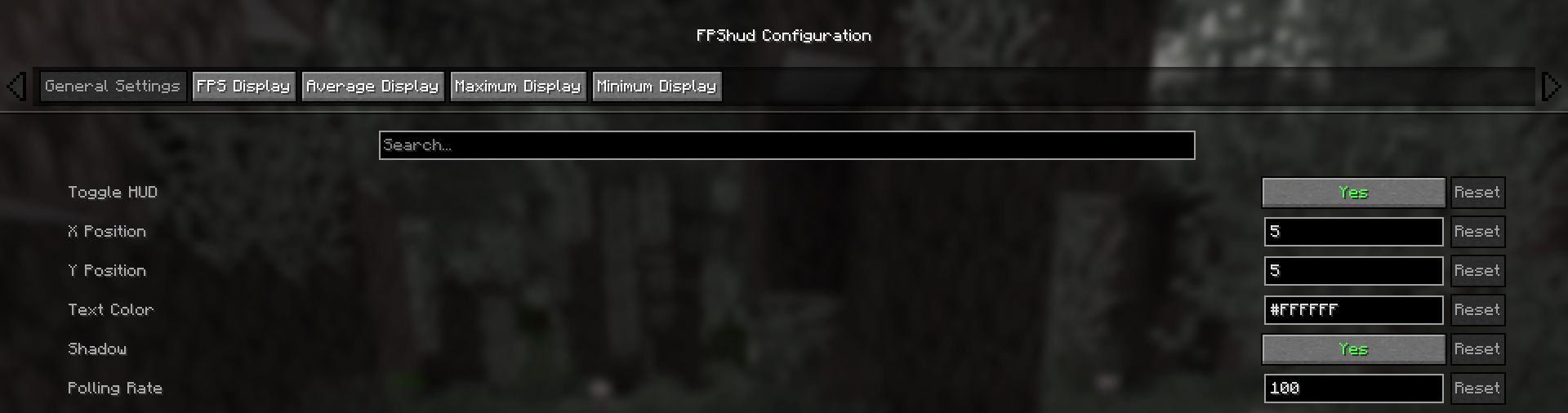
- **General Settings**:
> - **`Toggle HUD`** toggles the entire HUD
> - **`X Position`** changes the X position of the HUD on the screen
> - **`Y Position`** changes the Y position of the HUD on the screen
> - **`Text Color`** changes the color of the entire HUD
> - **`Shadow`** enables or disables the text shadow on the HUD
> - **`Polling Rate`** indicates how frequently the mod should poll FPS
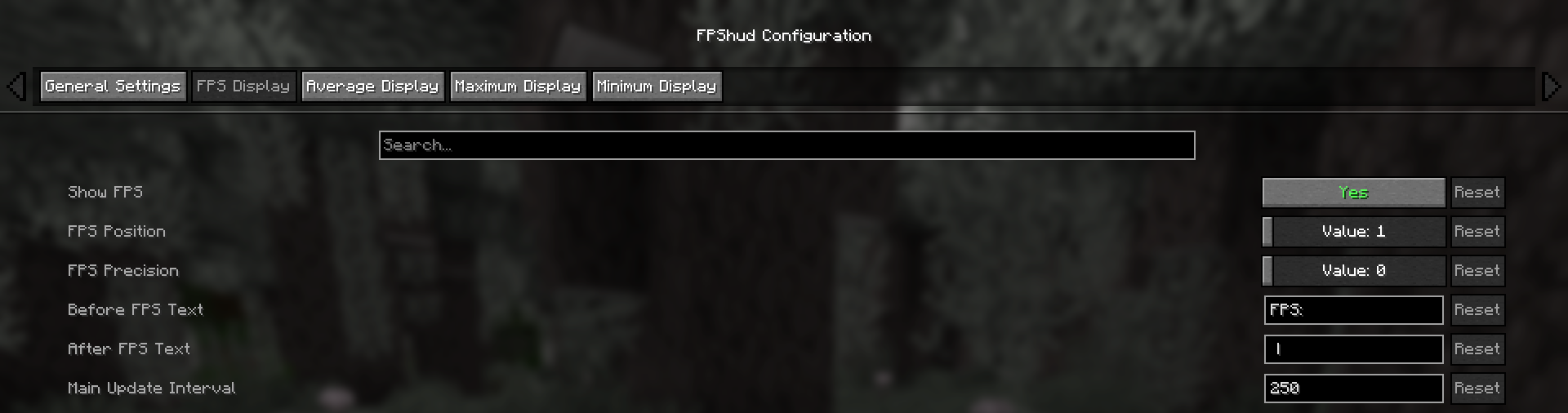
- **FPS Display, Average Display, Maximum Display, Minimum display**
> `Those settings can be changed for every one of the 4 fields:`
> - **`Show FPS`** toggles the FPS field
> - **`FPS Position`** indicates the position of the field (first, second, third, fourth)
> - **`FPS Precision`** indicates how many points of precision the field have
> - **`Before FPS Text`** changes the text displayed before the specific field FPS value
> - **`After FPS Text`** changes the text displayed after the specific field FPS value
### ModMenu config:
- GUI config is accessible from the ModMenu mods list
> The config screen is divided into 5 categories:
> - General Settings:
>
>
> - FPS Display, Average Display, Maximum Display, Minimum display:
>
>
### Why FPShud?
**Highly precise:**
> FPShud uses time elapsed from frame to frame for the FPS value calculation;
> This method of sampling elevates precision and customization, permitting millisecond precise calculations and FPS displaying
>
> FPShud works with a **`Polling Rate`** algorithm; samples are taken every frame, then smoothen every poll-time and finally processed to make them match the required
> **`Main Update Interval`**, **`Average Update Interval`**, **`Maximum Update Interval`** and **`Minimum Update Interval`** requirements
>
> For those reasons, it is not recommended to set `Polling Rate` and `Update Interval` to low values because results may appear very fluctuating
**Highly customizable:**
> You can customize the HUD to match every style:
>
>
> `only showing Avr and Max, modified 'Before Text', changed 'Text Color', removed 'Shadow', changed 'Precision' and modified 'Update Intervals'`
### Other:
> If you are using ModMenu install ClothConfigAPI to access the config screen
> Don't want ModMenu? The config file is accessible and editable in your config directory, changes apply after a game restart
> Settings will be saved in your config folder and updated at runtime
> The mod is client side (works on multiplayer)
### Links:
> - [GitHub page](https://github.com/Flavio6561/FPShud)
> - [Modrinth page](https://modrinth.com/mod/FPShud)
> - [Changelogs](https://github.com/Flavio6561/FPShud/wiki/Version-changelogs)
> - [Report an issue](https://github.com/Flavio6561/FPShud/issues)