
Описание
> _I'm just confused that those particle mods have no footprint feature._
>
> _I can't find such one, so I made this one._
# Footprint Particle
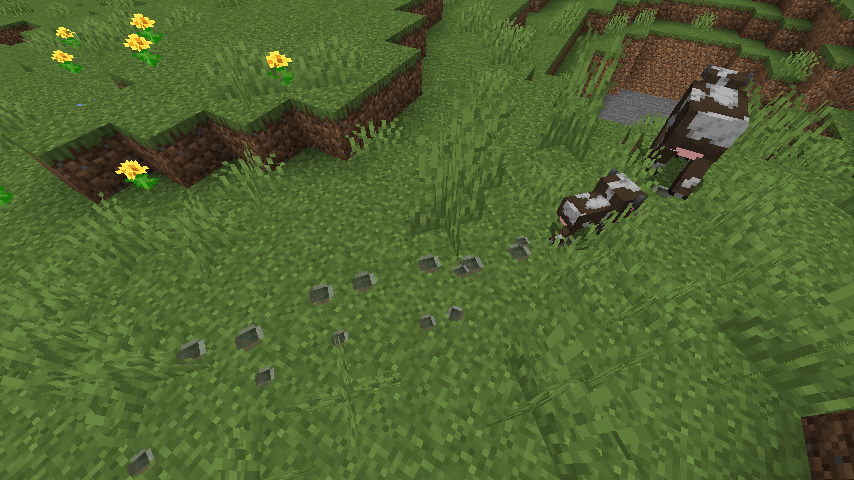
A simple mod that adds footprint for mobs (and players). Highly configurable designed for modpacks.
## Feature
- Footprint gen on low hardness block (by default).
- Baby mob has a baby print.
- Spider & horse has special pos to gen.
- Waterprint gen when touched water for a while.
- Minecart Spark.
- Boat trail (water and land is difference).
- Swimming Pop.
- Raise dust when walking on snow.
- [Pehkui](https://modrinth.com/mod/pehkui) support.
- [Random Mob Sizes](http://modrinth.com/mod/random-mob-sizes) support.
## Configurable
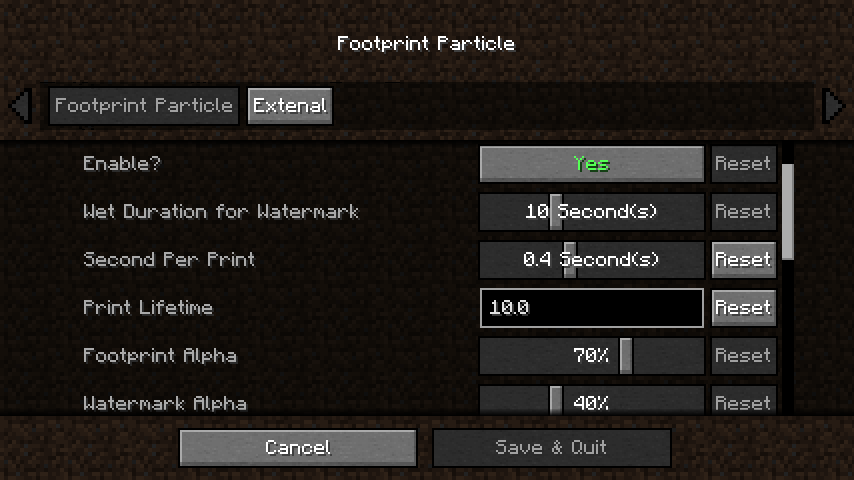
You can config its lifetime, frequency, and others through `Cloth Config` and `Mod Menu`.
- Which type / specific block can (or not) gen.
- Which mob can (or not) gen.
- What print size for specific mob.
- How high where is print gen on specific block (snow etc.)
- Which mob regarded as spider / horse (to gen on special way).
- Which texture should specific mob gen.
- More as you wish...
### Custom Print Texture
1.Make a resourcepack and put your `texture.png`s to the path below:
```
assets\footprintparticle\textures\particle\
```
2.Make a `footprint.json` or copy one from the mod.jar to your resourcepack path below (or `watermark.json` if you wanna replace watermark at same time):
```
assets\footprintparticle\particles\
```
3.Add your `texture.png`s file name to the .json, formatting like:
```
{
"textures": [
"footprintparticle:footprint", // delete this line if you don't need default ugly print :)
"footprintparticle:texture1",
"footprintparticle:texture2",
"footprintparticle: ..." // remember last line NOT have comma (",")
]
}
```
4.Packing and install your pack into the game, enabled your resourcepack, then go to the config screen and edit the "Custom Print Texture" option as tooltip says:
```
minecraft:cat,texture1,texture2
minecraft:cow,texture1
modid:mobid,textureName
...
```
5.Enjoy!
## Dependence
Since 0.3.1c we now support Forge & Fabric in a same jar, but dependence has some differ:
### For all loader
- **Architectury API** is required.
- **Cloth Config** is required to manage config file & build configScreen.
### Fabric extra needs
- **Fabric API** is required.
- **Mod Menu** is optional to access configScreen.
## Contact
Any suggestions are welcome to Github.