
Описание
---
# 🍩 DonutSus — Anticheat Flag Monitor
> Real-time anticheat flag monitoring with a clean in-game GUI. Built for staff who need to act fast.
## 🔍 What is DonutSus?
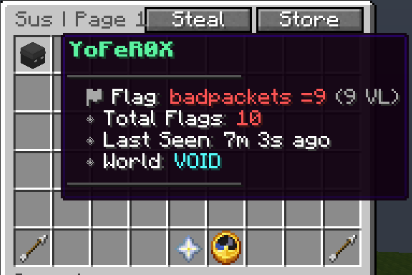
DonutSus hooks into your anticheat and shows flagged players in a live in-game GUI. Open it with one command and instantly see who's flagging, what check, their VL, and when it happened.
## ✨ Features
**🔗 Anticheat Support**
Supports **[GrimAC](https://modrinth.com/plugin/grimac)** and **[Vulcan](https://www.spigotmc.org/resources/vulcan-anti-cheat-advanced-cheat-detection-1-8-1-21-11-folia-supported.83626/)** out of the box. Swap between them in `config.yml` with a single line. If you want this plugin to support any other anticheat, feel free to DM me on Discord @yoferox.
**🌍 World Filter**
Cycle through Overworld, Nether, End (or any custom world) using the built-in world switcher button.
**💾 Persistent Flag Data**
Flag history saves on shutdown and restores on startup, including when flagged players rejoin.
**⚡ Folia Compatible**
Works on both standard Paper/Spigot and Folia.
## 📋 Commands & Permissions
| Command | Description | Permission |
| ------------------ | -------------------------- | ----------------- |
| `/sus` | Opens the flag monitor GUI | `donutsus.use` |
| `/donutsus reload` | Reloads the config | `donutsus.reload` |
## ⚙️ Requirements
* **Minecraft:** 1.21+
* **Server:** Spigot, Paper, or Folia
* **Anticheat:** [GrimAC](https://modrinth.com/plugin/grimac) or [Vulcan](https://www.spigotmc.org/resources/vulcan-anti-cheat-advanced-cheat-detection-1-8-1-21-11-folia-supported.83626/) (at least one must be installed)
## 📦 Installation
1. Drop `DonutSus.jar` into your `plugins/` folder.
2. Make sure **[GrimAC](https://modrinth.com/plugin/grimac)** or **[Vulcan](https://www.spigotmc.org/resources/vulcan-anti-cheat-advanced-cheat-detection-1-8-1-21-11-folia-supported.83626/)** is installed.
3. Go to `plugins/DonutSus/config.yml`.
4. Set `anticheat: GrimAC` or `anticheat: Vulcan` in the config.
5. Run `/donutsus reload` or restart, then use `/sus`.
## 🛠️ Configuration
Everything in the GUI, titles, lore, button slots, worlds, and messages, is configurable in `config.yml`. Hex color codes (`&#rrggbb`) are fully supported.
## 📸 Visual Representation
---