
Описание
##  Meaning of Project | Смысл проекта
### EN
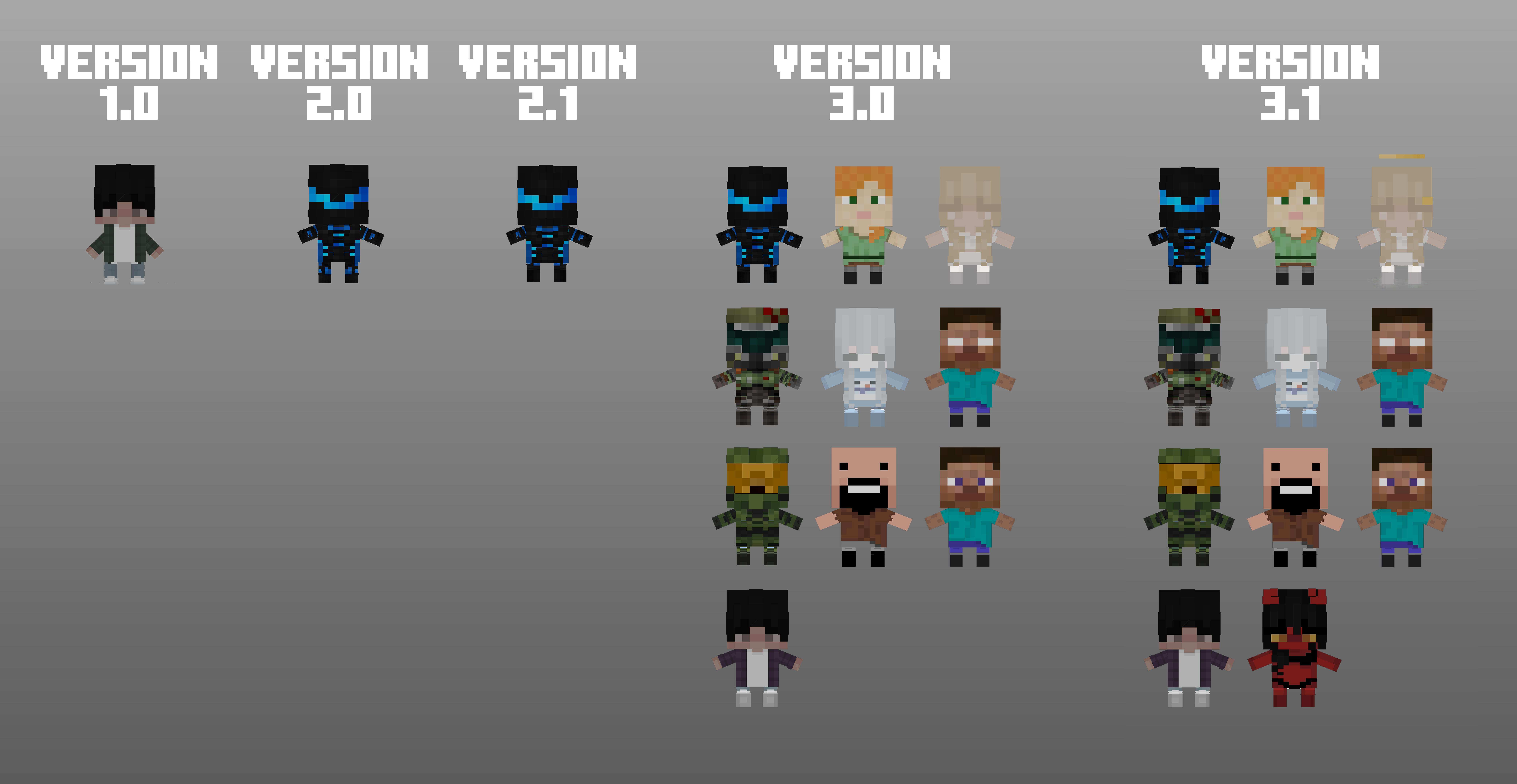
This resource pack was created to replace the usual **Totem of Undying** with a **Doll**, which can be changed by applying **any skin suitable for the player’s model** to it. The resource pack also has a function for changing the skin by **renaming** the item, here is a list of available skins:
List
|Name|Description|
|---------------------|:---------------------:|
|Alex|the official standard skin of Mojang.|
|Angel|a spiritual being who communicates the will of God and has supernatural powers.|
|Doomguy|a character from the DOOM series of games.|
|Efronskaya|the first tester of this resource pack.|
|Herobrine|the legend and Minecraft creepypasta.|
|Master Chief|a character from the Halo series of games.|
|Notch|the creator of Minecraft.|
|Steve|the official default skin of Mojang.|
|TheReizi|the creator of this resource pack.|
|Demongirl|supernatural being inferior to the gods.|
### RU
Данный ресурспак создан для замены обычного **Тотема Бессмертия** на **Куклу**, которую можно изменить наложением на нее любой **подходящий для модельки игрока** скин. Также у ресурспака есть функция изменения скина через **переименовывание** предмета, вот список доступных скинов:
Список
|Название|Описание|
|---------------------|:---------------------:|
|Alex|официальный стандартный скин Mojang.|
|Angel|духовное существо, сообщающее волю Бога и обладающее сверхъестественными возможностями.|
|Doomguy|персонаж из серии игр 'DOOM'.|
|Efronskaya|первый тестер данного ресурспака.|
|Herobrine|легенда и крипипаста Minecraft.|
|Master Chief|персонаж из серии игр 'Halo'.|
|Notch|создатель Minecraft.|
|Steve|официальный стандартный скин Mojang.|
|TheReizi|создатель данного ресурспака.|
|Demongirl|сверхъестественное существо, занимающее низшее по сравнению с богами положение.|
## 💡Requirements for Use | Требованию к использованию💡
- Forge
- OptiFine **1.7.2-1.21.1** for Forge CIT | Для Forge CIT
- Forge CIT **1.20.1** for rename | Для переименовывния
- Fabric
- Fabric API **1.14-26.2** for CIT Resewn | Для CIT Resewn
- OptiFine **1.7.2-1.21.1** for OptiFabric | Для OptiFabric
- OptiFabric **1.14-1.20.4** for CIT Resewn | Для CIT Resewn
- [CIT Resewn](https://modrinth.com/mod/cit-resewn) **1.17-1.20.4** for rename | Для переименовывния
- [CIT Resewn Continuation](https://modrinth.com/mod/cit-resewn-continuation) **1.21.11-26.2** for rename | Для переименовывния
- Hat Command **1.17-1.20.4** for the command /hat | Для команды /hat
## ❗️How to Project Works | Принцип работы проекта❗️
### Using a Totem | Использование тотема
### Changing Totems in Appearance | Изменение тотемов внешне
## 🔧Project Changing | Изменения проекта🔧
### EN
**REPLACING THE SOUND OF USING TOTEM**
1. in the assets\minecraft\sounds\item\totem\ folder, replace the sound file use_totem.ogg with another one with the same name and format.
**REPLACING THE MAIN SKIN WITH A TOTEM**
1. in the assets\minecraft\textures\item\ folder there are 2 PNG files **totem** and **totem_of_undying**, which contain the skin for the player.
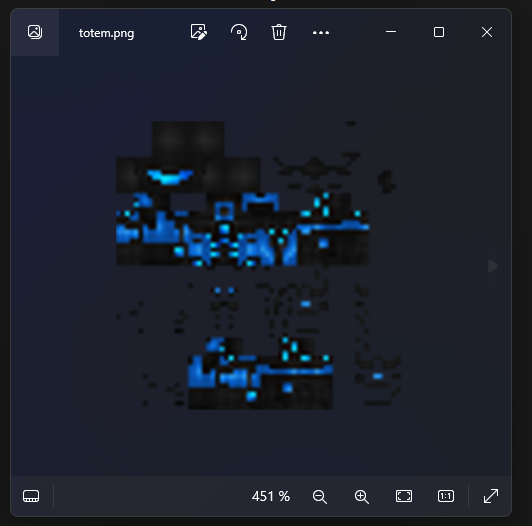
2. It is required to replace these 2 PNG files with other same PNG files, leaving the same name.
3. you need to copy this folder **(item)**, delete the '**items**' folder and paste the '**item**' folder from the clipboard, then rename the pasted folder to '**items**'.
**ADDING YOUR SKINS TO THE TOTEM**
1. in the assets\minecraft\optifine\cit\dolls folder, create a new folder with the name of the doll, which will be displayed in the game.
2. Add a skin in PNG format and a name in English lowercase letters to the folder.
3. copy 2 files (with .json and .properties format) from the 'TheReizi' folder and paste them into your folder.
4. open a file with .json format and in line 4 instead of **./thereizi** write ./**name of the PNG file without '.png'** and save.
5. open the file with the .properties format, in the 3rd line after 'model=' write **name of the PNG file without '.png'**
6. in line 4 of the same file, write instead of '(TheReizi)' - **(name of your folder from step 1)** and save.
7. in the game itself, change and rename the totem to **the name of your folder from step 1** and that’s it!
### RU
**ЗАМЕНА ЗВУКА ИСПОЛЬЗОВАНИЯ ТОТЕМА**
1. в папке assets\minecraft\sounds\item\totem\ замените звуковой файл use_totem.ogg на другой, с таким же названием и форматом.
**ЗАМЕНА ОСНОВНОГО СКИНА НА ТОТЕМ**
1. в папке assets\minecraft\textures\item\ лежат 2 PNG-файла **totem** и **totem_of_undying**, в которых находится скин для игрока.

2. требуется заменить эти 2 PNG-файла на другие одни и те же PNG-файлы, оставив при этом одно и то же имя.
3. нужно скопировать эту папку (**item**), удалить папку '**items**' и вставить папку '**item**' из буфера обмена, затем переименовать вставленную папку в '**items**'.
**ДОБАВЛЕНИЕ СВОИХ СКИНОВ НА ТОТЕМ**
1. в папке assets\minecraft\optifine\cit\dolls создайте новую папку с названием куклы, которое будет отображаться в игре.
2. в папку добавьте скин в формате PNG и названием из английских строчных букв.
3. скопируйте из папки 'TheReizi' 2 файла (с форматом .json и .properties) и вставьте в свою папку.
4. откройте файл с форматом .json и в 4 строке вместо **./thereizi** напишите ./**название PNG-файла без '.png'** и сохраните.
5. откройте файл с форматом .properties, в 3 строке после 'model=' пишите **название PNG-файла без '.png'**
6. в 4 строке того же файла пишете вместо '(TheReizi)' - **(название вашей папки из пункта 1)** и сохраните.
7. в самой игре изменяете переименовываете тотем в **название вашей папки из пункта 1** и всё!
## 📌Note | Примечание📌
### EN
All these 3 types of resource pack changes will be in the form of a video on the channel where the top video using this totem was released.
### RUS
Все эти 3 вида изменения ресурспака будут в виде видео на канале, где вышло самое верхнее видео с использованием этого тотема.