
Описание
# Day Counter
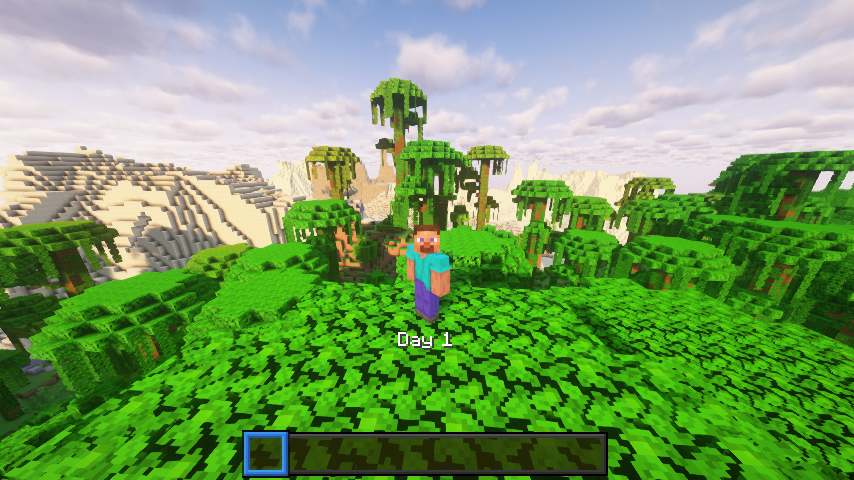
A lightweight Minecraft 1.21.5 datapack that displays the current in‑game day number above your hotbar. No commands, functions, or dependencies, just a simple day tracker.
## What It Does
- Shows “Day X” (where X is the current day) in the action bar every time the sun rises.
- Works in any world type (survival, hardcore, creative).
## Example Uses
- **YouTubers** – Let viewers see which day of your survival series they’re watching.
- **Challenge runs** – Keep track of how many days you’ve survived without building a clock.
- **Casual players** – Know when to celebrate milestones like Day 100.
## Installation
1. Download the DayCounter datapack ZIP or clone from the repo.
2. Put the `DayCounter` folder into your world’s `datapacks/` directory.
3. Start Minecraft 1.21.5 or newer, then run:
```
/reload
```
4. Verify it's active:
```
/datapack list
```
You should see `DayCounter` enabled.
## Usage
1. Load into your world.
2. Each new day you’ll see the “Day X” update above your hotbar.
3. No further setup needed.
## Details
**Pack format**: 71 (1.21.5)
**Namespace**: `daycounter`
## License
This datapack is released under the MIT License. Feel free to modify and share.