Описание
# Custom MOTD
This mod gives you access to customize your server join screen.
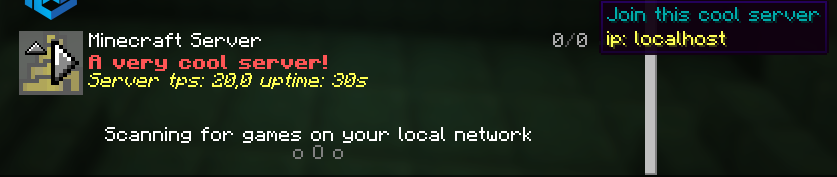
You can change your MOTD, icon, player count, max players and the hover players.
It also supports [Placeholder API](https://modrinth.com/mod/placeholder-api).
The icon is now a link instead of locally. Why?, this is because you can now have a link that has a changing picture, and it will update to it every 10 sec.
**Important** If you don't want one of the features you can easily turn them off bye commenting out them in the config.
# Example

# Config
In your motd if you use placeholders you need to place it between two "", For example "%server:time%"
```
#Motd text (uses vanilla system, use this tool https://mctools.org/motd-creator), You can also use the normal vannila color codes. They are located here (https://minecraft.wiki/w/Formatting_codes)
motd: A minecraft server
# From here remove "#" if you want to use a feature
#Potho link (use this if you want to change the photo at the same time as the server is running)
#link-to-photo: link
#If you want to change the max player count, (Only visual, not changing your player count)
#max-player-count: 420
#If you want to change the current player count, (Only visual)
#player-count: 69
#Hover text for player amount, max 12, (Only visual)
#plyer-list:
#- steve
```
# Looking for a server?
Get BisectHosting and save 25% off for new customers using code Lukas at checkout. Thanks for your support - it helps me develop this and other mods I make! #ad
[](https://bisecthosting.com/Lukas)