Описание
# CreativeEditorWands StationAPI for Minecraft Beta 1.7.3
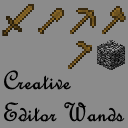
A StationAPI mod for Minecraft Beta 1.7.3 that adds world edit type properties to wooden tools when enabled.
* Mod (mostly) works on Multiplayer with [GlassConfigAPI](https://modrinth.com/mod/glass-config-api) version 3.0+ used to sync configs!
## List of changes
All changes only apply when player is OP or in single-player toggle wands on/off via bedrock.
* Selection Tool (wooden axe)
* Mode 1: Select two points (`right-click` on two blocks)
* Mode 2: Copy selection (area between the two points) over to the new area `right-click`
* Mode 3: Fill selection (area between the two points) with whatever block is `right-clicked`
* Use `scroll-wheel` in inventory to rotate selection (does nothing if no selection has been made)
* Hit living entities to rotate selection in multiplayer (also works in single-player)
* Hold `left-shift` and use `scroll-wheel` to change axe mode in single-player
* Use `right-click` in the air to change axe mode in multiplayer
* Paint Brush (wooden sword)
* Draw with `right-click`
* Block ID zero means copy `right-clicked` block and use it to draw
* Use `scroll-wheel` in inventory to select block type
* Hold `left-shift` and use `scroll-wheel` to select block metadata
* Erase Brush (wooden shovel)
* Erase with `right-click`
* Block ID zero means erase any block
* Use `scroll-wheel` in inventory to select block type
* Hold `left-shift` and use `scroll-wheel` to select block metadata
* Block Picker (wooden pickaxe)
* Select block ID and metadata with `right-click`
* In single-player in inventory pick up the pickaxe and click a brush to apply the color to it
* In multiplayer the selected block will be used for all brushes
* Use `scroll-wheel` in inventory to select block type
* Hold `left-shift` and use `scroll-wheel` to select block metadata
* Brushes Mode (wooden hoe)
* Use `scroll-wheel` in inventory to change brush size
* Hit living entities to change brush size in multiplayer (also works in single-player)
* Use `right-click` on a block to change brush type and apply brush mode
* Use `right-click` in the air to apply brush mode
* Enable/disable creative editor wands tools with bedrock block
* Use `right-click` to enable/disable creative editor wands
* This is a single-player only feature
## Structure Command
If you are using [RetroCommands](https://modrinth.com/mod/retrocommands) with this mod, you now also have access to the `/structure` command.
This command allows you to save, copy, and paste structures.
* NOTE: This command currently does not work with modded blockstates
How it works:
1. `/structure 1` to set the first position of the structure to copy (this happens where your player is standing)
2. `/structure 2` to set the second position of the structure to copy (this happens where your player is standing)
3. `/structure copy SaveName` copies the structure using a cube between positions 1 and 2
- `SaveName` can be anything you want and is the saved name of the structure.
- You can save as many structures as you want, just don't reuse the same name unless if you want to overwrite that structure.
4. `/structure paste SaveName` pastes the structure at the location the player is currently standing at
5. `/structure fill BlockID (BlockMeta)` fills the structure with the provided block ID (and optionally metadata value) using a cube between positions 1 and 2
## Installation using Prism Launcher
1. Download an instance of Babric for Prism Launcher: https://github.com/babric/prism-instance
2. Install Java 17 and set the instance to use it: https://adoptium.net/temurin/releases/
3. Add GlassConfigAPI 3.0.2+ to the mod folder for the instance: https://modrinth.com/mod/glass-config-api
4. Add Glass Networking to the mod folder for the instance: https://modrinth.com/mod/glass-networking
5. Add StationAPI to the mod folder for the instance: https://modrinth.com/mod/stationapi
6. (Optional) Add Mod Menu to the mod folder for the instance: https://modrinth.com/mod/modmenu-beta
7. Add this mod to the mod folder for the instance: https://github.com/telvarost/GameplayEssentials-StationAPI/releases
8. Run and enjoy! 👍
## Feedback
Got any suggestions on what should be added next? Feel free to share it by [creating an issue](https://github.com/telvarost/CreativeEditorWands-StationAPI/issues/new). Know how to code and want to do it yourself? Then look below on how to get started.
## Contributing
Thanks for considering contributing! To get started fork this repository, make your changes, and create a PR.
If you are new to StationAPI consider watching the following videos on Babric/StationAPI Minecraft modding: https://www.youtube.com/watch?v=9-sVGjnGJ5s&list=PLa2JWzyvH63wGcj5-i0P12VkJG7PDyo9T