
Описание
# Create Track Map



[](https://modrinth.com/mod/create-fabric)
[](https://modrinth.com/mod/fabric-api)
[](https://modrinth.com/mod/fabric-language-kotlin)
[](https://modrinth.com/mod/create)
[](https://modrinth.com/mod/kotlin-for-forge)
[](https://github.com/jenchanws/create-track-map)
[](https://modrinth.com/mod/create-track-map)
[](https://smp.littlechasiu.com/discord)
Create Track Map (CTM) is a multi-loader mod that displays a track map of Create trains in your world, including all tracks, signals, stations, and trains. The signals and trains are updated in (practically) real time.
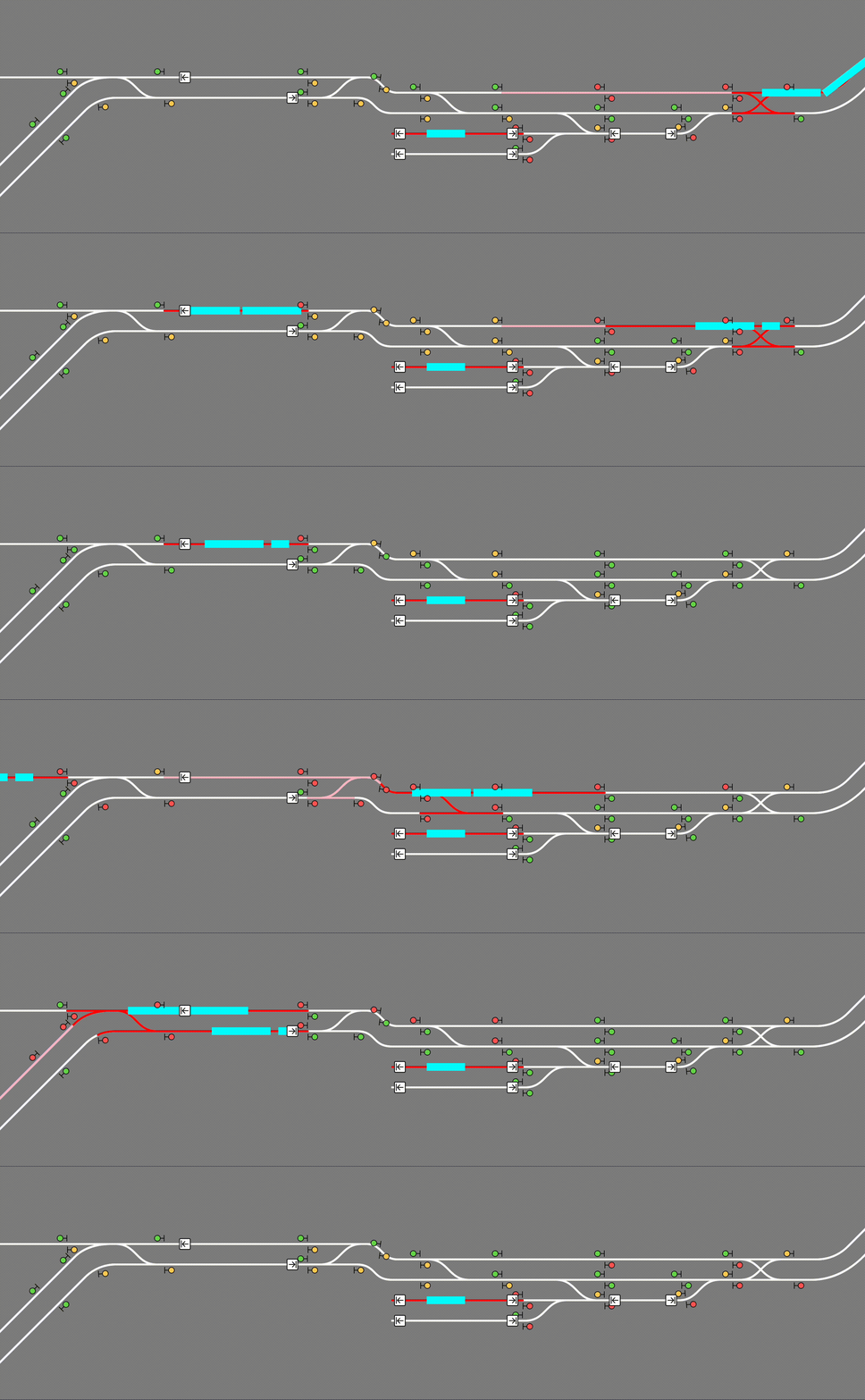
# Usage
CTM is available for [download on Modrinth](https://modrinth.com/mod/create-track-map). **Please make sure you download the correct version for your loader, Minecraft version, and Create version.** Below is the compatibility chart for Create versions:
| | CTM ≤1.3 | CTM 1.4 | CTM ≥1.5 |
|:---|:--:|:--:|:--:|
| **Create 0.5.0** | ✅ | ✅ | ❌ |
| **Create 0.5.1** | ❌ | ✅ | ✅ |
## Installation
Simply place the .jar file in your mods folder (or install with a modloader) like any other mod! CTM is intended to be a server side mod, but can also run in single-player worlds and LAN servers. It runs a web server on port `3876` by default, but [this can be configured](#configuration). You must forward this port if you wish to see the map. *[(How do I do this?)](https://www.google.com/search?q=how+to+I+port+forward)*
The map itself is visible at the root (by default `http://localhost:3876/`). If using a proxy to serve the map, make sure to configure it to let Server-Sent Events through.
### *Singleplayer*
The map is hosted on your computer so while Minecraft is open, enter `http://localhost:3876/` into your browser.
### *Multiplayer*
**A) Local (LAN) server**\
The map is still hosted on your computer so while the game is open, enter `http://localhost:3876/` into your browser.\
Those in your household can see the map by entering `http://[your computer's IPV4 address]:3876/` into their browser.\
*[How do I see my computer's IPV4 address?](https://www.google.com/search?q=how+do+i+see+my+local+ipv4+address)*
**B) The server is on my PC**\
The map is still hosted on your computer so while the server is open, enter `http://localhost:3876/` into your browser.\
Those in your household can see the map by entering `http://[your computer's IPV4 address]:3876/` into their browser.\
Those outside your household can see the map by entering `http://[your public IPV4 address]:3876/` into their browser.\
*[How do I see my public IPV4 address?](https://www.google.com/search?q=what+is+my+public+ipv4+address)*
**C) The server is hosted with a hosting service**\
The map is hosted with the server on that service. You can see the map at `[your server address]:3876/` while the server is up.\
**NOTE: YOUR SERVICE MUST SUPPORT EXTRA PORT FORWARDING.** You can check with support/the docs for the service or just good old Google. If the service doesn't support this, you are out of luck. You can switch services or try hosting your own.
*Just so it's clear: Do not include the brackets around your IPV4 address! For example: `192.168.0.0:3876`*
## READ THIS BEFORE ASKING FOR HELP!
To use this mod, **you must be able to open a second port**, in addition to your Minecraft server, which CTM will run its web server on. If you are using Aternos, this is not possible. If you are using a shared hosting provider, please contact your host for assistance in opening a port. No support will be provided to open a port or to diagnose issues which are not caused by a bug in the mod.
# Advanced Usage
### CTM API
CTM provides the following API, also accessible through the same port:
- `/api/network`, `/api/network.rt`: List of all track pieces and train stations
- `/api/signals`, `/api/signals.rt`: List of all train signals, including their states
(green, yellow, red)
- `/api/blocks`, `/api/blocks.rt`: List of all signal control blocks, and whether they are occupied or reserved by a train
- `/api/trains`, `/api/trains.rt`: List of all assembled trains, including their names and
positions
- `/api/style.css`: CSS style sheet generated from configured colors and fonts
- `/api/config.json`: Map configuration
The `.rt` versions update in real time with Server-Sent Events (SSE).
### Configuration
CTM's config options can be found at `create-track-map.json` in your server's config directory. It is automatically created at startup if it doesn't exist.
The following options are available:
```js
{
// Whether to actually start the watcher and the server.
"enable": false,
// How long to wait between track data updates.
"watch_interval_seconds": 0.5,
// The port the internal web server listens on.
"server_port": 3876,
"map_style": {
// Font to use for the map's UI. Must be a valid CSS font stack.
"font": "ui-monospace, \"JetBrains Mono\", monospace",
// Colors for individual components of the map. Must be valid CSS colors.
// Any CSS color format will work, such as named colors and rgb().
"colors": {
"background": "#888",
"track": {
"occupied": "red",
"reserved": "pink",
"free": "white"
},
"signal": {
"green": "#71db51",
"yellow": "#ffd15c",
"red": "#ff5f5c",
"outline": "black"
},
"portal": {
"primary": "purple",
"outline": "white"
},
"station": {
"primary": "white",
"outline": "black"
},
"train": "cyan",
"lead_car": "darkturquoise"
}
},
"map_view": {
"initial_dimension": "minecraft:overworld",
"initial_position": { "x": 0, "z": 0 },
// Zoom levels must be integers, but may be negative.
// Each zoom level is twice as big as the previous.
// 0 is a decent minimum but may be impractical for large networks.
// 3 is the sensible default for viewing double-tracked networks.
"initial_zoom": 3,
"min_zoom": 0,
"max_zoom": 4,
// Whether a zoom control should be visible on the screen.
"zoom_controls": true,
// Which side of the track a signal should be displayed on.
// Valid values are LEFT or RIGHT (all uppercase).
"signals_on": "RIGHT"
},
"dimensions": {
// Dimension names must be namespaced.
"minecraft:overworld": {
// Label that shows up in the layer switcher.
"label": "Overworld"
},
"minecraft:the_nether": {
"label": "Nether"
},
"minecraft:the_end": {
"label": "End"
}
},
"layers": {
"tracks": {
"label": "Tracks",
"min_zoom": 0,
"max_zoom": 4
},
"blocks": {
"label": "Track Occupancy",
"min_zoom": 0,
"max_zoom": 4
},
"signals": {
"label": "Signals",
"min_zoom": 0,
"max_zoom": 4
},
"portals": {
"label": "Portals",
"min_zoom": 0,
"max_zoom": 4
},
"stations": {
"label": "Stations",
"min_zoom": 0,
"max_zoom": 4
},
"trains": {
"label": "Trains",
"min_zoom": 0,
"max_zoom": 4
}
}
}
```
Reload the config without restarting the server by running `/ctm reload` (operator permissions required).