← Назад к ресурсам

Create: Data and Plots

Create graphs and plots in Create

Modrinth economy game-mechanics management

Описание

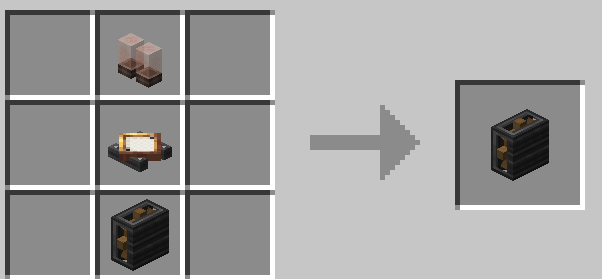
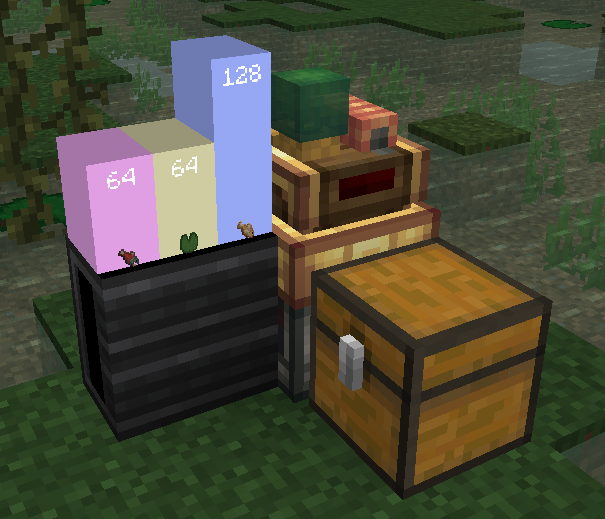
![Title](https://cdn.modrinth.com/data/cached_images/9eb4380c8bba31bde249db139e69fed6c32c2d62.png) *Plotting in Create.* ![https://github.com/intergrav/devins-badges/blob/v3/assets/cozy/supported/fabric_64h.png?raw=true](https://github.com/intergrav/devins-badges/blob/v3/assets/cozy/supported/fabric_64h.png?raw=true) ![https://github.com/intergrav/devins-badges/blob/v3/assets/cozy/built-with/java_64h.png?raw=true](https://github.com/intergrav/devins-badges/blob/v3/assets/cozy/built-with/java_64h.png?raw=true) ![https://github.com/intergrav/devins-badges/blob/v3/assets/cozy/requires/create_64h.png?raw=true](https://github.com/intergrav/devins-badges/blob/v3/assets/cozy/requires/create_64h.png?raw=true) ## Addon Info **Dashboard block recipe:** ![Recipe](https://cdn.modrinth.com/data/cached_images/644f95b49f89ea01f21ca862bdb28f7d8d2ce40d.png) **How to use:** 1. Place dashboard block somewhere. 2. Place smart-observer next to container (for example, chest). 3. Place display link, that targets to dashboard, on the observer. 4. Select "List matching items" type in display link. 5. Done! ✅ ![Barplot](https://cdn.modrinth.com/data/cached_images/dea5e61fddfbeb73776868c756c67d05b07ed8c3.png) | ⚠ Create: Data and Plots is indev. It may have a lot of changes. | |----------------------------------------------------------------------| | Join discord for more information about updates. |