
Описание
## 🇰🇷 한국어
**Count Easy**은 마인크래프트 **띵타이쿤 서버 플레이를 위해 커스터마이징된 클라이언트 전용 편의성 모드**입니다.
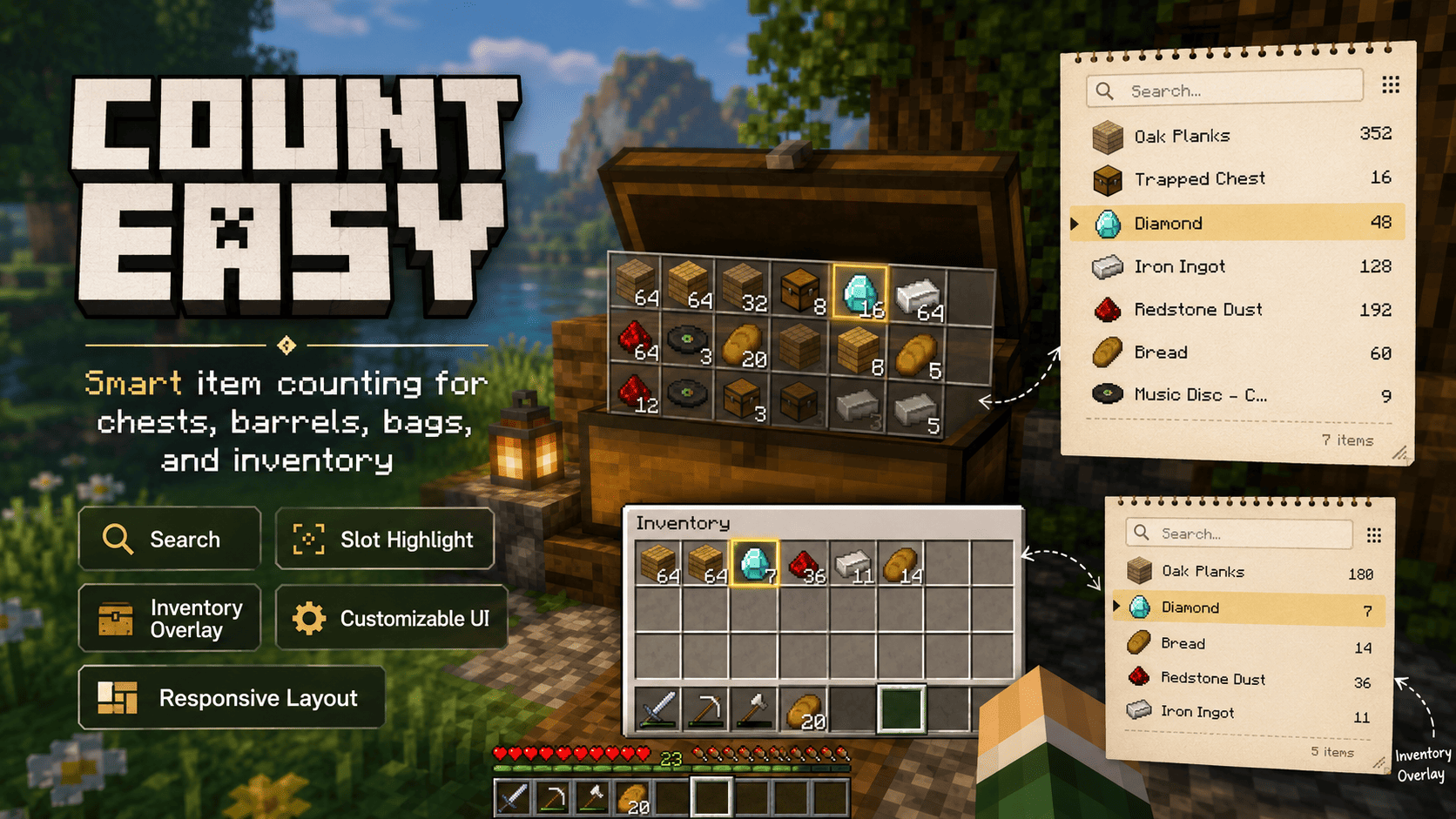
상자와 각종 지원 보관함을 열었을 때 아이템의 개수를 자동으로 계산해 보여주는 기본 기능을 중심으로, 띵타이쿤의 아이템 분류, 판매가, 스킬, 시세, 항해 포인트 등 서버 플레이에 필요한 다양한 정보를 하나의 오버레이에서 편하게 확인할 수 있도록 제작되었습니다.
> **본 프로젝트는 띵타이쿤 공식 제작물이 아닌 비공식 편의성 모드입니다.**
---
### 📦 자동 아이템 집계
지원되는 보관함을 열면 내부의 아이템을 자동으로 분석하여 별도의 오버레이에 표시합니다.
- 아이템 종류별 자동 집계
- `1세트 = 64개` 기준 세트 / 나머지 / 총수량 표시
- 동일 아이템 자동 합산
- 아이템 아이콘과 이름 표시
- 아이템 검색 기능
- 수량 클릭 시 숫자 클립보드 복사
- 많은 아이템은 스크롤하여 확인 가능
- 긴 아이템 이름 자동 축약 지원
더 이상 상자 안의 아이템을 직접 세어 계산할 필요가 없습니다.
---
### 🎒 인벤토리 & 모험 가방
보관함뿐만 아니라 플레이어 인벤토리의 아이템도 별도의 패널로 확인할 수 있습니다.
- 플레이어 인벤토리 패널
- 띵타이쿤 모험 가방 화면 지원
- 인벤토리 / 보관함을 각각 독립적으로 검색
- 패널 위치 개별 조정
- 필요에 따라 기능 ON / OFF
---
### 🔍 아이템 위치 강조
오버레이에 표시된 아이템에 마우스를 올리면 실제 인벤토리 또는 보관함에서 해당 아이템이 들어 있는 슬롯을 강조합니다.
아이템이 많은 상자에서도 원하는 아이템을 빠르게 찾을 수 있습니다.
---
### 📚 컬렉션북 지원
띵타이쿤 컬렉션북에 필요한 아이템을 인식하여 오버레이에서 구분할 수 있습니다.
컬렉션 대상 아이템에는 별도의 표시가 추가되어, 보관 중인 아이템 가운데 컬렉션에 필요한 품목을 쉽게 확인할 수 있습니다.
---
### 🗂️ 띵타이쿤 전용 아이템 분류
띵타이쿤의 아이템을 종류에 따라 자동으로 그룹화하여 표시합니다.
지원되는 주요 분류:
- 농작물 · 과일
- 꽃
- 향장품
- 주괴
- 정동석
- 형광 제련품
- 귀중품
- 연금품
- 공예품
- 일반 요리
- 황금 요리
- 커피
- 영혼
- 원혼
- 가죽 명품
- 반려어 방생
- 항해 재료
- 기타
각 그룹은 개별적으로 접거나 펼칠 수 있으며, 서로 다른 종류의 아이템 가격은 별도의 합계로 관리됩니다.
---
### 💰 예상 판매가 계산
띵타이쿤 아이템의 판매 가격 정보를 기반으로 현재 보유하고 있는 아이템의 **예상 판매가**를 계산할 수 있습니다.
- 아이템 개당 예상 판매가
- 보유 수량 기준 예상 판매 금액
- 품목별 합계
- 판매 불가능한 아이템 구분
- 유통기한 만료 아이템 감지
- 가격을 확인할 수 없는 아이템 별도 처리
가격 정보는 어디까지나 **예상값**이며, 서버 업데이트 및 실제 게임 내 가격 정책에 따라 차이가 발생할 수 있습니다.
---
### 📈 판매 스킬 적용
자신의 띵타이쿤 스킬 레벨을 설정하면 판매가 계산에 해당 스킬 효과를 반영할 수 있습니다.
재배 / 채광 / 해양 / 사냥 계열의 여러 판매 관련 스킬을 지원하며, 다음과 같은 품목별 보너스를 개별적으로 계산합니다.
- 요리
- 커피
- 주괴
- 정동석
- 형광 제련품
- 귀중품
- 향장품
- 공예품
- 연금품
- 영혼
- 원혼
- 가죽 명품
- 반려어 방생 등
스킬을 배우지 않았다면 레벨을 `0`으로 설정할 수 있습니다.
---
### 🐟 반려어 방생 금액 계산
반려어는 일반 물고기와 별도로 처리됩니다.
아이템에 표시된 정보를 분석하여:
- 애정도 인식
- 애정도에 따른 방생 배율 적용
- 관련 스킬 보너스 적용
- 개체당 예상 방생 금액
- 전체 예상 방생 금액
을 계산합니다.
일반 물고기와 무역 아이템은 일반 판매가 계산 대상에서 제외됩니다.
---
### ⛵ 항해 포인트 계산
띵타이쿤의 항해 관련 아이템을 인식하여 항해 포인트를 계산할 수 있습니다.
- 개당 항해 포인트
- 현재 보유 수량 기준 포인트
- 항해 관련 아이템의 총 포인트 확인
오버레이 표시 정보는 설정에서 **수량 / 예상 판매가 / 항해 포인트** 중 원하는 방식으로 변경할 수 있습니다.
---
### 🔄 띵타운 시세 동기화
일부 가격이 변동되는 품목은 **띵타운에서 제공되는 공개 시세 데이터**를 이용해 최신 가격 정보를 동기화할 수 있습니다.
현재 시세 동기화 대상:
- 일반 요리
- 공예품
동기화 화면에서는 다음 정보를 확인할 수 있습니다.
- 마지막 동기화 시간
- 시세 데이터 갱신 시간
- 예상 적용 기간
- 현재 시세 적용 여부
- 품목별 시세 비율
- 동기화 성공 / 실패 상태
조회에 실패하더라도 기존에 정상적으로 저장된 시세가 있다면 기존 데이터를 유지합니다.
**시세 출처: 띵타운 (ddingtown.vercel.app)**
> 시세 및 계산 결과는 참고용 예상값입니다. 서버의 실제 가격이나 업데이트 시점에 따라 차이가 있을 수 있습니다.
---
### 🎨 자유로운 UI 설정
플레이 환경에 맞춰 오버레이를 다양하게 조정할 수 있습니다.
- 오버레이 드래그 이동
- 보관함 / 인벤토리 패널 위치 개별 저장
- UI 및 글씨 크기 `50% ~ 150%`
- 크기 프리셋 제공
- 패널 최대 표시 행 `6 ~ 30`
- 그룹 접기 / 펼치기
- 긴 아이템 이름 축약
- 아이템 위치 강조 ON / OFF
- 인벤토리 패널 ON / OFF
- 모험 가방 지원 ON / OFF
- 컬렉션북 표시 ON / OFF
- 패널 위치 초기화
---
### ⚙️ 설정 열기
기본 설정 키:
**`;` (세미콜론)**
Minecraft 키 설정에서 변경할 수 있습니다.
**Mod Menu**를 사용하고 있다면 Mod Menu에서도 Count Easy 설정 화면을 열 수 있습니다.
---
### 🖥️ 클라이언트 전용
Count Easy는 **클라이언트 전용 모드**입니다.
개인이 자신의 Minecraft 클라이언트에 설치하여 사용하는 방식이며, 서버에 Count Easy를 별도로 설치할 필요가 없습니다.
---
### ⚠️ 안내
Count Easy는 띵타이쿤 플레이를 편리하게 만들기 위해 제작된 **비공식 서드파티 모드**입니다.
띵타이쿤의 업데이트로 아이템 이름, 가격, 스킬 효과 또는 시스템이 변경될 경우 일부 계산 결과가 실제 게임과 일시적으로 다를 수 있습니다.
문제가 발견될 경우 사용 중인 Count Easy 버전과 함께 제보해 주세요.
---
## 🇺🇸 English
**Count Easy** is a **client-side utility mod customized specifically for the DdingTycoon Minecraft server**.
Its core feature automatically counts items inside supported containers, while additional DdingTycoon-specific features provide item categories, estimated sale values, skill bonuses, market prices, sailing points, collection information, and more through a convenient overlay.
> **This is an unofficial third-party project and is not an official mod developed by the DdingTycoon team.**
---
### 📦 Automatic Item Counting
When a supported container is opened, Count Easy automatically scans its contents and displays them in a separate overlay.
- Automatic item counting
- Stack / remainder / total quantity display based on `64 items = 1 stack`
- Automatic merging of identical items
- Item icons and names
- Item search
- Click a quantity to copy the number to your clipboard
- Scrollable item lists
- Optional shortening of long item names
No more manually counting everything inside your storage.
---
### 🎒 Inventory & Adventure Bags
Count Easy can also display the player's inventory in a separate panel.
- Player inventory panel
- Support for DdingTycoon adventure bag screens
- Independent searches for container and inventory panels
- Independent panel positioning
- Optional enable / disable settings
---
### 🔍 Slot Highlighting
Hovering over an item in the Count Easy overlay highlights the matching slots inside the container or player inventory.
This makes locating specific items much easier when working with large inventories.
---
### 📚 Collection Book Support
Count Easy can recognize supported DdingTycoon collection-book items and mark them directly in the overlay.
This makes it easier to identify items that may still be needed for your collection.
---
### 🗂️ DdingTycoon Item Categories
Server-specific items are automatically organized into categories such as:
- Crops & Fruit
- Flowers
- Cosmetics
- Ingots
- Geodes
- Fluorescent Products
- Valuables
- Alchemy
- Crafts
- Food
- Golden Food
- Coffee
- Souls
- Wraiths
- Luxury Leather
- Pet Fish
- Sailing Materials
- Other items
Categories can be collapsed or expanded individually, and sale totals remain separated by item category.
---
### 💰 Estimated Sale Values
Count Easy can calculate estimated sale values for supported DdingTycoon items.
It can display:
- Estimated unit price
- Estimated total value based on quantity
- Category totals
- Items that cannot be sold
- Expired items
- Items with unknown pricing information
All prices should be considered **estimates** and may differ from actual in-game values after server updates or economy changes.
---
### 📈 Sale Skill Support
You can enter your DdingTycoon skill levels and have Count Easy apply the appropriate bonuses when calculating estimated prices.
Multiple Farming, Mining, Ocean, and Hunting-related sale skills are supported for categories including:
- Food
- Coffee
- Ingots
- Geodes
- Fluorescent Products
- Valuables
- Cosmetics
- Crafts
- Alchemy
- Souls
- Wraiths
- Luxury Leather
- Pet Fish release values
Set a skill level to `0` if the skill has not been learned.
---
### 🐟 Pet Fish Release Estimates
Pet fish are handled separately from regular fish.
Count Easy can analyze their information and calculate:
- Affection level
- Affection multiplier
- Relevant skill bonus
- Estimated release value per fish
- Estimated total release value
Regular fish and trade items are excluded from normal sale-price calculations.
---
### ⛵ Sailing Points
Supported DdingTycoon sailing items can also display:
- Sailing points per item
- Points based on current quantity
- Total sailing points
Overlay row information can be configured to display **quantity, estimated sale value, or sailing points**.
---
### 🔄 DdingTown Market Synchronization
Items with changing market prices can use publicly available market data from **DdingTown**.
Currently supported market categories include:
- Normal Food
- Crafts
The market-sync screen displays information such as:
- Last successful synchronization
- Source update time
- Estimated price period
- Current / expired market status
- Market ratio
- Synchronization result
If an update fails, previously saved valid market data can remain available.
**Market source: DdingTown (ddingtown.vercel.app)**
> Market prices and calculated values are estimates and may not always exactly match current in-game values.
---
### 🎨 Customizable Interface
Count Easy provides several options for customizing the overlay:
- Drag-and-drop panel positioning
- Separate positions for inventory and container panels
- UI scale from `50% to 150%`
- Scale presets
- `6 to 30` maximum visible rows
- Collapsible item categories
- Long-name shortening
- Slot highlighting toggle
- Inventory panel toggle
- Adventure bag support toggle
- Collection-book indicator toggle
- Panel position reset
---
### ⚙️ Opening the Settings
Default key:
**`;` (Semicolon)**
The key can be changed through Minecraft's keybind settings.
If **Mod Menu** is installed, the Count Easy configuration screen can also be opened directly from Mod Menu.
---
### 🖥️ Client-Side Only
Count Easy is a **client-side mod**.
Only the player needs to install it. The Minecraft server does not need to have Count Easy installed.
---
### ⚠️ Disclaimer
Count Easy is an **unofficial third-party utility mod** created to improve the DdingTycoon gameplay experience.
DdingTycoon updates may change item names, prices, skills, or game systems. When this happens, some information or calculations may temporarily differ from the live server.
If you encounter an issue, please report it together with the version of Count Easy you are using.