Описание
# Concerto
## ✨ Features
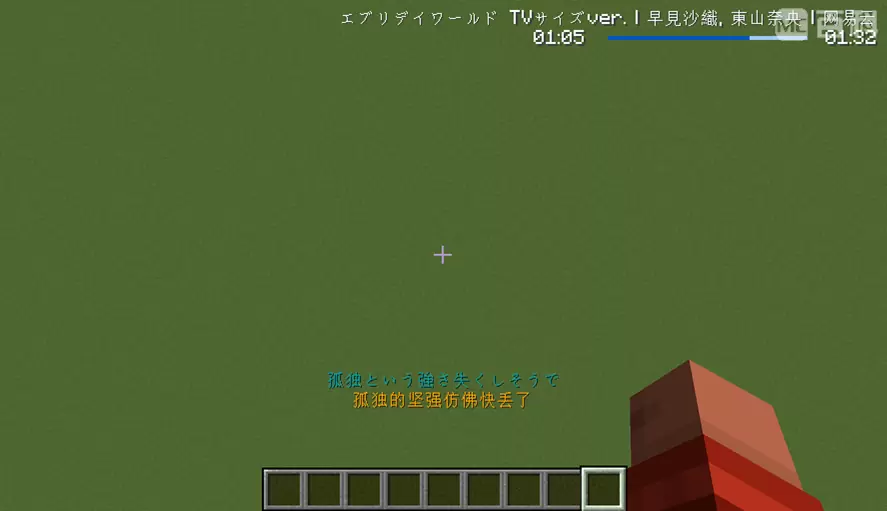
- **Many sources, one player** — NetEase Cloud Music, QQ Music, KuGou Music, local audio files (drag & drop), and direct HTTP links.
- **Smooth playback** – drag the progress bar to move through a track, keep listening while streams load, and choose an audio output option if the default does not suit your setup. Supported formats include MP3, OGG/Opus, FLAC, WAV, M4A/AAC, and AIFF.
- **Music rooms (listen together)** — members of a room share playback in real time: the same track, the same position, the same pauses. Rooms can be named, listed publicly, and joined from a browser screen or by UUID.
- **Server-wide queue (KTV mode)** — players queue songs for the whole server, vote to skip, and the server falls back to preset radios when the queue is empty.
- **Shared access & preset playlists** – server owners can configure their own supported music-service accounts for the server and share curated playlists with everyone.
- **Cross-platform** — Fabric and NeoForge on the client; a dedicated Paper plugin lets modded clients use every server feature on plugin servers.
---
## 📦 Installation
| Platform | What to install |
| --- | --- |
| **Fabric client** | `Concerto-mc-fabric-.jar` + [Fabric API](https://modrinth.com/mod/fabric-api) |
| **NeoForge client** | `Concerto-mc-neoforge-.jar` |
| **Paper server** | `Concerto-mc-paper-.jar` into `plugins/` |
Concerto stores its settings, playlists, downloads, and sign-in data in the `Concerto/` folder next to the game or server directory.
You can use Concerto as a local player in singleplayer and on servers that do not have it installed. Shared rooms, sharing, and the server-wide queue need Concerto on the server too (Fabric, NeoForge, or Paper).
---
## ⌨️ Hotkeys
All hotkeys can be rebound in **Options → Controls**.
| Default key | Action |
| :---: | --- |
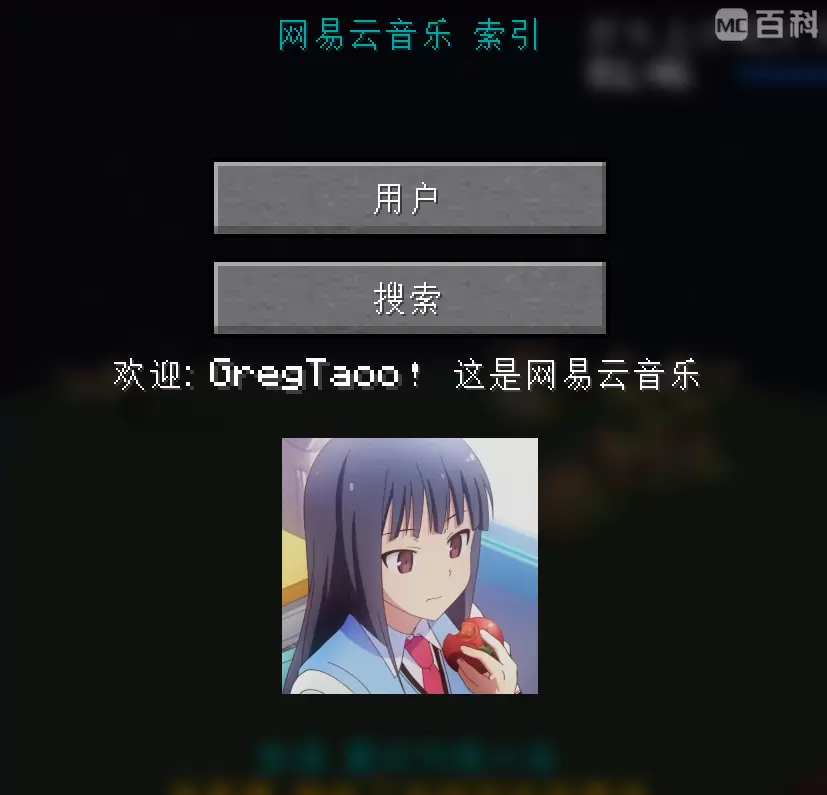
| `I` | Open the Concerto index (main menu) |
| `U` | Open the playlist screen |
| `N` | Play the next track |
| `P` | Pause / resume |
---
## 🖱️ Screens & Controls
### Index screen (`I`)
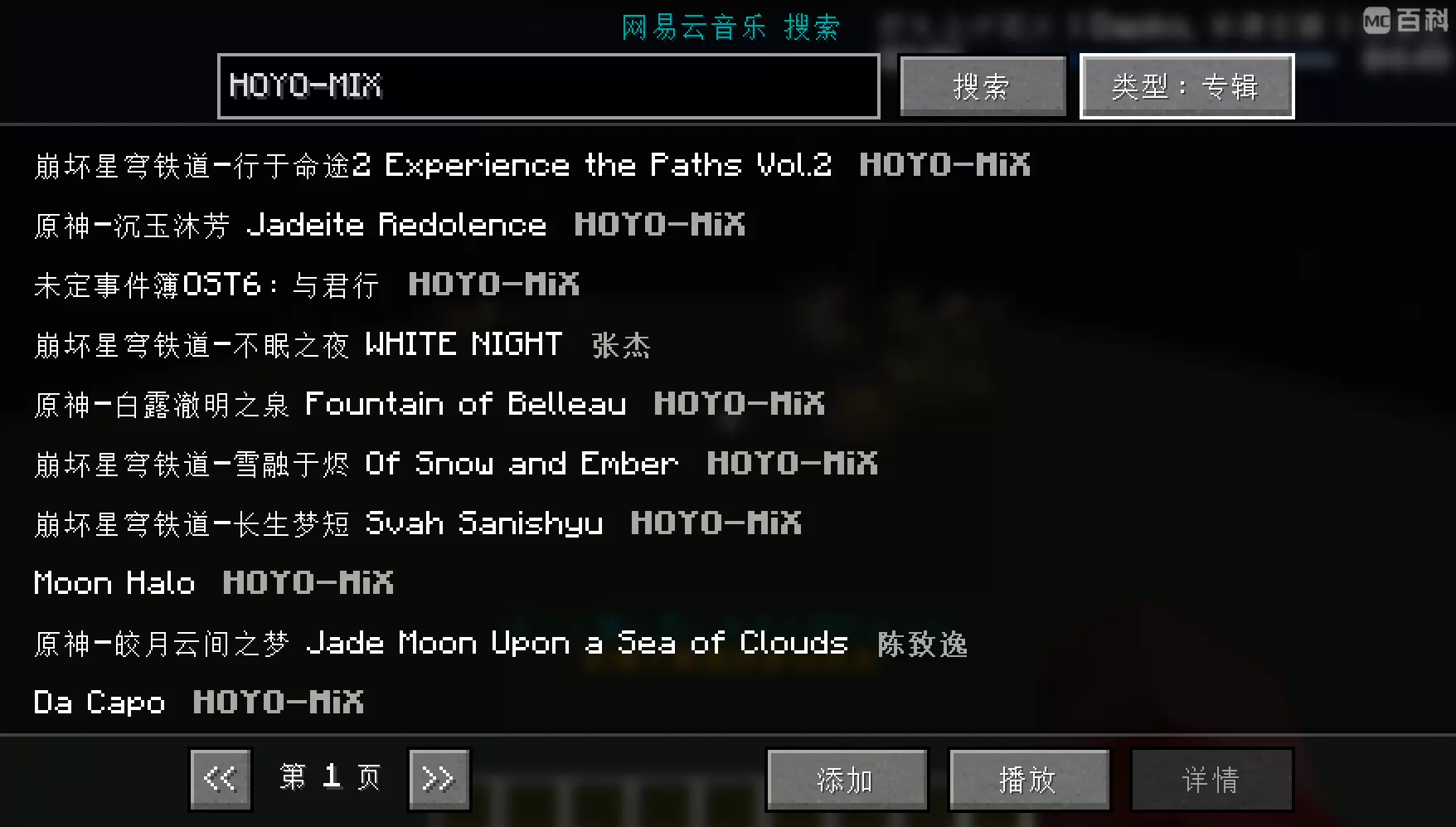
Your starting point for playlists, music services (NetEase / QQ / KuGou), search, local files, links, music rooms, and settings.
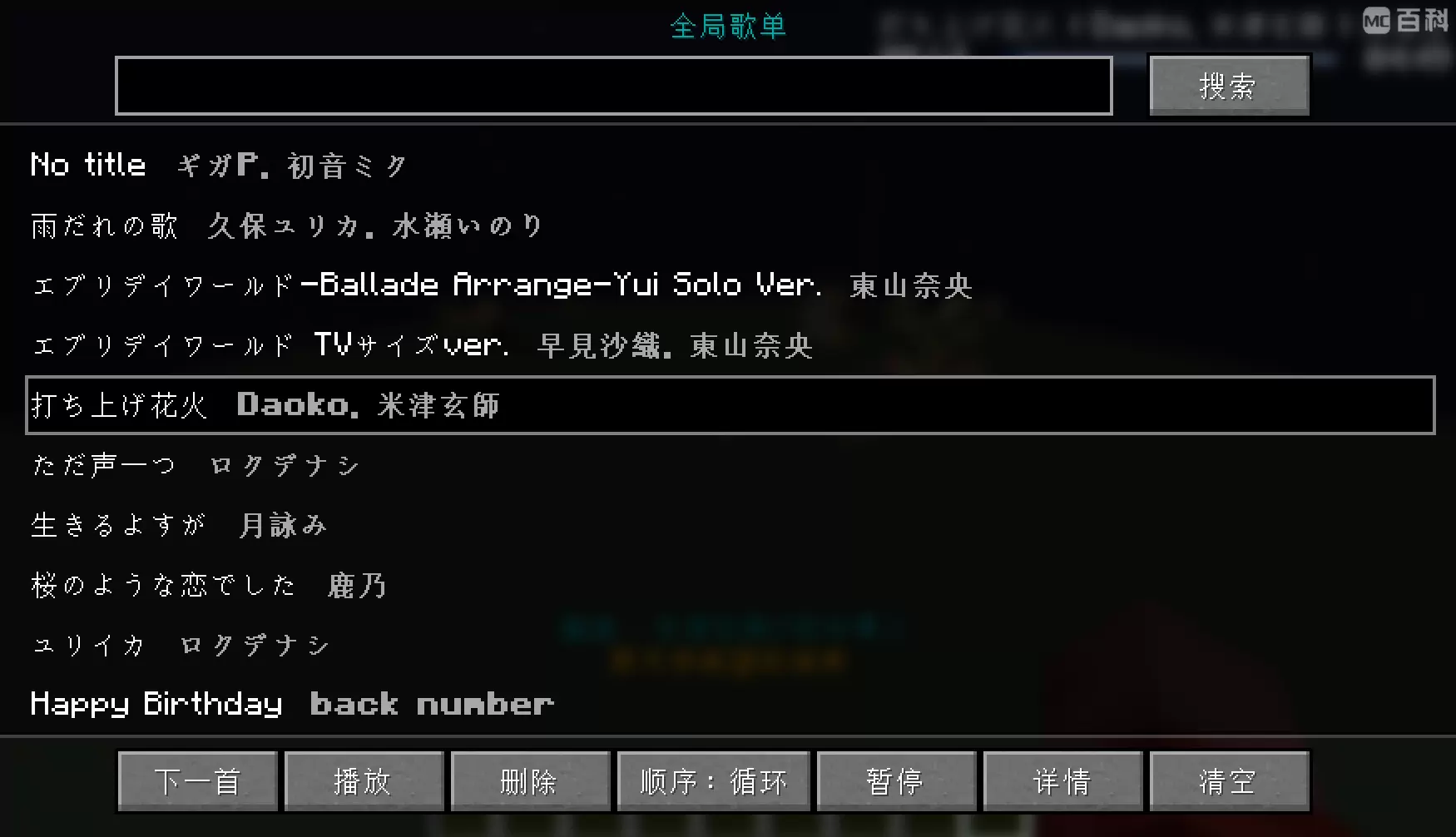
### Playlist screen (`U`)
- **Drag & drop** audio files or whole folders from your file manager to import them.
- **Double-click** an entry to play it; single click selects.
- Bottom row: next / play / delete / order (normal, random, reversed, loop) / pause / info / clear.
- In the server-wide queue, **Play** becomes **Request in server** and queues the selected song instead.
- The **volume button** pops up a slider (click anywhere else to dismiss). Volume changes apply instantly and are saved to the config.
- The search box filters the current playlist.
### Playlist previews
- Select **Save to Local** to add the displayed playlist to **Local Playlists** immediately; it is also written as JSON under `Concerto/local_playlists/`.
### Player screen
- Drag the progress bar to **seek**; a preview of the target position is shown while dragging.
- Shows title, artist, source, cover art, and buffering state for streamed tracks.
### Music rooms screen
- **Discovery view**: lists the server's public (visible) rooms with one-click join, plus fields to create a named room, join by UUID, refresh, or enter the server queue.
- **Management view** (when you are in a room): member list, rename, toggle *visible* / *joinable*, grant co-op permission, and dissolve or leave the room.
### Options screen
Use the in-game options to adjust audio output, HUD visibility, scrolling-text speed, NetEase audio quality, and more. Audio output changes take effect from the next track.
---
## 📜 Commands
### Client player control – `/concerto` (alias `/music`)
The `/music` alias can be disabled with the `registerMusicCommand` client config option.
Most everyday actions are available from the screens above. Commands are optional shortcuts for players and server owners who prefer them.
| Command | Description |
| --- | --- |
| `/concerto pause` | Toggle pause / resume |
| `/concerto start` | Start the player if it is not running |
| `/concerto stop` | Stop playback |
| `/concerto clear` | Stop playback and clear the playlist |
| `/concerto restart` | Restart the player core (recovers from a stuck state) |
| `/concerto reload` | Reload configs, local playlists, and restart the player |
| `/concerto save` | Cache the current track locally (cacheable sources only) |
| `/concerto like` / `dislike` | Like / unlike the current track (NetEase Cloud Music only) |
| `/concerto download-current` | Download the current track and its lyrics to `Concerto/` |
| `/concerto download-all` | Download every track in the current playlist |
| `/concerto export-as-playlist` | Export the current playlist as a JSON preset playlist (`Concerto/local_playlists`) |
| `/concerto clean-cache` | Wipe the client cache (music, images, verification files) |
### Music rooms & server queue — `/musicroom` (requires Concerto on the server)
| Command | Description |
| --- | --- |
| `/musicroom create [name]` | Create (optionally named) and join a room; the room UUID is copied to your clipboard. Gated by the server's `musicRoomCommandPermission` |
| `/musicroom join ` | Join a room by UUID |
| `/musicroom quit` | Leave the current room or the server queue |
| `/musicroom remove` | Dissolve the room you own |
| `/musicroom members` | Show the room owner and member list |
| `/musicroom op ` | Toggle a member's playback-control permission (owner only) |
| `/musicroom agent join` / `quit` | Enter / leave the server-wide queue (KTV mode) |
| `/musicroom agent add` | Push your currently playing track onto the server queue |
| `/musicroom agent vote` | Start a skip vote for the current queued track |
| `/musicroom agent vote ` | Cast your vote in the running skip vote |
### Player-to-player sharing — `/sharemusic`
| Command | Description |
| --- | --- |
| `/sharemusic to ` | Share the current track with one player, or with everyone (`@a` goes through the server audit queue when audition is enabled). Sources that expose local file paths are refused as unsafe |
| `/sharemusic accept ` | Accept a share invitation |
| `/sharemusic reject ` | Reject a share invitation |
| `/sharemusic reject all` | Reject all pending invitations |
| `/sharemusic list ` | List pending invitations (clickable accept / reject buttons) |
### Server administration — `/concerto-server`
All subcommands require permission level 2 (OP) except `fetch-radios`, which everyone may use.
| Command | Description |
| --- | --- |
| `/concerto-server audit ` | Approve a pending `@a` broadcast request |
| `/concerto-server audit reject ` | Reject a pending broadcast request |
| `/concerto-server audit reject all` | Reject every pending request |
| `/concerto-server audit list ` | List the audit queue (clickable accept / reject buttons) |
| `/concerto-server reload` | Reload the server config, preset radios, and platform cookies |
| `/concerto-server reload-cookie` | Reload only the platform cookie files |
| `/concerto-server clean-cache` | Wipe the server-side cache |
| `/concerto-server fetch-radios` | Send the server's preset radios to your client |
| `/concerto-server agent reset` | Reset the server queue completely |
| `/concerto-server agent cut` | Force-skip the current queued track |
| `/concerto-server agent stop` / `start` | Stop / restart KTV mode |
---
## 📖 How-to
### Listen together in a music room
1. `/musicroom create My Room` (or use the music rooms screen) — the UUID lands in your clipboard.
2. Hand the UUID to friends (`/musicroom join `), or mark the room *visible* + *joinable* so it appears in everyone's room browser.
3. Whatever the controlling members play, seek, or pause is mirrored to every member in real time. Use `/musicroom op` to decide who may control playback.
### Run a server-wide queue (KTV mode)
1. In the server's Concerto settings, leave the server-wide queue enabled. You can also choose whether players receive an invitation when they join.
2. Players enter with `/musicroom agent join`, then use **Request in server** on a selected song. The `/musicroom agent add` command can still queue the current track; both are rate-limited by `musicAgentAddTimeLimit`.
3. If the server resolves a song as a trial clip, everyone in the queue is notified.
4. Anyone in the queue can start a skip vote: `/musicroom agent vote`, then others confirm with `/musicroom agent vote true` (or `false`).
5. When the queue is empty the server plays its preset radios, if configured.
### Share a music-service account with the server
1. Sign in to the music service on your own client.
2. Copy the `.cookie` files created in your client's `Concerto/` folder to the server's `Concerto/` folder. Treat these files like passwords.
3. In the server's Concerto settings, enable shared account access for the queue, then run `/concerto-server reload-cookie`.
### Ship preset playlists
Put exported playlist JSON files (see `/concerto export-as-playlist`) on the server under `Concerto/preset_radios/`; the special file `music_agent.json` is what KTV mode falls back to. Clients receive the radios automatically, or on demand via `/concerto-server fetch-radios`.
### Cache & downloads
Concerto only saves music when you ask it to: use `/concerto save` for the current track, or `download-current` / `download-all` for permanent copies with lyrics. The cache size can be adjusted in the settings.
---
## ⚙️ Configuration
You do not need to edit files for normal use: the in-game options screen covers the common choices. The reference below is for players and server owners who want more control. Settings files are in `Concerto/`; edit them only while the game is closed.
### `client_config.json`
**Playback & networking**
| Key | Default | Meaning |
| --- | --- | --- |
| `playerVolume` | `1.0` | Player volume, `0.0` – `1.0` |
| `playerVolumeFollowsMaster` | `true` | Multiply by Minecraft's master volume |
| `playbackBackend` | `"JAVASOUND"` | Audio backend: `"JAVASOUND"` or `"OPENAL"`. Changing it takes effect from the next track |
| `displayPlayerScreenCoverAndSpectrum` | `true` | Show cover art and the spectrum on the player screen; `false` uses the full-width lyrics view |
| `neteaseMusicQuality` | `"HIRES"` | NetEase quality: `"STANDARD"`, `"HIGHER"`, `"EXHIGH"`, `"LOSSLESS"`, `"HIRES"` |
| `maxCacheSize` | `100000000` | Cache budget in bytes (music and images each) |
| `handshakeRequired` | `true` | Verify the Concerto handshake before using server features |
| `confirmAfterReceived` | `true` | Ask before accepting an incoming share (`false` auto-accepts) |
| `joinAgentWhenInvited` | `false` | Auto-accept the server's KTV invitation on join |
| `registerMusicCommand` | `true` | Register the `/music` alias |
| `printRequestResults` | `false` | Log platform API responses (debugging) |
| `kuGouMusicLite` | `false` | Use the KuGou "concept/lite" endpoints |
| `autoGetKuGouDailyVIP` | `false` | Claim KuGou's daily VIP automatically |
**HUD**
Each HUD element has a `display*` switch, a position, an alignment (`LEFT` / `CENTER` / `RIGHT`), and ARGB colors:
| Element | Keys |
| --- | --- |
| Lyrics | `displayLyrics`, `lyricsPosition` (default `0.5,1-100`), `lyricsAlignment`, `lyricsColor` |
| Sub-lyrics (translation) | `displaySubLyrics`, `subLyricsPosition` (default `0.5,1-89`), `subLyricsAlignment`, `subLyricsColor` |
| Track details | `displayMusicDetails`, `musicDetailsPosition` (default `1-30,0+5`), `musicDetailsAlignment`, `musicDetailsColor` |
| Time & progress bar | `displayTimeProgress`, `timeProgressPosition` (default `1-30,0+15`), `timeProgressAlignment`, `timeProgressTextColor`, `timeProgressColor`, `timeProgressBgColor` |
| Cover art | `displayCoverImg`, `coverImgPosition` (default `1-25,0`), `coverImgSize`, `coverImgInCircle`, `coverImgRotate` |
| Misc | `textShadow`, `hideWhenChat`, `scrollingTextSpeed` |
- **Position format**: `±,±`. `0.5,1-100` = horizontally centered, 100 px above the bottom edge; `1-30,0+15` = 30 px from the right, 15 px from the top.
- **Color format**: `#AARRGGBB`, e.g. `#ffffffff` opaque white, `#ff00aaaa` opaque teal.
### `server_config.json`
| Key | Default | Meaning |
| --- | --- | --- |
| `auditionRequired` | `true` | `@a` broadcasts need OP approval via `/concerto-server audit` |
| `serverMusicAgent` | `true` | Enable the server-wide queue (KTV mode) |
| `agentInviteWhenJoin` | `true` | Invite players to the queue when they join |
| `musicRoomCommandPermission` | `2` | Minimum permission level to create a music room |
| `musicAgentAddTimeLimit` | `60` | Seconds a player must wait between queue submissions |
| `musicAgentUseShared` | `true` | Resolve queued tracks through the server's own cookies |
| `kuGouMusicLite` | `false` | Use the KuGou lite endpoints server-side (also pushed to clients) |
---
## ❓ FAQ
**How do I set up a music-service account on a server?**
Sign in on your own client first, then copy the `.cookie` files from the client's `Concerto/` folder to the server's. Run `/concerto-server reload-cookie` afterwards. Keep these files private: they grant access to your account.
**NetEase keeps erroring after a QR-code login.**
NetEase's risk control flags logins from new devices/locations aggressively. Skip QR/password login and paste the complete cookie of an existing, working browser session instead.
**QQ Music stops resolving after a few days.**
QQ Music cookies expire quickly by design. Refresh the cookie files on the server and run `/concerto-server reload-cookie`.
**Which audio output option should I pick?**
`JAVASOUND` is the recommended default. Try `OPENAL` if playback stutters or uses the wrong device. The change applies from the next track.
**Moving through a track is slow sometimes.**
Some streamed files and radio sources cannot jump directly to every position, so Concerto may need a moment to catch up. Moving within recently played audio is usually faster.
**Which local audio files can I play?**
Concerto supports MP3, OGG/Opus, FLAC, WAV, M4A/AAC, and AIFF. Support for unusual encodings inside those containers can vary, so converting a problematic file to MP3 or WAV is still a useful fallback.
**The player is stuck / silent after an error.**
`/concerto restart` resets the player core without touching your playlist. If screens render wrongly or covers are black, `/concerto clean-cache`, and as a last resort delete `Concerto/cache` while the game is closed.
**Room / sharing commands say the feature is unavailable.**
Those features need Concerto on the server (Fabric, NeoForge, or the Paper plugin). On vanilla servers the mod still works as a purely local player.
**My volume resets or ignores the slider.**
If `playerVolumeFollowsMaster` is on, the effective volume is `playerVolume × master volume` — check Minecraft's own Music & Sounds settings too.
-----------------------------------------------
## ✨ 功能亮点
- **多来源,一个播放器** —— 网易云音乐、QQ 音乐、酷狗音乐、本地音频文件(支持拖放导入)、HTTP 直链,都在同一条播放队列里。
- **顺畅播放** —— 拖动进度条即可跳转,流媒体加载时也能继续收听;如果默认输出不合适,还可切换音频输出方式。支持 MP3、OGG/Opus、FLAC、WAV、M4A/AAC 和 AIFF。
- **音乐室(一起听)** —— 同一房间的成员实时共享播放状态:同一首歌、同一进度、同步暂停。房间可以命名、公开展示,在房间列表界面一键加入,也可以凭 UUID 加入。
- **全服点播(KTV 模式)** —— 玩家给全服排队点歌,可以发起投票切歌;没人点歌时自动播放服务器预设歌单。
- **共享账号与预设歌单** —— 服主可以为服务器配置自己已登录的音乐服务账号,并把整理好的歌单分享给所有玩家。
- **跨平台** —— 客户端支持 Fabric 和 NeoForge;插件服可用专属 Paper 插件,模组客户端在插件服上同样能用全部服务端功能。
---
## 📦 安装
| 平台 | 需要安装 |
| --- | --- |
| **Fabric 客户端** | `Concerto-mc-fabric-.jar` + [Fabric API](https://modrinth.com/mod/fabric-api) |
| **NeoForge 客户端** | `Concerto-mc-neoforge-.jar` |
| **Paper 服务端** | `Concerto-mc-paper-.jar` 放进 `plugins/` |
Concerto 会把设置、歌单、下载内容和登录信息保存在游戏或服务端目录旁的 `Concerto/` 文件夹中。
单人游戏和未安装 Concerto 的服务器中,都可以把它当作本地播放器使用;音乐室、音乐分享和全服点播等联机功能则需要服务端也安装 Concerto(Fabric、NeoForge 或 Paper 均可)。
---
## ⌨️ 快捷键
以下按键都可以在 **选项 → 按键控制** 里改绑。
| 默认按键 | 功能 |
| :---: | --- |
| `I` | 打开 Concerto 主菜单 |
| `U` | 打开播放列表界面 |
| `N` | 播放下一首 |
| `P` | 暂停 / 继续 |
---
## 🖱️ 界面与操作
### 主菜单(`I`)
这是播放列表、网易云 / QQ / 酷狗曲库、搜索、本地文件、链接、音乐室和设置的统一入口。
### 播放列表界面(`U`)
- 直接从文件管理器**拖放**音频文件或整个文件夹即可导入。
- **双击**条目播放,单击选中。
- 底部一排按钮:下一首 / 播放 / 删除 / 播放顺序(顺序、随机、倒序、单曲循环)/ 暂停 / 详情 / 清空。
- 加入全服点播后,**播放**会变为**服务器点歌**,并将选中的歌曲加入服务器队列。
- **音量按钮**会弹出滑条,点击界面其他位置自动收起;音量即调即生效,并写入配置。
- 顶部搜索框用于筛选当前列表。
### 歌单预览
- 点击**保存到本地**,即可将当前歌单立即加入**本地歌单**;同时会写入 `Concerto/local_playlists/` 下的 JSON 文件。
### 播放器界面
- 拖动进度条**跳转播放位置**,拖动过程中会显示目标位置预览。
- 显示标题、歌手、来源、封面,流媒体曲目会显示缓冲状态。
### 音乐室界面
- **发现视图**:列出服务器上公开(可见)的房间,一键加入;也可以在这里输入房名创建房间、凭 UUID 加入、刷新列表或进入全服点播。
- **管理视图**(已在房间内时):成员列表、改名、切换*可见* / *可加入*、给成员授权、解散或退出房间。
### 选项界面
可在游戏内选项中调整音频输出、HUD 显隐、滚动文字速度、网易云音质等。切换音频输出会从下一首开始生效。
---
## 📜 指令一览
### 客户端播放控制 —— `/concerto`(别名 `/music`)
`/music` 别名可通过客户端配置项 `registerMusicCommand` 关闭。
日常操作都可以在上面的界面中完成;以下指令只是为喜欢快捷操作的玩家和服主准备的补充。
| 指令 | 说明 |
| --- | --- |
| `/concerto pause` | 暂停 / 继续 |
| `/concerto start` | 启动播放器(未运行时) |
| `/concerto stop` | 停止播放 |
| `/concerto clear` | 停止播放并清空播放列表 |
| `/concerto restart` | 重启播放器核心(用于从卡死状态恢复) |
| `/concerto reload` | 重载配置和本地歌单,并重启播放器 |
| `/concerto save` | 把当前曲目存入本地缓存(仅限可缓存来源) |
| `/concerto like` / `dislike` | 收藏 / 取消收藏当前曲目(仅网易云音乐) |
| `/concerto download-current` | 下载当前曲目及歌词到 `Concerto/` |
| `/concerto download-all` | 下载当前播放列表中的全部曲目 |
| `/concerto export-as-playlist` | 把当前播放列表导出为 JSON 预设歌单(`Concerto/local_playlists`) |
| `/concerto clean-cache` | 清空客户端缓存(音乐、图片、校验文件) |
### 音乐室与全服点播 —— `/musicroom`(需要服务端装有 Concerto)
| 指令 | 说明 |
| --- | --- |
| `/musicroom create [房名]` | 创建(可命名)并加入房间,房间 UUID 自动复制到剪贴板;受服务端 `musicRoomCommandPermission` 权限限制 |
| `/musicroom join ` | 凭 UUID 加入房间 |
| `/musicroom quit` | 退出当前房间或全服点播队列 |
| `/musicroom remove` | 解散自己创建的房间 |
| `/musicroom members` | 查看房主和成员列表 |
| `/musicroom op ` | 给成员授予 / 收回播放控制权(仅房主可用) |
| `/musicroom agent join` / `quit` | 加入 / 退出全服点播(KTV 模式) |
| `/musicroom agent add` | 把自己正在播放的曲目推送到全服点播队列 |
| `/musicroom agent vote` | 对当前点播曲目发起切歌投票 |
| `/musicroom agent vote ` | 在进行中的投票里投赞成 / 反对票 |
### 玩家间音乐分享 —— `/sharemusic`
| 指令 | 说明 |
| --- | --- |
| `/sharemusic to ` | 把当前曲目分享给指定玩家;`@a` 为全服广播(开启审核时会先进入管理员审核队列)。会暴露本地文件路径的来源出于安全考虑无法分享 |
| `/sharemusic accept ` | 接受一条分享邀请 |
| `/sharemusic reject ` | 拒绝一条分享邀请 |
| `/sharemusic reject all` | 拒绝全部待处理邀请 |
| `/sharemusic list ` | 分页查看待处理邀请(带可点击的接受 / 拒绝按钮) |
### 服务端管理 —— `/concerto-server`
除 `fetch-radios` 所有人可用外,其余子指令都需要 2 级权限(OP)。
| 指令 | 说明 |
| --- | --- |
| `/concerto-server audit ` | 通过一条待审核的全服广播请求 |
| `/concerto-server audit reject ` | 拒绝一条广播请求 |
| `/concerto-server audit reject all` | 拒绝全部待审核请求 |
| `/concerto-server audit list ` | 分页查看审核队列(带可点击的接受 / 拒绝按钮) |
| `/concerto-server reload` | 重载服务端配置、预设电台和平台 Cookie |
| `/concerto-server reload-cookie` | 只重载平台 Cookie 文件 |
| `/concerto-server clean-cache` | 清空服务端缓存 |
| `/concerto-server fetch-radios` | 把服务器预设电台同步到自己的客户端 |
| `/concerto-server agent reset` | 彻底重置全服点播队列 |
| `/concerto-server agent cut` | 强制切掉当前点播曲目 |
| `/concerto-server agent stop` / `start` | 停止 / 重新开启 KTV 模式 |
---
## 📖 使用指南
### 和朋友"一起听"
1. `/musicroom create 我的房间`(或在音乐室界面操作),UUID 会自动进剪贴板。
2. 把 UUID 发给朋友(`/musicroom join `);或者把房间设为*可见* + *可加入*,让它出现在所有人的房间列表里。
3. 有控制权的成员切歌、拖进度、暂停,其他成员都会实时跟随。用 `/musicroom op` 决定谁有控制权。
### 开一场全服 KTV
1. 在服务端 Concerto 设置中保持全服点播开启;也可以选择是否在玩家进服时发送邀请。
2. 玩家用 `/musicroom agent join` 进入队列,再从歌曲页面点击**服务器点歌**;`/musicroom agent add` 仍可把正在播放的歌曲加入队列,两种方式都受 `musicAgentAddTimeLimit` 限制。
3. 服务器解析到试听片段时,会通知队列中的所有成员。
4. 歌不合口味?任何队列内玩家都能 `/musicroom agent vote` 发起切歌投票,其他人用 `/musicroom agent vote true`(或 `false`)表态。
5. 没人点歌时,服务器自动播放预设电台(如已配置)。
### 与全服共享音乐服务账号
1. 先在自己的客户端登录音乐服务。
2. 把客户端 `Concerto/` 中生成的 `.cookie` 文件复制到服务端的 `Concerto/` 目录。请像保管密码一样保管这些文件。
3. 在服务端 Concerto 设置中开启点播队列的共享账号访问,然后执行 `/concerto-server reload-cookie`。
### 下发预设歌单
把导出的歌单 JSON(见 `/concerto export-as-playlist`)放到服务端 `Concerto/preset_radios/` 下;其中 `music_agent.json` 是 KTV 模式空闲时的兜底歌单。客户端会自动收到电台列表,也可以用 `/concerto-server fetch-radios` 手动拉取。
### 缓存与下载
Concerto 只会在你主动操作时保存音乐:`/concerto save` 保存当前曲目,`download-current` / `download-all` 会连同歌词下载为长期保存的副本。缓存大小可在设置中调整。
---
## ⚙️ 配置说明
日常使用无需编辑文件,游戏内选项已覆盖常用设置。下面的内容仅供希望进一步调整的玩家和服主参考。设置文件位于 `Concerto/` 目录;如需编辑,请先关闭游戏。
### `client_config.json`
**播放与联机**
| 配置项 | 默认值 | 说明 |
| --- | --- | --- |
| `playerVolume` | `1.0` | 播放器音量,`0.0` – `1.0` |
| `playerVolumeFollowsMaster` | `true` | 音量再乘以 Minecraft 主音量 |
| `playbackBackend` | `"JAVASOUND"` | 音频后端:`"JAVASOUND"` 或 `"OPENAL"`,切换后下一首生效 |
| `displayPlayerScreenCoverAndSpectrum` | `true` | 在播放页面显示封面和频谱;`false` 时使用全宽歌词视图 |
| `neteaseMusicQuality` | `"HIRES"` | 网易云音质:`"STANDARD"`、`"HIGHER"`、`"EXHIGH"`、`"LOSSLESS"`、`"HIRES"` |
| `maxCacheSize` | `100000000` | 缓存上限(字节,音乐与图片各自计算) |
| `handshakeRequired` | `true` | 使用服务端功能前要求完成 Concerto 握手校验 |
| `confirmAfterReceived` | `true` | 收到分享先询问(改为 `false` 则自动接受) |
| `joinAgentWhenInvited` | `false` | 进服时自动接受全服点播邀请 |
| `registerMusicCommand` | `true` | 注册 `/music` 别名 |
| `printRequestResults` | `false` | 打印平台 API 响应(调试用) |
| `kuGouMusicLite` | `false` | 使用酷狗概念版接口 |
| `autoGetKuGouDailyVIP` | `false` | 自动领取酷狗每日 VIP |
**HUD 显示**
每个 HUD 元素都有 `display*` 开关、位置、对齐方式(`LEFT` / `CENTER` / `RIGHT`)和 ARGB 颜色:
| 元素 | 相关配置项 |
| --- | --- |
| 歌词 | `displayLyrics`、`lyricsPosition`(默认 `0.5,1-100`)、`lyricsAlignment`、`lyricsColor` |
| 副歌词(翻译) | `displaySubLyrics`、`subLyricsPosition`(默认 `0.5,1-89`)、`subLyricsAlignment`、`subLyricsColor` |
| 曲目信息 | `displayMusicDetails`、`musicDetailsPosition`(默认 `1-30,0+5`)、`musicDetailsAlignment`、`musicDetailsColor` |
| 时间与进度条 | `displayTimeProgress`、`timeProgressPosition`(默认 `1-30,0+15`)、`timeProgressAlignment`、`timeProgressTextColor`、`timeProgressColor`、`timeProgressBgColor` |
| 封面 | `displayCoverImg`、`coverImgPosition`(默认 `1-25,0`)、`coverImgSize`、`coverImgInCircle`、`coverImgRotate` |
| 其他 | `textShadow`、`hideWhenChat`、`scrollingTextSpeed` |
- **位置格式**:`±,±`。如 `0.5,1-100` 表示水平居中、距底边 100 像素;`1-30,0+15` 表示距右边 30 像素、距顶边 15 像素。
- **颜色格式**:`#AARRGGBB`,如 `#ffffffff` 为不透明纯白,`#ff00aaaa` 为不透明青色。
### `server_config.json`
| 配置项 | 默认值 | 说明 |
| --- | --- | --- |
| `auditionRequired` | `true` | `@a` 全服广播需要 OP 通过 `/concerto-server audit` 审核 |
| `serverMusicAgent` | `true` | 开启全服点播(KTV 模式) |
| `agentInviteWhenJoin` | `true` | 玩家进服时发送点播邀请 |
| `musicRoomCommandPermission` | `2` | 创建音乐室所需的最低权限等级 |
| `musicAgentAddTimeLimit` | `60` | 单个玩家两次点歌的最小间隔(秒) |
| `musicAgentUseShared` | `true` | 点播曲目统一通过服务端自己的 Cookie 解析 |
| `kuGouMusicLite` | `false` | 服务端使用酷狗概念版接口(会同步给客户端) |
---
## ❓ 常见问题
**怎样在服务端配置音乐服务账号?**
先在自己的客户端登录,再把客户端 `Concerto/` 中的 `.cookie` 文件复制到服务端同名目录,然后执行 `/concerto-server reload-cookie`。这些文件可以访问你的账号,务必妥善保管。
**网易云扫码登录后一直报错?**
网易云的风控对新设备、异地登录非常敏感。建议放弃扫码 / 密码登录,直接把浏览器里已正常登录的完整 Cookie 粘贴进来。
**QQ 音乐过几天就解析失败?**
QQ 音乐的授权有效期本来就短,过期是正常现象。在服务端更新 Cookie 文件后执行 `/concerto-server reload-cookie` 即可。
**音频输出选哪个?**
推荐先使用默认的 `JAVASOUND`。如果遇到卡顿或输出设备不对,再试试 `OPENAL`。切换后从下一首开始生效。
**有些歌拖动进度条很慢?**
部分流媒体文件和电台无法直接跳到任意位置,因此 Concerto 可能需要一点时间追上进度;在刚刚播放过的片段之间移动通常会更快。
**本地音频文件支持哪些格式?**
Concerto 支持 MP3、OGG/Opus、FLAC、WAV、M4A/AAC 和 AIFF。同一种格式中较少见的编码方式可能仍有差异;遇到无法播放的文件时,可尝试转换为 MP3 或 WAV。
**播放器卡死 / 出错后没声音?**
`/concerto restart` 会重启播放器核心且不动播放列表。如果界面渲染异常、封面黑块,先 `/concerto clean-cache`;仍不行就在游戏关闭状态下删除 `Concerto/cache` 目录。
**音乐室 / 分享指令提示功能不可用?**
这些功能需要服务端装有 Concerto(Fabric、NeoForge 或 Paper 插件)。在纯净服务器上,模组仍可作为本地播放器正常使用。
**音量调了没反应或自己变小?**
如果开着 `playerVolumeFollowsMaster`,实际音量是 `playerVolume × 主音量`——记得检查 Minecraft 自己的音乐音量设置。