
Описание
This mod expands vanilla keybinds with combo support, letting you bind any action to a chord or a key sequence instead of a single key.
It is **client-side only** and requires no server-side installation.
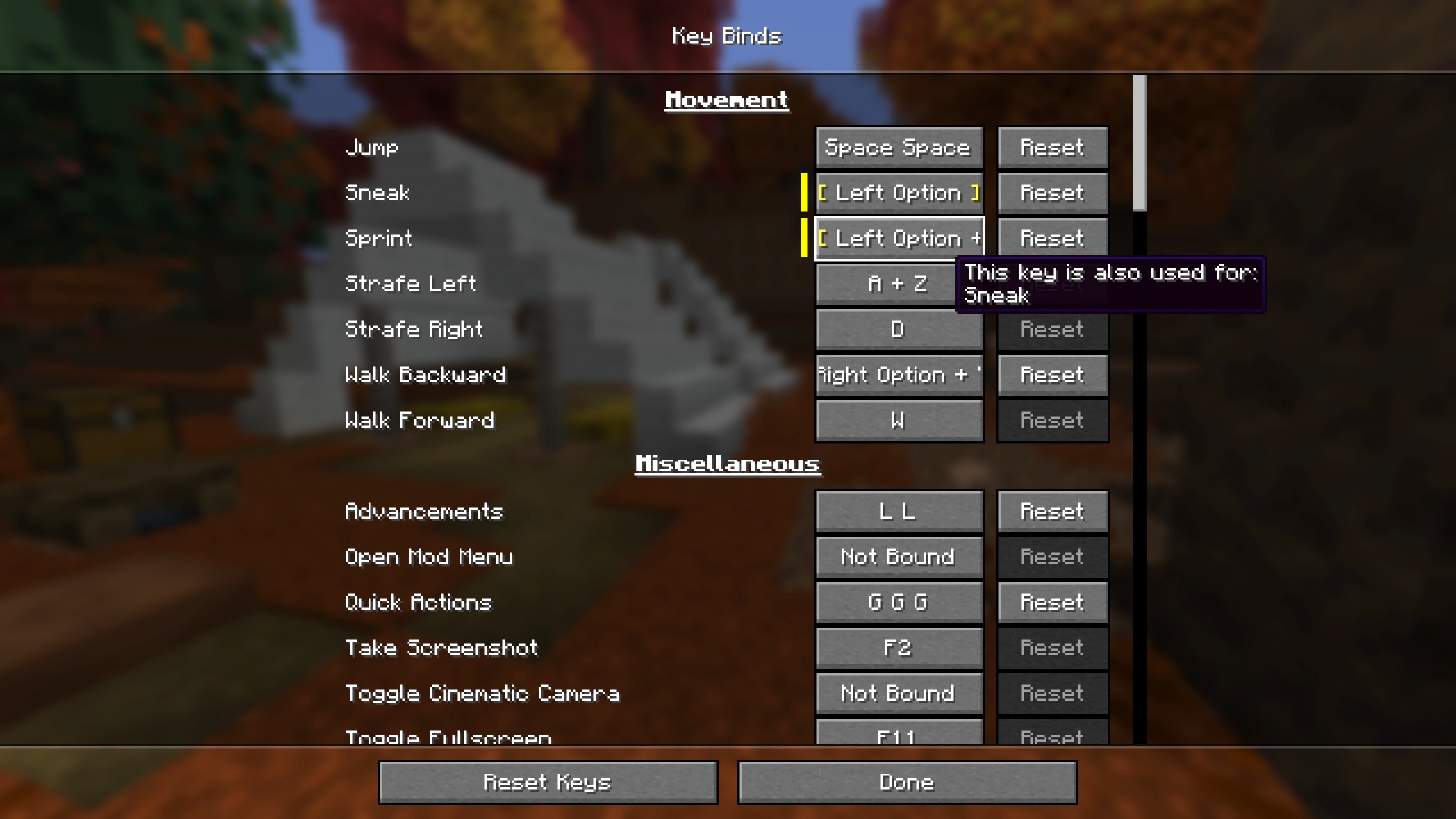
## Features
### Chord Combos
- Bind actions to key combinations such as **Left Shift + E**, **Left Control + Left Button**, or any other held key + trigger pair
- Any key or mouse button can be the trigger or a held key in a combo. The last key pressed during recording becomes the trigger, and all previously held keys complete the combination
- No limits! Hold as many keys as you want for as wild a combination as you need
- Can be followed by a sequence combo
### Sequence Combos
- Bind actions to repeated key presses such as **double-tap Q** or **triple-tap Space**
- A configurable time window determines how quickly the taps must occur
- No limits! Bind to as many taps as you want
### Controls Screen Integration
- Combo recording is embedded directly in the vanilla **Controls > Key Binds** screen, meaning no separate UI
- Press **Escape** to unbind a key
### Configuration
- **Allow Conflicts**: When disabled, pressing a combo will not also trigger bindings whose keys are fully contained in it. For example, binding both **E** and **Left Shift + E** means pressing **Left Shift + E** would normally fire both. Disabling this ensures only **Left Shift + E** fires. The same applies to sequences: if a single press and a multi-tap are bound to the same key (e.g. **Q** and **Q Q**), pressing that key will only trigger the single press binding. Two bindings like **Left Control + E** and **Left Shift + E** are not considered conflicting, since pressing one can never accidentally fire the other. They only both trigger if you deliberately hold **Left Control + Left Shift + E**. This setting only applies to bindings that share the same trigger key (default: on)
- **Sequence Window**: How quickly you must press the key repeatedly in-game for a sequence to register (default: 400 ms)
- **Sequence Recording Window**: How long the recorder waits between taps when capturing a sequence in the Controls screen (default: 200 ms)
- Settings are saved to `config/combind.json`
## Use Cases
This mod shines in modpacks where keys are scarce and every binding needs to be deliberate, but works just as well in vanilla for extra flexibility.
### A Practical Example
**Double-tap Q (Q Q)** (or even **triple-tap Q (Q Q Q)**!) to drop items instead of a single press. No more accidental drops.
## Compatibility
This mod has no required dependencies beyond Fabric API. It works with:
- **[ModMenu](https://modrinth.com/mod/modmenu)** _(recommended)_ — adds a config button to the mod list as an alternative to manually editing `config/combind.json`
- **[Controlling](https://modrinth.com/mod/controlling)** and **[Searchables](https://modrinth.com/mod/searchables)** — search for bindings by their combo using syntax like `key:"Left Shift + E"` or `key:"Q Q"`. Unsupported as of `combind-v1.0.0+26.3`, until both mods release a version compatible with 26.3
---
_**Note**: Some niche vanilla interactions are tied to a specific input type and may not work when rebound. For example, a mouse button bound to "Open Inventory" will not close it the way a key would, and a key bound to "Pick Block" will not support block duplication dragging inside containers the way a mouse button would._
_**Note**: If you encounter any compatibility issues, please report them on the [GitHub Issues page](https://github.com/Pemiridosa/combind/issues)._
---
## For Mod Developers
Using the Combind API
Combind exposes three API classes under `net.pemiridosa.combind.api` that let your mod register key bindings with full combo support.
### Dependency Setup
Add Combind as a compile-time dependency via the Modrinth Maven repository:
```groovy
// build.gradle
repositories {
maven { url "https://api.modrinth.com/maven" }
}
dependencies {
compileOnly "maven.modrinth:combind:VERSION"
localRuntime "maven.modrinth:combind:VERSION" // optional: for dev runs
}
```
Declare the dependency in `fabric.mod.json`. Use `depends` if your mod requires Combind, or `suggests` if it is optional:
```json
"depends": {
"combind": "*"
}
```
---
### API Classes
| Class | Purpose |
|---|---|
| `CombindKeyBinding` | Wraps a vanilla `KeyMapping` with combo support — the main entry point |
| `KeyCombo` | Describes a combo: single key, chord, sequence, or chord + sequence |
| `InputKey` | Represents one physical input — `InputKey.keyboard(scancode)` or `InputKey.mouse(button)` |
---
### Examples
#### Chord — held modifier(s) + trigger key
Bind an action to **Left Shift + E**:
```java
KeyMapping.Category category = KeyMapping.Category.register(
Identifier.fromNamespaceAndPath("mymod", "mymod")
);
KeyMapping someActionMapping = KeyMappingHelper.registerKeyMapping(
new KeyMapping("key.mymod.someaction", InputConstants.KEY_E, category)
);
// Left Shift + E
CombindKeyBinding someActionBinding = CombindKeyBinding.of(someActionMapping,
new KeyCombo(
InputKey.keyboard(InputConstants.KEY_E),
new InputKey[]{ InputKey.keyboard(InputConstants.KEY_LSHIFT) }
)
);
someActionBinding
.onPress(ctx -> LOGGER.info("Some action PRESSED — combo: {}", ctx.combo().getDisplayName()))
.onRelease(ctx -> LOGGER.info("Some action RELEASED — combo: {}", ctx.combo().getDisplayName()));
```
#### Chord with multiple modifiers
Bind an action to **Left Control + Left Shift + E**:
```java
KeyMapping someActionMapping = KeyMappingHelper.registerKeyMapping(
new KeyMapping("key.mymod.someaction", InputConstants.KEY_E, category)
);
// Left Control + Left Shift + E
CombindKeyBinding someActionBinding = CombindKeyBinding.of(someActionMapping,
new KeyCombo(
InputKey.keyboard(InputConstants.KEY_E),
new InputKey[]{
InputKey.keyboard(InputConstants.KEY_LCONTROL),
InputKey.keyboard(InputConstants.KEY_LSHIFT)
}
)
);
someActionBinding
.onPress(ctx -> LOGGER.info("Some action PRESSED — combo: {}", ctx.combo().getDisplayName()))
.onRelease(ctx -> LOGGER.info("Some action RELEASED — combo: {}", ctx.combo().getDisplayName()));
```
#### Sequence — tap the same key multiple times
Bind an action to **M M** (double-tap) or **M M M** (triple-tap):
```java
KeyMapping someActionMapping = KeyMappingHelper.registerKeyMapping(
new KeyMapping("key.mymod.someaction", InputConstants.KEY_M, category)
);
// Double-tap M (M M)
CombindKeyBinding someActionBinding = CombindKeyBinding.of(someActionMapping,
KeyCombo.sequence(InputKey.keyboard(InputConstants.KEY_M), 2)
);
// Triple-tap M (M M M) — even safer
CombindKeyBinding someActionBinding = CombindKeyBinding.of(someActionMapping,
KeyCombo.sequence(InputKey.keyboard(InputConstants.KEY_M), 3)
);
someActionBinding
.onPress(ctx -> LOGGER.info("Some action PRESSED — combo: {}", ctx.combo().getDisplayName()))
.onRelease(ctx -> LOGGER.info("Some action RELEASED — combo: {}", ctx.combo().getDisplayName()));
```
#### Chord + sequence — hold modifier(s) while multi-tapping
Bind an action to **Left Shift + Q Q** (double-tap Q while holding Shift):
```java
// Left Shift + Q Q
CombindKeyBinding binding = CombindKeyBinding.of(mapping,
new KeyCombo(
InputKey.keyboard(InputConstants.KEY_Q),
new InputKey[]{ InputKey.keyboard(InputConstants.KEY_LSHIFT) },
2
)
);
```
#### Mouse button as trigger
Bind an action to **Left Control + Left Button**:
```java
// Left Control + Left Mouse Button
CombindKeyBinding binding = CombindKeyBinding.of(mapping,
new KeyCombo(
InputKey.mouse(InputConstants.MOUSE_BUTTON_LEFT),
new InputKey[]{ InputKey.keyboard(InputConstants.KEY_LCONTROL) }
)
);
```
#### Single key (no explicit combo needed)
`CombindKeyBinding.of(mapping)` infers the initial combo from the `KeyMapping`'s default key:
```java
CombindKeyBinding binding = CombindKeyBinding.of(mapping); // defaults to the KeyMapping's key
```
#### Unbound — no key assigned by default
```java
// Player must configure this in the Controls > Key Binds screen
CombindKeyBinding binding = CombindKeyBinding.of(mapping, KeyCombo.unbound());
```
---
### Tick-Based Polling (Vanilla Style)
If you prefer the standard tick-polling pattern instead of callbacks, it works unchanged via the vanilla `KeyMapping`:
```java
ClientTickEvents.END_CLIENT_TICK.register(client -> {
while (someActionMapping.consumeClick()) {
// handle each queued click
}
if (someActionMapping.isDown()) {
// binding is currently held
}
});
```
For more details, see the full implementation at [src/client/java/net/pemiridosa/combind/api](https://github.com/Pemiridosa/combind/tree/26.3/src/client/java/net/pemiridosa/combind/api).