
Описание
# Smaller world saves without changing gameplay
Worlds grow quietly. Regions, block entities, entities, and repeated chunk data can make backups, transfers, and long-term storage heavier than expected.
**Chunkis gives Minecraft a dedicated chunk storage layer designed to keep world data compact and recoverable.**
## What Chunkis does
Chunkis replaces vanilla chunk persistence with its own CIS format. It:
- stores Chunkis-owned ("claimed") chunk data in compact region files — chunks Chunkis has taken over as the authoritative source, as opposed to chunks still owned by vanilla's Anvil format;
- restores blocks, block entities, entities, and supported metadata when chunks load;
- protects vanilla saves that haven't been claimed by Chunkis from being overwritten;
- rejects unsafe or incomplete chunk payloads;
- supports importing existing vanilla worlds through its migration path;
- works with singleplayer worlds and integrated (LAN-hosted) servers.
**Dedicated servers:** Chunkis has not been tested on dedicated server setups. If you're running a standalone/dedicated server (not a LAN world hosted from the client), treat this as unsupported until stated otherwise.
Chunkis changes how chunks are stored. It does not add gameplay content, change recipes, or replace rendering.
## Why use it?
| Benefit | What it means |
|---|---|
| **Smaller worlds in many cases** | CIS can avoid redundant storage, but the result depends on the world — see [Storage impact](#storage-impact). |
| **Easier backups** | Smaller saves are faster to copy, upload, archive, and transfer. |
| **Safer, predictable persistence** | Chunkis validates ownership and rejects data that can't be reconstructed safely, so restored state is deliberate rather than dependent on accidental vanilla behavior. |
| **No fake performance promises** | Chunkis is a storage mod — not an FPS or TPS booster. |
## Requirements
- Minecraft `1.21.11`
- Fabric Loader
- Fabric API
- Java 21 or newer
## Installation
1. Install [Fabric Loader](https://fabricmc.net/use/) for Minecraft `1.21.11`.
2. Download [Fabric API](https://modrinth.com/mod/fabric-api) and Chunkis from [Modrinth](#) / [CurseForge](#) *(links TBD)*, or grab the latest release from [GitHub Releases](https://github.com/Liparakis/Chunkis/releases).
3. Place both `.jar` files in your `.minecraft/mods` folder (or your server's `mods` folder, for integrated/LAN hosting).
4. Launch with the Fabric profile.
## Compatibility
Chunkis has not been tested against other mods that write or optimize chunk/region data (e.g. lighting engine replacements, other chunk-storage or compression mods). If you're running mods in that category, back up before testing and report any conflicts you find.
## Important: Beta software
Before installing:
1. Make a complete backup of your world.
2. Test on a copy or a new world first.
3. Restart the world and verify blocks, block entities, entities, and dimensions.
4. Keep the backup until you are satisfied with the result.
**Uninstalling Chunkis is not an automatic rollback.** If you need to return to vanilla storage, restore the backup made before Chunkis became authoritative.
## Existing worlds
Chunkis can import existing vanilla MCA data through its integrated-server migration path.
The migration checks both normal chunk regions and external entity regions. Source files are only retired after the migrated data is validated and a verified backup is created.
If your world already contains authoritative CIS data, Chunkis treats leftover vanilla region files as stale takeover data. Always keep a backup before allowing this transition.
## Storage impact
Chunkis does not guarantee that every world will become smaller. Storage results depend on:
- terrain and block-state variety;
- block entities;
- entities;
- world history;
- other mods that write chunk data.
**Benchmark:**
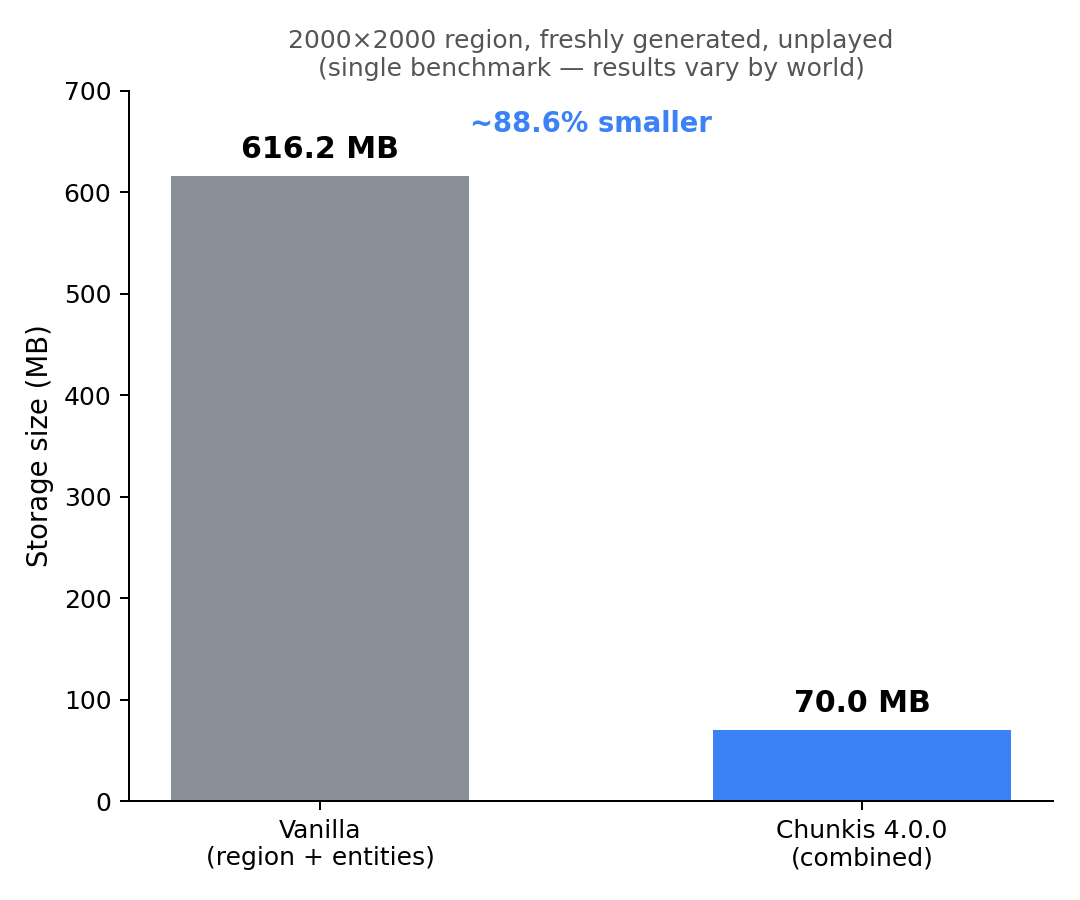
A freshly generated, unplayed 2000×2000 region (via Chunky) stored **603 MB** in vanilla's region files plus **13.2 MB** in its separate entities folder (**616.2 MB** combined), vs **70 MB** in Chunkis 4.0.0's combined format (region + entities together) — an **~88.6%** reduction. This is a single benchmark on an unplayed world; played worlds with more block entities and terrain variety will see different results. Community-submitted benchmarks on real, played worlds are welcome — [open an issue](https://github.com/Liparakis/Chunkis/issues) with your numbers.
## FAQ
### Will Chunkis improve FPS or TPS?
No general improvement is promised. Chunkis focuses on chunk storage, save/load behavior, and persistence safety.
### Is Chunkis always smaller than vanilla?
No — see [Storage impact](#storage-impact).
### Does Chunkis change gameplay?
It does not add gameplay content. It changes how chunk data is persisted and restored.
### Can I use it on my existing world?
Yes, via the migration path described in [Existing worlds](#existing-worlds). Back up first — see [Beta software](#important-beta-software).
### Does Chunkis work on dedicated servers?
Not tested. Chunkis is confirmed to work with singleplayer worlds and integrated (LAN-hosted) servers. Dedicated server support is untested — proceed with caution and back up first if you try it.
### Can I revert to Anvil automatically?
No. Restore your pre-Chunkis backup instead.
### What if I find a problem?
Please report it with your Minecraft version, Fabric versions, complete mod list, reproduction steps, `latest.log`, and crash report if available.
[Report a bug on GitHub](https://github.com/Liparakis/Chunkis/issues)
[Read the detailed documentation](https://github.com/Liparakis/Chunkis/wiki)
---
**License:** *[MIT]*