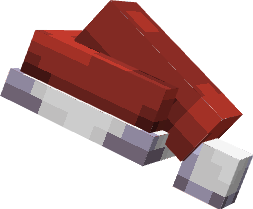
Описание
## A simple 3D Santa hat that replaces the carved pumpkin. Works through renaming on an anvil.
## ⚡ Quick Start (choose your version)
### 🔴 For **1.21 – 1.21.4 and 26.1 below** (1.20, 1.19, etc.)
👉 **Download mod:** `CIT Resewn` **or** `OptiFine`
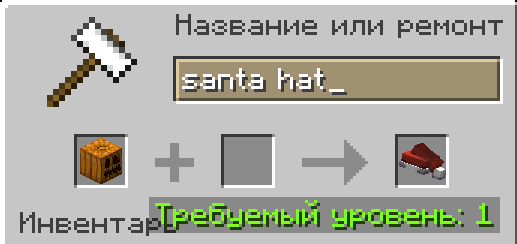
**In-game:** Rename the carved pumpkin on anvil → `Santa Hat`
## 📸 How it looks
### 🟢 For **1.21.5 – 1.21.11**
👉 **Download mod:** `Custom Item Model` (CIM)
**In-game:**
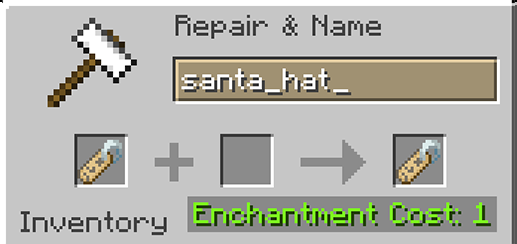
1. Rename a **Name Tag** on anvil → `santa_hat`
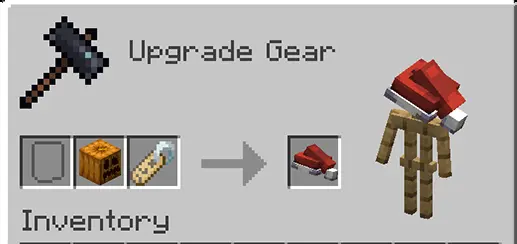
2. Combine **pumpkin + name tag** in the Smithing Table
## 📸 How it looks
🇷🇺 Русский: Тоже самое только на русском
## ⚡ Быстрый старт (выбери свою версию)
### 🔴 Для версий **1.21.4 и ниже** (1.20, 1.19 и т.д.)
👉 **Скачай мод:** `CIT Resewn` **или** `OptiFine`
**В игре:** Переименуй тыкву в наковальне → `Santa Hat`
### 🟢 Для версий **1.21.5 – 1.21.11**
👉 **Скачай мод:** `Custom Item Model` (CIM)
**В игре:**
1. Переименуй **именную бирку** в наковальне → `santa_hat`
2. Соедини **тыкву + бирку** в кузнечном столе
---
🇷🇺 Русский: Подробная инструкция и решение проблем (click to expand)
**❓ Почему не работает без мода?**
В ванильном Minecraft 1.21.11 нет возможности менять модель предмета по имени. Поэтому нужен один из модов выше.
**❓ Текстура чёрно-фиолетовая (шахматка)?**
Это проблема разделения атласов текстур в 1.21.11. Убедись, что в файле `red_hat.json` путь к текстуре ведёт в папку `item`, а не `block`:
}
---
#фаа
🇬🇧 English: instructions & troubleshooting (click to expand)
**❓ Why doesn't it work without a mod?**
Vanilla Minecraft 1.21.11 cannot change item models based on name. You need one of the mods above.
**❓ Texture is black/purple (checkerboard)?**
This is due to texture atlas separation in 1.21.11. Make sure in `red_hat.json` the texture path points to the `item` folder, not `block`:
}
------------

Текстурпак создан `[LuckyVIP]`.
*Спасибо за поддержку! Если понравилось — не забудьте поставить лайк на проекте.*