
Описание
# ChatImage
✨ Show image in Minecraft chat ✨
📖Docs
·
🐛Submit Suggestion/Bug
.
📃Chinese
.
⬇️CurseForge
·
⬇️Modrinth
## Quick Start
Enter `[[CICode,url=https://blog.kituin.fun/img/bg.png,name=Image]]` in the chat line
> 1.2.0 Could Transfer Http-Url To Image Directly
than it will transfer to image
Support display local image (need ServerSide Mod) and GIF
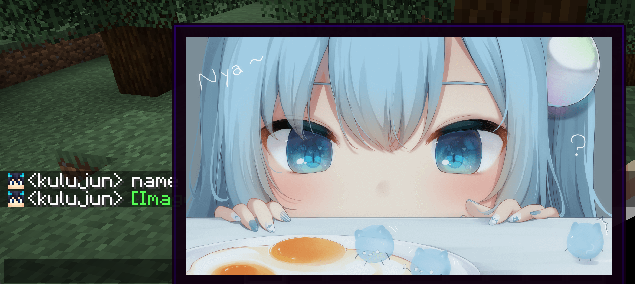
(image from [甘城なつき](https://www.pixiv.net/users/3036679))
## Compatibility
- ✅[Chat Heads (Mod)](https://modrinth.com/mod/chat-heads)
- ✅[McBot🔗 (Mod)](https://modrinth.com/mod/mcbot)
- ✅[ChatBridge - CQCode](https://github.com/TISUnion/ChatBridge)
- ✅[NoChatReports](https://modrinth.com/mod/no-chat-reports)
## Support input method
- Manual Input `CICode`
- Send `CICode` With Command
- Drag Image Into Chat Screen
## Specification
It use `ChatImageCode` (`[[CICode,=]]`)
| Arg | Require | Type | Remark |
|------|---------|---------|-------------------------------------------------------|
| url | true | String | Image address (please use `file:///` for local files) |
| nsfw | false | boolean | Is it an nsfw image |
| name | false | String | The name displayed in the chat |
| pre | false | String | prefix(default:`[`)(can't be`,`) |
| suf | false | String | suffix(default:`]`)(can't be`,`) |
`nsfw` will determine whether to display the image directly
if it is set to `true`, you need to click to view it (or open the nsfw mode in the configuration file to view it directly)
### Example:
- Web Image `[[CICode,url=,name=Image]]`
- example: `[CICode,url=https://blog.kituin.fun/img/bg.png,name=Image]]`
- Local Image `[[CICode,url=file:///,name=Image]]`
- example: `[[CICode,url=file:///C:\blog\kituin\fun\img\bg.png,name=Image]]`
## Use Command to send [[CICode]]
`/chatimage send `
Send CICode with display name and url
`/chatimage url `
Send CICode with url (use default display name)
## Config Settings
- manual configure
- The configuration file is located at: `.minecraft/conifg/fabric/chatimageconfig.json`
- After modifying the configuration file, please use `/chatimage reload` to reload the configuration file
- Use key binding (default `End` key)
- Use [Mod Menu](https://github.com/TerraformersMC/ModMenu), click the configuration button to configure
## Support Image Type
- png
- jpg/jpeg
- jfif
- gif
- ico
- bmp