
Описание
**ENGLISH**
Do you love exploring Minecraft but are you tired of dying at night or hiding in any hole? Then this mod is for you!
With this incredible addition, you can explore without limits.
Forget about compatibility concerns with other well-known mods, since this one does not present any conflict. In addition, you can build your shelter just by throwing a capsule to the ground. Isn't it great? And that's not all!
These capsules not only offer you a safe place to rest, but they also contain valuable resources within each structure. And best of all, there are different levels of capsules available. From the basic one, which provides you with a simple shelter to spend the night and quickly continue your adventure, to more advanced versions that offer additional comforts.
How can you improve them? It's simple, you just need to surround the basic capsules with blocks from the higher category, following the Minecraft ore pattern. That easy!
But that's not all this mod has to offer. You will also find new ores of two different materials essential to creating the basic capsule, both of which are scattered throughout the world in abundance.
And that's not all, a complete set of blocks, weapons, tools and full armor is also included! How to get them? Simply use the traditional method for each case, using the appropriate item!
In addition, the inhabitants of the world will be able to acquire a new profession and sell the new items. Get ready for a completely renewed gaming experience with this exciting mod!
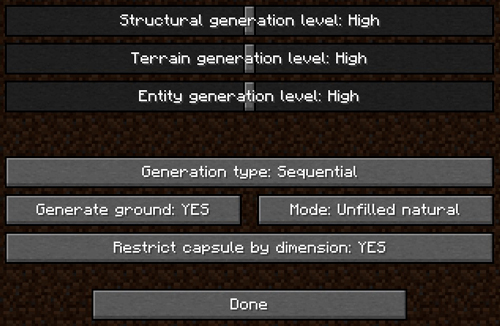
You also have a configuration screen available to adjust the parameters, improving the experience to your liking.
**¡Currently it has more than 40 structures available!**
**In client mode it is compatible with Xareo's WorldMap/Minimap and creates a point/mark where the structure is created. In server mode it is not incompatible but does not perform this action at the moment.**
-------------------------------------
**ADVANCED MODE**
I have customized a capsule where you can add your own structures and use them in the world. To do this, you need to follow a series of simple steps.
The first thing you will need is your structure in NBT format. This can be obtained using the structural blocks already offered by Minecraft. There are hundreds of tutorials on YouTube that teach you how to do this.
Once you have the NBT file, you need to locate the "structures" folder that is generated when the mod is first launched or create it yourself in the Minecraft installation folder, by default "C:\Users\YOUR WINDOWS USERNAME\AppData\Roaming\.minecraft", and you must paste the NBT file inside the folder.
The final step is to create a JSON file. For this, you can use the example provided here:
View JSON
{
"capsuleType": "PLATINUM",
"dimension": {
"namespace": "minecraft",
"path": "overworld"
},
"structure": {
"name": "testchest",
"properties": []
},
"parts": []
}
You only need to modify a few things:
- In "structure.name": in the example, it contains "testchest", it must match the name of the NBT file you obtained, omitting the file extension ("omit the .nbt").
- In "structure.properties": it is optional. You can set some properties that will be established when the structure is built in the world.
- In "parts": it is optional, only necessary if the structure you are going to add consists of several parts. Constructions in Minecraft are limited to a cube of 48 x 48 x 48 blocks, so only what is within that limit will be saved. This option allows you to chain as many structures as necessary, making it possible to build gigantic structures.
With this, you can now use that structure with the PLATINUM capsule, which is the only one that allows this feature.
Explanation of parameters and options:
View JSON Explanation
{
"capsuleType": "PLATINUM",