
Описание
# BlockTuner (Forge Mod)
## About
This is the forge version of BlockTuner.
If you want a fabric version, please visit [this page](https://modrinth.com/mod/blocktuner).
If you want the data pack for older versions of Minecraft, please visit [this page](https://github.com/xwjcool123/blocktuner).
## Instructions
### Installation
Put this mod in your `mods` folder. You also need to install [Forge API](https://files.minecraftforge.net/net/minecraftforge/forge/) if you haven't installed it yet.
Server need to install the mod for it working.
### How to Use BlockTuner
`Ctrl` + Right clock on a note block to open up tuning UI. Placing a note block while holding `Ctrl` also opens the UI automatically.
`Ctrl` to show the note of the note block at crosshair.
`Ctrl` + middle click on note blocks to pick up readily tuned note blocks.
Right click note blocks with blaze rods to play with right clicks without tuning.
### Tuning UI
Top-right corner (from left to right)
*  Play mode - toggle whether the GUI will turn off immediately upon clicking a note on the piano keyboard.
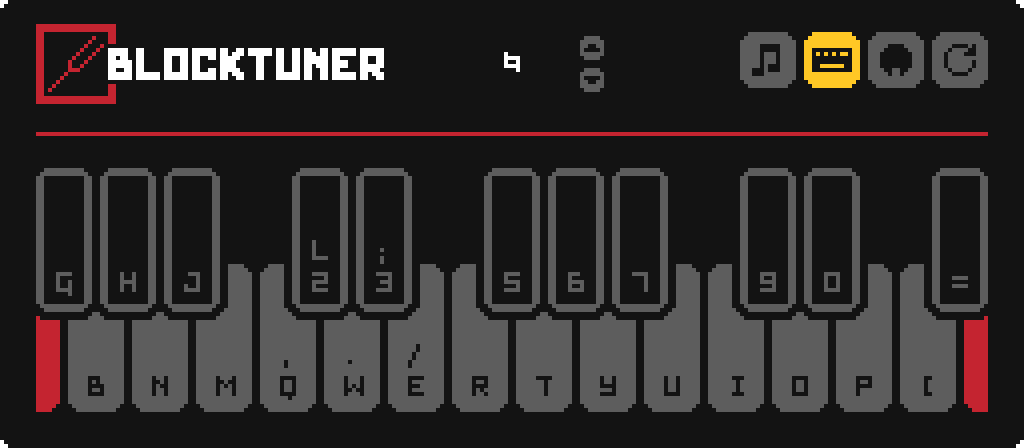
*  Typing keyboard to piano keyboard - toggle whether you want to play the piano keyboard using your computer keyboard.
*  MIDI Device - Click to cycle through available MIDI input devices. The icon shows red if the device is currently unavailable. This usually means it is being used by another program.
### Keyboard Mapping:
## Credits
### Original author
* Fabric version original author - [xwjcool](https://github.com/xwjcool123)
### Localization
* Russian - [Felix14-v2](https://github.com/Felix14-v2) (Currently outdated)
* Japanese - [misaka10843](https://github.com/misaka10843) & [hakkaku](https://note.com/hakukak/)