
Описание

# Why Bkups?
- Comes with a GUI that will help you through out the mod
- Four different types of backups
- Whopper System (switch between worlds in-game)
- Many ways to protect your world or server
- Lots of option to have your own personal customization
- Settings Menu
- No cheats on needed
- Install and Play!
# Backup Manager (GUI)


## Types of Backups

- **Manual:** this backup is made by the player manually
- **Auto:** this backup is made automatically according to the settings you've set
- **Exit:** this backup is made whenever you leave the world you're in
- **Legacy:** this type of backups are the ones that are created with the minecraft settings
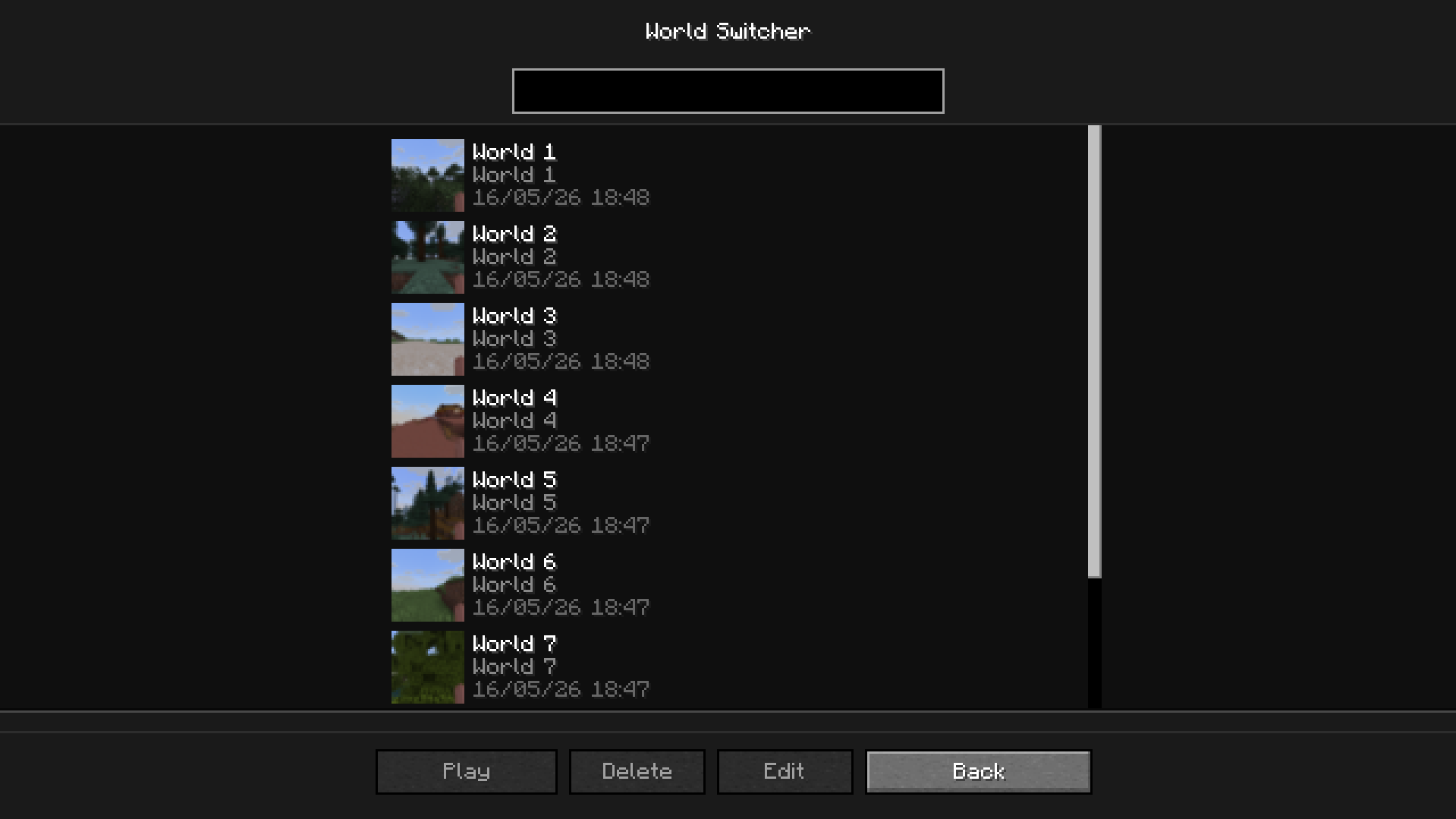
## Whopper System
This system lets you switch worlds without having to go back to the main menu
## The Trash
To access the trash, click on the trash button in Backup Manager. All your deleted backups will appear here **if you have the trash enabled** (`/bkup trash on`)

With the trash, you can **permanently delete** the backup or **recover** it
## Settings Menu
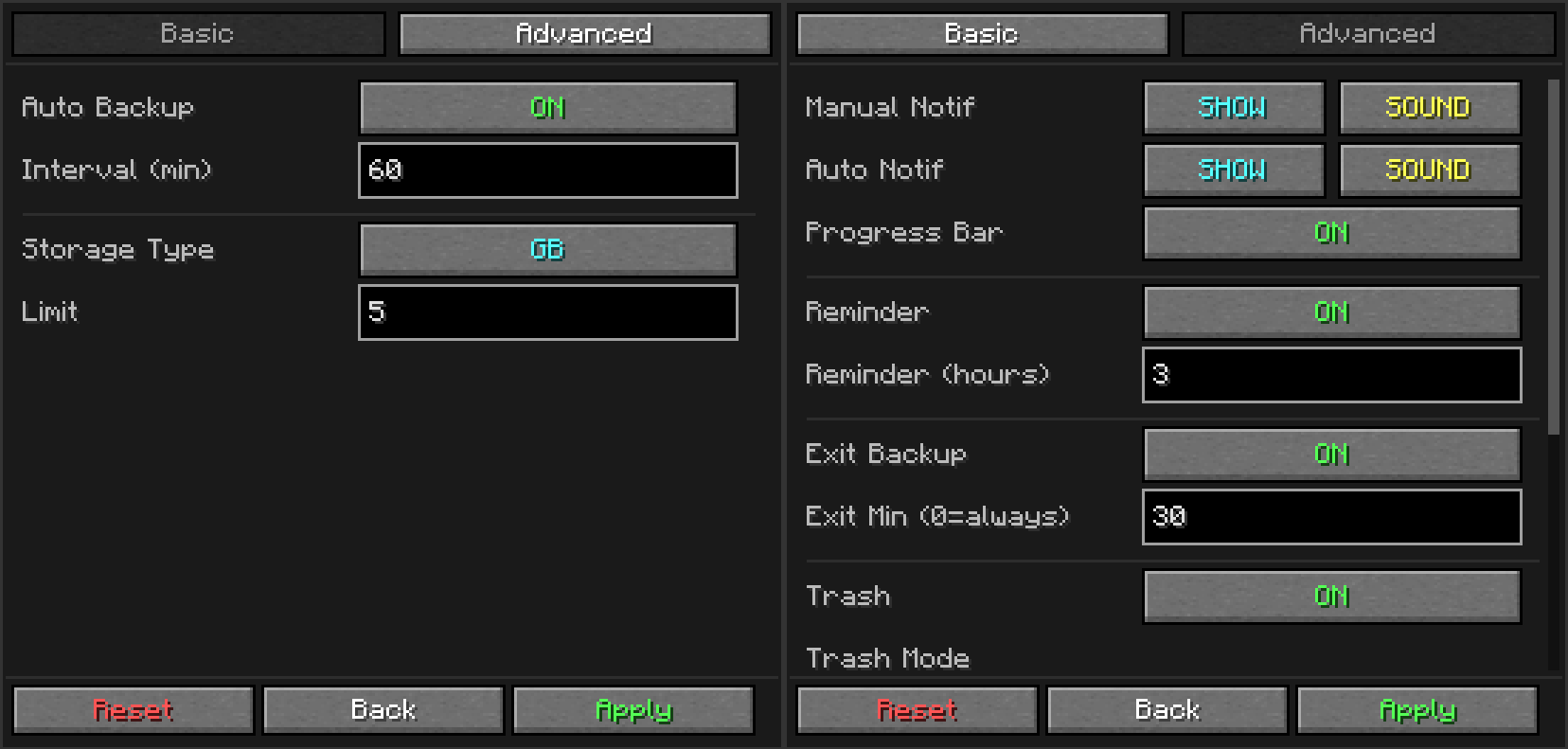
A settings menu so you don't have to use commands
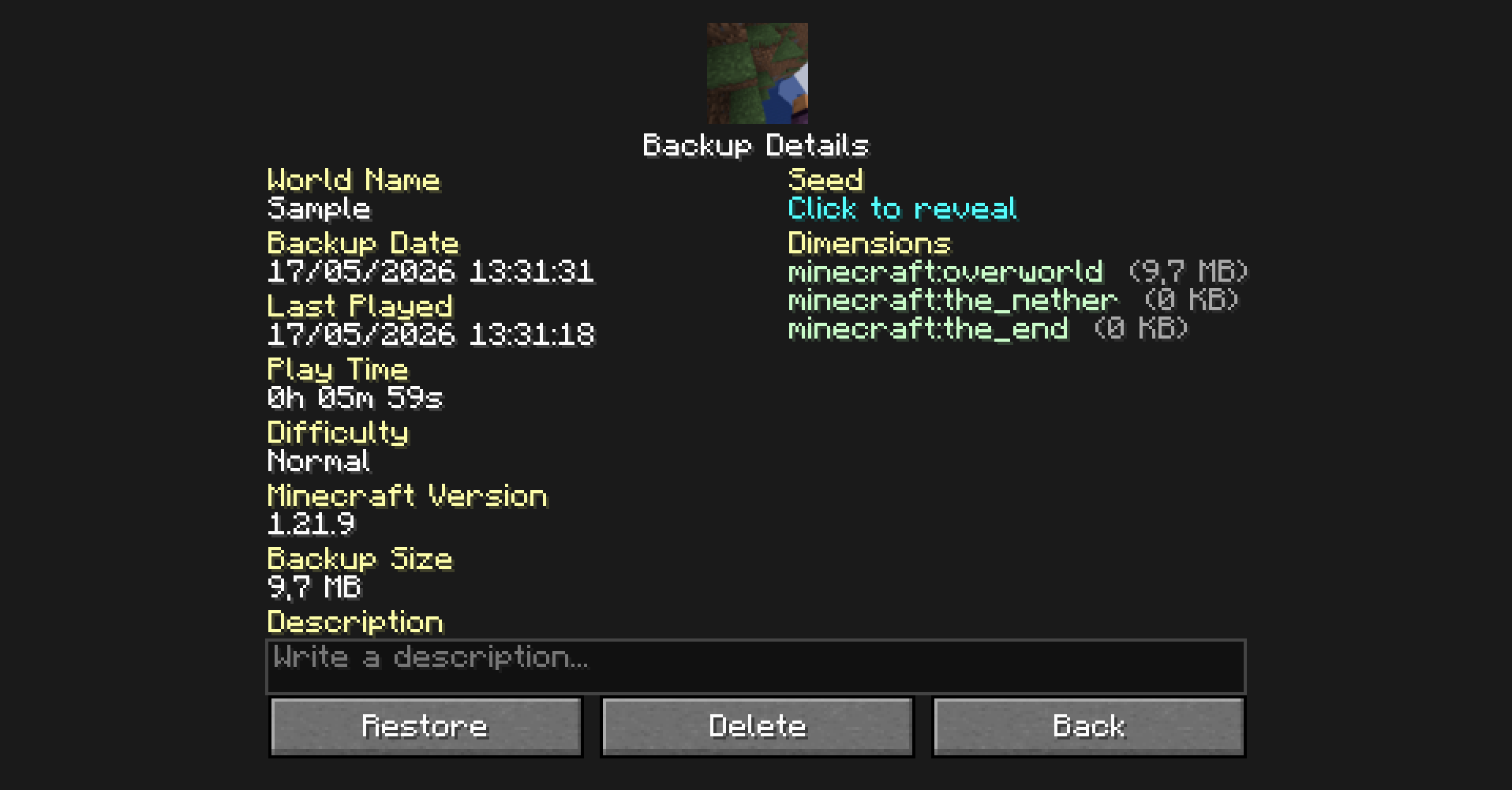
## Detailed Backup
To access this screen, double-click on a backup in the backup manager
## Favorites
You can add your backups to your favorites. The advantages are:
- Your backup will not be deleted by auto-cleanup
- Better visibility of your backups
## Tree Structure
The tree structure works to view backups easily
# Commands
- `/bk [custom_name]` If you want to make a manual backup (`[custom_name]` it's used to name the backup)
- `/bkup ` To do a lot of option to customization, **more about it bellow**
Subcommands
| Command | Description |
| :--- | :--- |
| `/bkup auto ` | Toggles automatic backups |
| `/bkup storage ` | Sets retention limit by `gb` or `backups` |
| `/bkup delete ` | Deletes a backup (or moves to trash if enabled) |
| `/bkup status` | Shows current settings and disk usage |
| `/bkup help [command]` | Displays the command list in-game |
| `/bkup advanced exit ` | Toggles backup when stopping the server or leaving the world |
| `/bkup advanced trash ` | Manages trash system (`on`, `off`, `clear`, `recover`) |
| `/bkup advanced compression ` | Sets compression to `fast` (larger) or `heavy` (smaller) |
| `/bkup advanced path ` | Changes the backup folder location |
| `/bkup advanced config ` | Toggles chat notifications, sounds, and progress bar |
| `/bkup advanced admin ` | Grants backup permissions to non-OP players |
| `/bkup advanced unadmin ` | Removes backup permissions from non-OP players |
Detailed
| Command | Description |
| :--- | :--- |
| **Manual Backups** | |
| `/bk` | Creates an instant backup with the world folder name. |
| `/bk [custom_name]` | Creates a backup with a specific name (e.g., `/bk BossFight`). |
| **Help** | |
| `/bkup help` | Shows the main help menu. |
| `/bkup help ` | Shows detailed help for a topic: `bk`, `auto`, `storage`, `status`, `delete`, `advanced`. |
| **Storage Limits** | |
| `/bkup storage gb` | Sets limit by size (e.g., `5 gb`). Deletes oldest files when full. |
| `/bkup storage backups` | Sets limit by quantity (e.g., `20 backups`). |
| **Delete** | |
| `/bkup delete ` | Deletes a backup. Moves it to Trash if enabled. |
| **Info** | |
| `/bkup status` | Prints current config, disk usage, and stats to chat. |
| **Automation** | |
| `/bkup auto on` | Enables auto-backups every 60 minutes. |
| `/bkup auto on ` | Enables auto-backups with a custom interval (e.g., `30`). |
| `/bkup auto off` | Disables automatic backups completely. |
| `/bkup advanced exit on` | Enables backup when stopping the server (always). |
| `/bkup advanced exit on ` | Enables exit backup only if session > `` minutes. |
| `/bkup advanced exit off` | Disables backups on server stop. |
| **Trash System** | |
| `/bkup advanced trash on` | Enables Trash. Deleted files stay for 24 hours. |
| `/bkup advanced trash on hours` | Custom Trash: Files expire after `` hours. |
| `/bkup advanced trash on backups` | Custom Trash: Keeps a batch of `` deleted files. |
| `/bkup advanced trash on backups accumulated` | Custom Trash: Rolling buffer of `` deleted files. |
| `/bkup advanced trash off` | Disables Trash. Files are deleted permanently. |
| `/bkup advanced trash clear` | Instantly empties the trash folder. |
| `/bkup advanced trash recover ` | Restores a deleted file from Trash to its original folder. |
| **Technical Settings** | |
| `/bkup advanced compression fast` | **Level 1**: Fastest backup speed, larger file size. |
| `/bkup advanced compression heavy` | **Level 9**: Best compression, smaller file size (slower). |
| `/bkup advanced path ` | Changes backup folder location (e.g., `D:/Backups`). |
| `/bkup advanced path reset` | Resets storage folder to default (`/bkups`). |
| **Notifications & UI** | |
| `/bkup advanced config noti on` | Reminds you to backup if you haven't in 3 hours. |
| `/bkup advanced config noti on ` | Sets custom reminder interval. |
| `/bkup advanced config noti off` | Disables "long session" warnings. |
| `/bkup advanced config progress show` | Shows the boss-bar progress on top of screen. |
| `/bkup advanced config progress hide` | Hides the progress bar. |
| `/bkup advanced config ` | Sets chat visibility and sound for a backup category. `all` applies to both manual and auto. |
| **Admin** | |
| `/bkup advanced admin ` | Allows a player to use backup commands without OP. |
| `/bkup advanced unadmin ` | Revokes backup privileges. |
# How does Bkups work?
## How are folders created
Bkups creates a folder in `.minecraft\bkups` if any bkup is created (excluding legacy ones, they are stored in `.minecraft\backups`, wich is the vanilla minecraft folder)
Following this logic, if only one backup has been created in `.minecraft\bkups\manual` it will only be create in that specific folder
This means that it is a local backup system, which means that all related files are on your PC
## How does it work online?
When two or more people are connected to your server with Bkups installed:
If a player **is not an admin**:
- When a backup is done, the message will appear in the chat, but the path will not
- They will also not be able to use the commands or buttons that appear in the pause menu
If a player **is an admin** (`/bkup admin `):
- They will be able to see the path
- Use all commands and buttons
- If they make a backup, it will be stored in the local folder of the server owner
## Backups to World
When a backup is created, bkup compress the world in a .zip, this .zip is later decompress after restaured
These .zip files are complete compressed copies of your world, so no data is lost
The command `/bkup compression ` changes the way in wich the folders .zip are stored
# Road Map
- Continue updating the mod with unique and useful ideas
- Fix [known bugs](https://github.com/BlanqKy/bkups/issues)
# Credits
- Blanq_Ky: Mod and versions development, project lead
- TrasTick: Responsible for descriptions on CurseForge and Modrinth pages