
Описание
# What is Perimeter?
Perimeter is a simple mod designed primarily to create perimeters for technical farms that require them.
** This is NOT a Quarry-style mod for automatically collecting resources**. Its purpose is to save you the time and effort of building TNT flying machines, which can be tedious to set up and may cause performance issues on low-end computers.
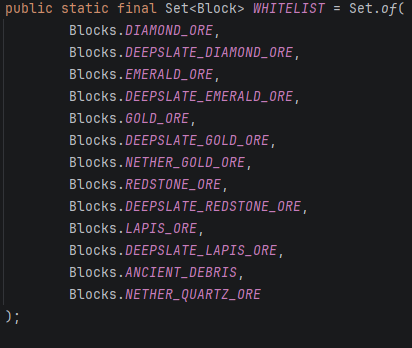
However, a small selection of blocks will be stored automatically when mined. Only the blocks included in the whitelist can be retrieved.
# How to use it
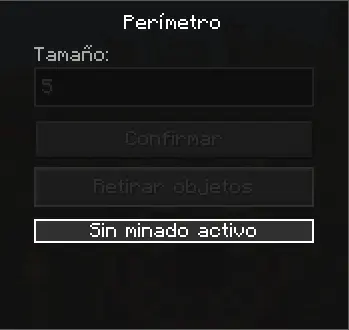
Open the block's GUI by right-clicking it.
First, enter the size of the perimeter. For example:
- Entering 5 will create a 5×5 perimeter.
- Entering 257 will create a 257×257 perimeter.
Then, press "Confirmar" to start excavating the perimeter.
The "Retirar Objetos" button allows you to collect all stored blocks that are included in the whitelist.
**Important**: If you don't want to collect the stored items, simply break the block. Destroying the block will permanently delete all stored contents.
# Crafting
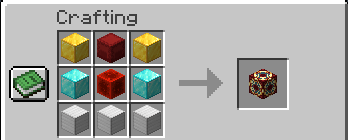
The crafting recipe is simple.
1 Red Shulker Box
1 Redstone Block
2 Gold Blocks
2 Diamond Blocks
3 Iron Blocks
# Creative Mode
In Creative Mode, the block can be obtained with the following command:
/give @a perimeter:perimeter
**The block can only be obtained through this command or by crafting it.**
