
Описание
[My Website](https://chylex.com/) | [Twitter](https://twitter.com/chylexmc) | [Patreon](http://www.patreon.com/chylex) | [Ko-Fi](https://ko-fi.com/chylex)
## Better Controls
[Better Controls](https://www.curseforge.com/minecraft/mc-mods/better-controls) is a new client-only mod that includes many more toggle keybinds and options than Better Sprinting. It's available for Forge and Fabric.
While not a direct replacement, I intend to support [Better Controls](https://www.curseforge.com/minecraft/mc-mods/better-controls) in the future and eventually stop updating Better Sprinting.
## Features
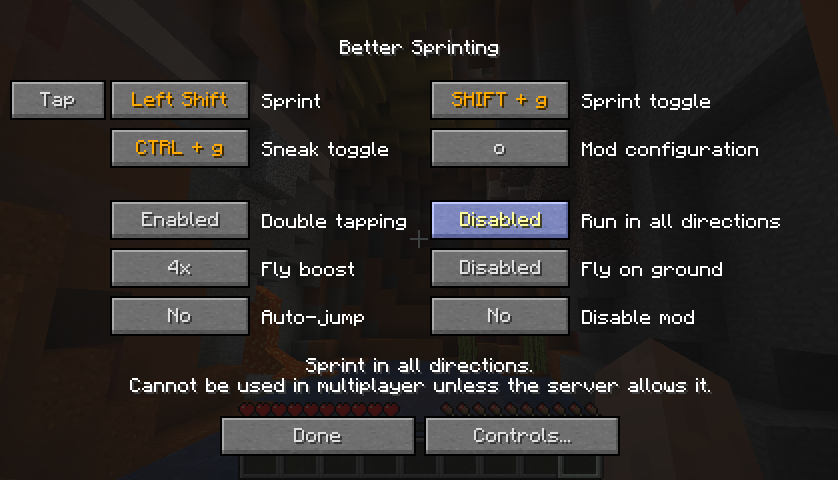
- Sprint key can be set to *Tap* or *Hold* mode
- Toggle keys for sprinting and sneaking
- Option to turn off double tapping W
- Option to sprint in all directions in singleplayer
- Configurable speed boost when flying in creative/spectator mode
- Option to continue flying when touching the ground
- To configure the mod, click the Better Sprinting button in Controls, or press the configuration key in-game (default: 'O')
- To configure update notifications in Minecraft 1.13/1.14, open the *config* folder (same location as the *mods* folder), and edit the *bettersprinting-client.toml* file in a text editor
### Tips
- While sprinting, press the Sprint key again to stop
- Opening a GUI while toggle sneaking makes you automatically stand up until you close it
- LAN multiplayer allows sprinting in all directions if the host has the mod installed
### Servers
Use the **/bettersprinting** admin command to enable special features, or automatically disable the mod for players on the server. If you don't have a Forge server, you can read about the [server protocol](https://raw.githubusercontent.com/chylex/Better-Sprinting/master/src/main/java/chylex/bettersprinting/server/ServerNetwork.java) to implement a custom plugin and benefit from the features.
## Installation Guide
### Client
1. Download and run [Forge installer](https://files.minecraftforge.net/)
2. Select **Install client**, and click OK
3. Start the **Minecraft Launcher**
4. Visit the **Installations** tab, and click the **Forge** profile
5. Open the folder shown in **Game directory**, and create a folder named **mods** inside it
6. [Download Better Sprinting](https://minecraft.curseforge.com/projects/better-sprinting/files) and place the file into the **mods** folder
### Server
1. Download and run [Forge installer](https://files.minecraftforge.net/)
2. Select **Install server**, don't forget to **change the installation folder**, and click OK
3. Create a folder named **mods** in the server folder
4. [Download Better Sprinting](https://minecraft.curseforge.com/projects/better-sprinting/files) and place the file into the **mods** folder
5. Start the server by running **forge-.jar**
### Old Versions
- Old releases for Minecraft versions between 1.2.5 - 1.8 are available in the [archive](http://archive.chylex.com/files/mods/Better%20Sprinting/)
- If you experience a mod conflict, try installing [PlayerAPI Core](https://minecraft.curseforge.com/projects/player-api/files) (only applies to versions 2.0.3 and older)
- In 1.7.10, vanilla clients cannot join Forge servers; if you install the mod on a 1.7.10 server, your users will need to install Forge (the mod itself is not required)
## License / Modpacks
Official files released after 12 June 2019 are licensed under [MPL-2.0](https://github.com/chylex/Better-Sprinting/blob/master/LICENSE), which allows you to use them in modpacks.
To verify, open the *.jar* file in an archive program, view the included *LICENSE* file, and ensure the first line reads *Mozilla Public License Version 2.0*.
If the *LICENSE* file is missing, you must follow Hardcore Ender Expansion 1's [License and Modpack Guidelines](http://hee.chylex.com/license).