
Описание
**This fully client side mod adds a command that allows you to communicate with ChatGPT while playing Minecraft**. It also works while you are playing on a Server. With the added ```/ask``` command, you can ask any question you want and receive an answer in the Minecraft chat:

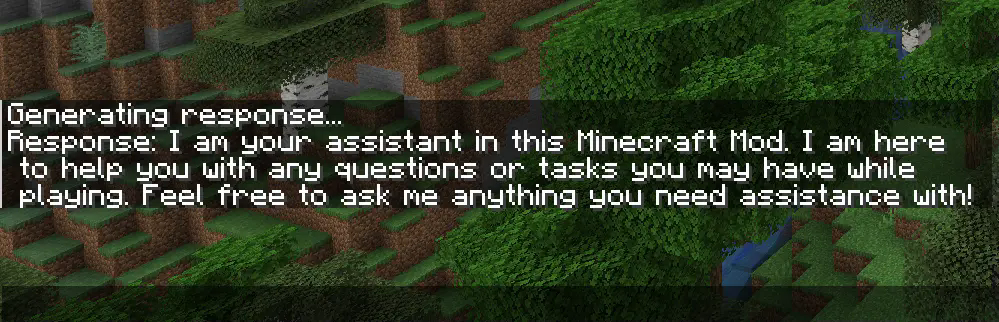
With the newest Version, you can now also **upload pictures** to ChatGPT. When you take a screenshot, you can see a button called "Send to OpenAI". Now you type in your question an hit enter. Make sure you use a model wich can process pictures like ```gpt-4o-mini``` if you have used the mod before the latest version, you have to change your model from ```gpt-3.5-turbo``` to ```gpt-4o-mini```.


### Setup Guide
___
**To use the mod**, you first need to type ```/config``` without any arguments to open the config screen. There you have to paste your OpenAI API Key and hit save. You can also use ```/config OPENAI_API_KEY ``` to connect your client to the OpenAI API. Your API key is obtainable [here](https://platform.openai.com/settings/organization/api-keys).

Make sure you have some **funds in your OpenAI account**. The default model (```gpt-4o-mini```) doesn’t really require any money, but you still need a minimum balance of $0.01 to use the API. You can add funds to your account [here](https://platform.openai.com/settings/organization/billing/overview)
### Configuration
___
If you want to use a model other than ```gpt-4o-mini``` (e.g., ```gpt-4o```), you can configure it by changing the name of the model in the config screen or you type ```/config AI_MODEL ```. Keep in mind that better models are also more expensive. You can view all available models [here](https://platform.openai.com/settings/organization/limits).

To change the role of ChatGPT, you have to change the sentance in the role field at the config screen or you type ```/config ROLE_OF_THE_AI ```
. The default role is:
_"You are an assistant implemented in a Minecraft mod to help players. You provide short answers with a maximum length of 4 short sentences."_
