
Описание

---
*A physically-grounded weather overhaul for Minecraft: 28 weather types across all three dimensions, a real atmospheric simulation, and a full progression of craftable weather instruments.*



---
## What is Advanced Weather?
Vanilla Minecraft has three weather states: clear, rain, and thunder. Advanced Weather replaces that with a living atmosphere. Air pressure, temperature, dew point and wind are simulated continuously and drive **28 distinct weather types**, each with its own particles, fog, sky, sound and gameplay effects. Weather doesn't teleport between states: it *transitions* based on the current atmospheric conditions, and you can actually **read, predict and archive** it using an in-world progression of scientific instruments you build yourself.
You can let it run procedurally, sync it to **real-world weather** at any location on Earth, or take full manual control.
---
## Features
### 🌍 A real atmospheric simulation
Runs a continuous model:
- **Air pressure** driven by layered simplex noise, with realistic velocity, damping and gusting.
- **Temperature** derived from the weather type, the solar day/night cycle, adiabatic pressure effects and (optionally) the current season.
- **Humidity** computed from temperature and dew point using the Magnus relative-humidity formula.
- **Wind** with base intensity per weather type, pressure-gradient contribution and randomized gusts.
- **Probabilistic transitions** - the next weather is chosen from a transition graph weighted by live atmospheric conditions, so a falling barometer genuinely means a storm is coming.
- **Forecasting** - the engine projects the atmosphere forward in time to predict the *next* weather with a confidence score.
- **Clouds** - a custom cloud renderer that reacts to the weather and the humidity/wind speed and direction.
Everything is per-dimension and saved with the world.
---
### 🌦️ 28 weather types across three dimensions
## **Overworld (17):**
#### Clear · Sunny · Cloudy · Overcast · Mist · Fog · Dense Fog · Drizzle · Light Rain · Heavy Rain · Freezing Rain · Thunderstorm · Snow · Blizzard · Hail · Windy · Sandstorm
## **Nether (6):**
#### Nether Clear · Ash Storm · Brimstone Storm · Lava Rain · Netherstorm · Hellfire
## **The End (5):**
#### End Clear · End Mist · Void Storm · Chorus Gale · Enderstorm
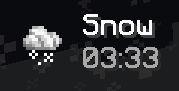
A configurable HUD shows which weather type is active, along with the time of day (can be disabled in the config):
### ✨ Atmospheric effects
Each weather brings its own hand-tuned visuals and audio:
- Volumetric **wind lines** and directional wind sound that scale with intensity and gusts.
- Weather-specific particles: blizzard flakes, sand, ash, ground fog, freezing splashes, hail, ember/void particles.
- **Rainbows** that can spawn after rain clears or during drizzle, **heat shimmer** in extreme heat, **water and lava ripples**, wind-blown **tumbleweeds** and drifting **chorus plants**.
- Dynamic **fog, sky, cloud, sun, star and lightning** rendering that reacts to the current weather.
### ⚡ Weather that affects gameplay
- **Hail** can damage crops, hurt exposed entities and break glass (each toggleable).
- **Heavy rain** slows crop growth.
- **Blizzards** deepen snow accumulation.
- Mobs **seek shelter** from dangerous weather.
- Lightning behaviour is reworked for storms.
*(All gameplay impacts are individually configurable.)*
### 🔬 Instruments & progression
Advanced Weather is also a **tech-progression mod**. You can't just read the weather, you have to build the tools.
- **New ores & materials:** Cinnabar (→ washed dust → distilled into **Mercury**) and Bauxite (→ Alumina → carbothermic reduction → **Aluminum**, ingots, nuggets and sheets). A **Hammer** lets you crush and press by hand (or use Create's crushing wheels).
- **Four core instruments**, each built from a calibrated heart: **Thermometer** (mercury vial), **Barometer** (spring), **Hygrometer** (sensitive fiber), **Anemometer** (cup rotor).
- **Calibration Bench** and **Calibration Tool** - components must be calibrated before assembly, and sensors linked to stations.
- **Portable** versions of every instrument for readings on the move.
### 📟 The weather station network
Build a working meteorological station:
- **Weather Station** - displays live readings; link sensors to unlock each measurement. Right-click with paper to **print a Weather Report**.
- **Sensors** (Thermometer / Barometer / Hygrometer / Anemometer) with **realistic placement rules** - a thermometer must be sheltered from direct sky with airflow; an anemometer needs open sky and clear sides; etc. Bad placement gives bad readings.
- **Weather Archive** - store reports and almanacs; it studies your measurement history to **forecast the next weather**, rejecting duplicates and reports older than its memory.
- **Auto-Sampler** - automatically feeds station data into an archive at a configurable interval.
- **Weather Detector** - emits redstone based on weather (rain, snow, storm, thunderstorm, hail, or an analog 0–15 wind signal).
- **Weather Almanac** - a portable record of archived trends.
### 🌐 Real-world weather mode *(opt-in)*
Enable it in the config and Advanced Weather will pull **live weather for any latitude/longitude on Earth** (via Open-Meteo) and reverse-geocode the place name (via OpenStreetMap Nominatim), mapping real conditions onto Minecraft's weather system.
> **Privacy note:** this mode is **disabled by default**. When enabled, the coordinates you set in the config are sent to Open-Meteo and OpenStreetMap Nominatim to fetch weather and a location name. No data leaves your game unless you turn this on.
---
## Configuration
Config files are generated in your `config/` folder (`advancedweather-common.json` and the client config). Highlights:
- **Weather toggles** - enable/disable any weather type per dimension (Overworld, Nether, End).
- **Gameplay** - `hailDamageCrops`, `hailDamageEntities`, `hailBreakGlass`, `heavyRainSlowCrops`.
- **Instruments** - `stationRequiresSensors`, `sensorLinkMaxDistance`.
- **Archive/forecasting** - record capacity, minimum records for a forecast, confidence curve, forecast horizon, data-aging thresholds.
- **Real weather** - `realWeatherEnabled`, `latitude`, `longitude`, `syncIntervalMinutes`, `realWeatherOverridesCommands`.
- **Create compat** - `enableCreateWindmillCompat`, `windmillWindThreshold`, `windmillDirectionAffectsOutput`, `windmillSpeedScaleFactor`.
A **YACL config screen** is provided for in-game editing.
---
## Compatibility
| Mod | Type | What it adds |
|-------------------------------------|-------------------|----------------------------------------------------------------------------------|
| **YetAnotherConfigLib (YACL)** | Required (client) | In-game config screen |
| **Create** | Optional | Windmills react to real wind (speed & direction); weather data on Display Boards |
| **Create: Aeronautics / Simulated** | Optional | Wind pushes simulated contraptions |
| **Serene Seasons** | Optional | Season-aware weather types, temperature & dew point |
| **JEI** | Optional (client) | Calibration Bench recipes in the recipe viewer |
| **Iris Shaders** | Incompatible | Some shaders may be incompatible with the way that AW render its fog |
---
## Requirements
- **Minecraft** 1.21.1
- **NeoForge** 21.1.230+
- **YetAnotherConfigLib** 3.6+
---
## License
Released under the **MIT License**. See [LICENSE](LICENSE.txt).
## Third-Party Software Notices :
This software embeds the following third-party libraries via JarJar:
1. **[Registrate](https://github.com/tterrag1098/Registrate)**
- Authors: tterrag, Create Mod Team
- License: [MPL-2.0 License](https://github.com/tterrag1098/Registrate?tab=MPL-2.0-1-ov-file)
2. **[Veil](https://github.com/FoundryMC/Veil)**
- Authors: Foundry Systems
- License: [GNU Lesser General Public License v3.0 (LGPL-3.0)](https://github.com/FoundryMC/Veil?tab=LGPL-3.0-1-ov-file)
3. **[Ponder](https://github.com/Creators-of-Create/Ponder)**
- Authors: Create Mod Team
- License: [MIT License](https://github.com/Creators-of-Create/Ponder?tab=MIT-1-ov-file)
4. **[Flywheel](https://github.com/Engine-Room/Flywheel)**
- Authors: Create Mod Team
- License: [MIT License](https://github.com/Engine-Room/Flywheel?tab=MIT-1-ov-file)
The respective licenses and copyright notices for these libraries apply.
See included files for full license texts where applicable.
## Credits
Created by **Antopfr**.
Real-world weather data © [Open-Meteo](https://open-meteo.com/). Location names © [OpenStreetMap contributors](https://www.openstreetmap.org/copyright) via Nominatim.