
Описание

# FAQ
- 1.19.2 documentation can be found [here](https://github.com/SiverDX/additional_enchantments/blob/1.19.2/README.md)
- 1.20.1 documentation can be found [here](https://github.com/SiverDX/additional_enchantments/blob/1.20.1/README.md)
Further enchantments are planned
- Hunter
- Confusion (maybe)
- Voiding (maybe)
- Straight Shot (maybe)
- ...?
General Technical Definitions
New trigger point for enchantment effects
- `equipment_change_trigger`: When changing any equipped item
- Most enchantments in this mod apply data attachments to the target entity, which handle the logic
- Meaning it is unlikely that they work well with other trigger points for enchantments
New loot item conditions
- `entity_type`
- `match_item_entity`
Entity Type
Allows broader checks for entities
EntityType (LootItemCondition)
```js
{
"type": Type, // [Mandatory] ||
"entity": EntityTarget // [Mandatory] || Which entity of the loot context is checked
}
```
Type
- `living_entity`: Entities that extend the `LivingEntity` class (i.e., no `Minecarts`, `Items` etc.)
- `enemy`: Entities that implement the `Enemy` interface or are of the mob category `MONSTER`
- `tamed`: Entities that extend the `TamableAnimal` class and are tamed
- `animal`: Entities that extend the `Animal` class
- `item`: Entities that extend the `ItemEntity` class
- `experience_orb`: Entities that extend the `ExperienceOrb` class
EntityTarget
- `this`
- `attacker`
- `direct_attacker`
- `attacking_player`
Match Item Entity
Allows using `ItemPredicates` to check the item of the `Item Entity`
```js
{
"predicate": ItemPredicate, // [Optional] || To match the item of the item entity, all are valid if left empty
"target": EntityTarget // [Optional] || Which entity of the loot context is checked (Default: 'this')
}
```
Additional explanations
- ItemPredicate: Check the `predicate` definition of [match_tool](https://minecraft.wiki/w/Predicate)
EntityTarget
- `this`
- `attacker`
- `direct_attacker`
- `attacking_player`
# Enchantments
## Fluid Vision
- Improves visibility through fluids from above
- Improves visibility while within the fluids
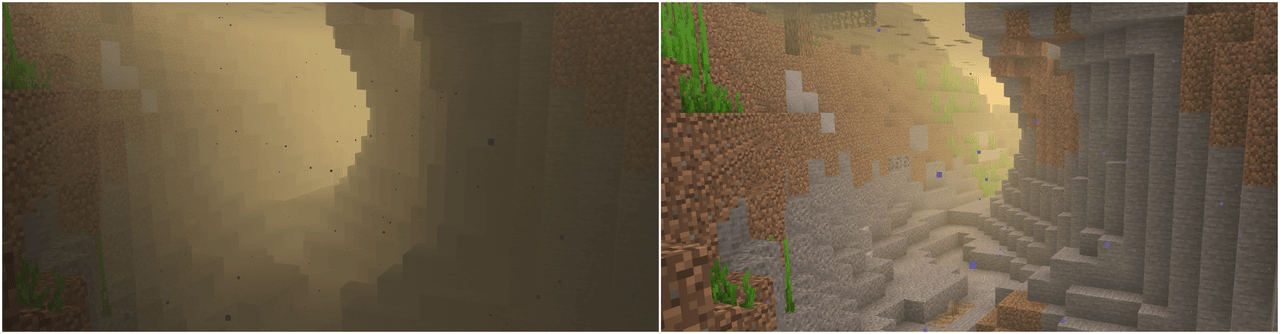
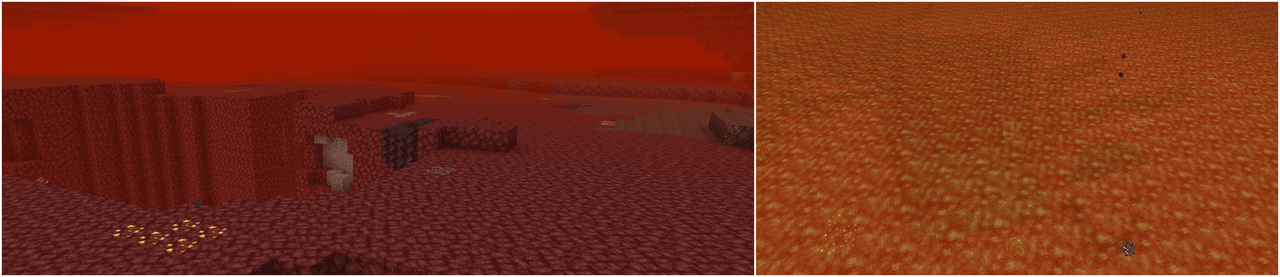
Default Effects
Level 1:
- Improves visibility in water
Level 2:
- Improves visibility in lava
- Improves visibility in `create` fluids (`#additional_enchantments:create` fluid type tag)
- Improves visibility in `the_bumblezone` fluids (`#additional_enchantments:bumblezone` fluid type tag)
- Better visibility
Level 3:
- Fluids from `Level 1` and `Level 2`
- Better visibility
Level 4:
- Fluids from `Level 1` and `Level 2`
- Better visibility
Technical Definition
```js
{
"vision": { // [Mandatory] ||
"values": [ // [Mandatory] ||
{
"level_range": { // [Mandatory] || Defines at which enchantment levels this effect will apply
"min": integer, // [Optional] ||
"max": integer // [Optional] ||
},
"value": [ // [Mandatory] ||
{
"id": ResourceLocation, // [Mandatory] || Unique identifier for the effect
"fluid_types": HolderSet, // [Mandatory] || Defines to which fluids this effect will apply to
"percentage": LevelBasedValue // [Mandatory] || Defines how see-through the fluid will be and by how much the viewing distance within the fluid will be improved
}
]
}
]
}
}
```
Additional explanations
- [ResourceLocation](https://minecraft.wiki/w/Identifier)
- [HolderSet](https://developers.wiki.resourcefulbees.com/miscellaneous-data)
- [LevelBasedValue](https://minecraft.wiki/w/Enchantment_definition#Level-based_value)
## Homing
- Causes the projectile to home in on targets
- Entities closest to the camera focus are prioritized (i.e., the entity you look at)
- Friendly entities (your tamed animals, allies or their tamed animals, players if pvp is disabled) are ignored
- The target definition with the highest priority is checked first
Default Effects
All Levels:
- Living entities (priority 0)
- Except `minecraft:villager`, `minecraft:iron_golem` and `minecraft:enderman`
- Animals (priority 1)
- Enemies (priority 2)
- Except `minecraft:enderman`
- Bosses (priority 3)
- `#c:bosses` and `minecraft:warden`
Level 2
- Improved search range, velocity and turn angle per tick
Level 3:
- Improved search range, velocity and turn angle per tick
Technical Definition
```js
{
"homing": { // [Mandatory] ||
"values": [ // [Mandatory] ||
{
"level_range": { // [Mandatory] || Defines at which enchantment levels this effect will apply
"min": integer, // [Optional] ||
"max": integer // [Optional] ||
},
"value": [ // [Mandatory] ||
{
"id": ResourceLocation, // [Mandatory] || Unique identifier for the effect
"projectiles": HolderSet, // [Optional] || Projectiles this effect applies to (none specified = all)
"target_condition": LootItemCondition, // [Mandatory] || Determines which entities are targeted
"search_range": { // [Mandatory] || Specifies the search range used to pick targets
"front": LevelBasedValue, // [Optional] || (Default: 0)
"back": LevelBasedValue, // [Optional] || (Default: 0)
"left": LevelBasedValue, // [Optional] || (Default: 0)
"right": LevelBasedValue, // [Optional] || (Default: 0)
"up": LevelBasedValue, // [Optional] || (Default: 0)
"down": LevelBasedValue // [Optional] || (Default: 0)
},
"velocity_multiplier": LevelBasedValue, // [Mandatory] || A multiplier that is applied per tick to the projectiles velocity
"max_turn_per_tick": LevelBasedValue, // [Optional] || The maximum amount of degrees the projectile can turn per tick (Default: 180, meaning it will snap directly to the target)
"priority": integer // [Optional] || The priority of this effect (Default: 0)
}
]
}
]
}
}
```
Additional explanations
- [ResourceLocation](https://minecraft.wiki/w/Identifier)
- [HolderSet](https://developers.wiki.resourcefulbees.com/miscellaneous-data)
- [LootItemCondition](https://docs.neoforged.net/docs/1.21.1/resources/server/loottables/lootconditions)
- `this` entity relates to the targeted entity
- `origin` relates to the position of the targeted entity
- `attacking_entity` relates to the owner of the projectile
- `direct_attacking_entity` relates to the actual projectile
- [LevelBasedValue](https://minecraft.wiki/w/Enchantment_definition#Level-based_value)
## Perception
- Displays entities as glowing using custom colors, see below to which entities are affected by default
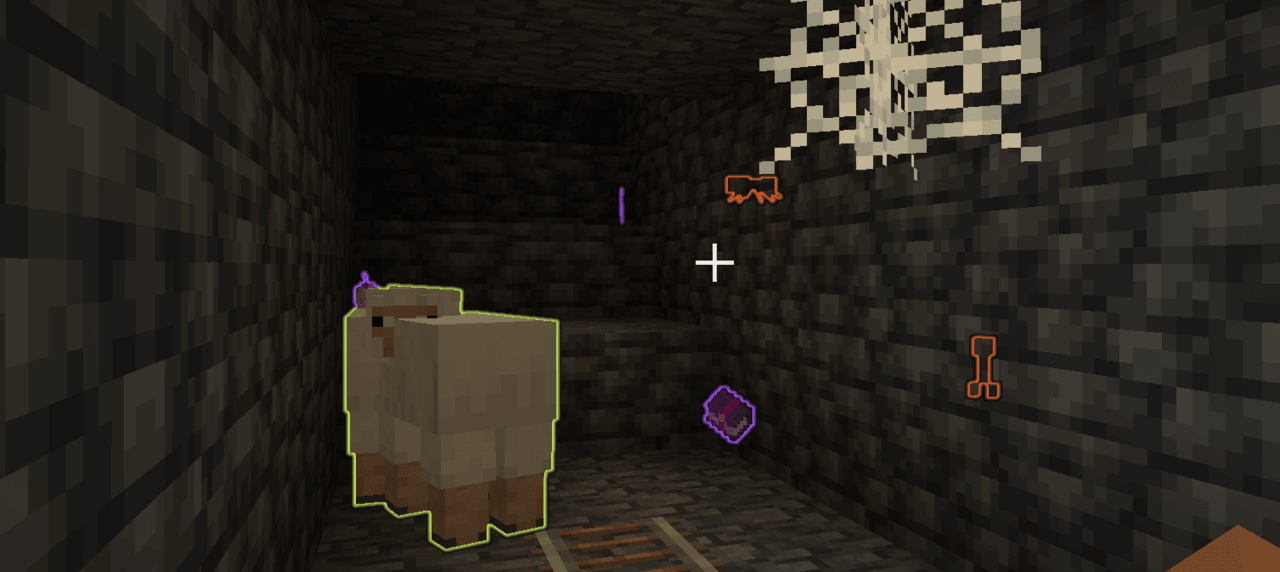
Default Effects
Level 1:
- Highlights valuable items (`#additional_enchantments:valuables` item tag)
- Highlights enchanted items
- Highlights enemies
- Highlights animals
Level 2:
- Highlights valuable items (`#additional_enchantments:valuables` item tag)
- Highlights enchanted items
- Highlights enemies
- Highlights animals
- Highlights bosses
Level 3:
- Highlights valuable items in a limited form (`#additional_enchantments:limited_valuables` item tag)
- Highlights enchanted books containing useful enchantments (e.g., `Unbreaking II` or `Mending`)
- Highlights enemies
- Highlights animals
- Highlights bosses
Technical Definition
```js
{
"perception": { // [Mandatory] ||
"values": [ // [Mandatory] ||
{
"level_range": { // [Mandatory] || Defines at which enchantment levels this effect will apply
"min": integer, // [Optional] ||
"max": integer // [Optional] ||
},
"value": [ // [Mandatory] ||
{
"key": ResourceLocation, // [Mandatory] || Unique identifier for the effect
"condition": LootItemCondition, // [Mandatory] || Checks which entities this effect will apply to
"range": LevelBasedValue, // [Mandatory] || Defines up to which distance the entities will be affected at
"color": ShiftingColor // [Mandatory] || The colors of the effect
}
]
}
]
}
}
```
ShiftingColor
```js
{
"colors": [ // [Mandatory] || The colors defined in here will be smoothly cycled through based on the specified shift rate
{
"color": TextColor, // [Mandatory] ||
"alpha": float // [Optional] || The alpha value of the color (0..1) (Default: 1)
}
],
"color_shift_rate": double, // [Optional] || At which speed the colors will be cycled through (Default: 1.0)
"priority": integer // [Optional] || Which color to be picked - the entry with the highest priority will be picked (Default: 0)
}
```
Additional explanations
- TextColor: Either a named minecraft color or Hex codes
- [ResourceLocation](https://minecraft.wiki/w/Identifier)
- [LootItemCondition](https://docs.neoforged.net/docs/1.21.1/resources/server/loottables/lootconditions)
- `this` entity context relates to the targeted entity that would receive the glow effect
- `origin` relates to the position of the targeted entity
- [LevelBasedValue](https://minecraft.wiki/w/Enchantment_definition#Level-based_value)
## Treasure Finder
- Will highlight blocks using different ways, see below for more information
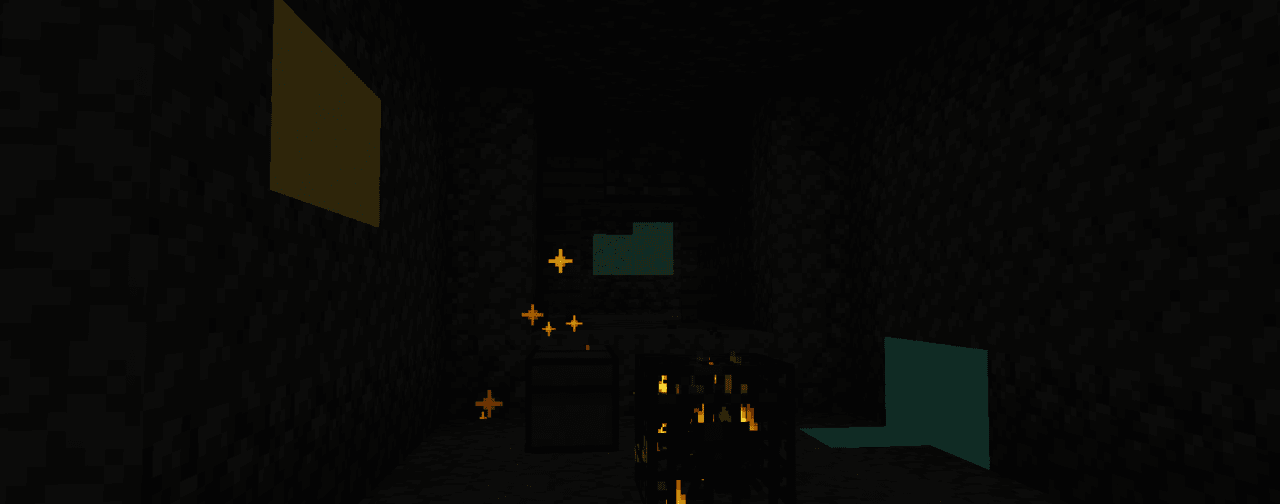
(Compression combined with a still image makes this look worse than it actually is)
Default Effects
All levels:
- `treasures`, using the `particles` display type
Level 1:
- (Uses `simple_shader` for all ores)
- Copper ore
- Iron ore
- Zinc ore
- Silver ore
Level 2:
- (Uses `simple_shader` for all ores)
- Iron ore
- Zinc ore
- Silver ore
- Lapis ore
- Gold ore
Level 3:
- (Uses `simple_shader` for all ores)
- Lapis ore
- Gold ore
- Emerald ore
- Diamond ore
Level 4:
- (Uses `outline` for all ores)
- Emerald ore
- Diamond ore
- Netherite ore
Technical Definition
```js
{
"vision": { // [Mandatory] ||
"values": [ // [Mandatory] ||
{
"level_range": { // [Mandatory] || Defines at which enchantment levels this effect will apply
"min": integer, // [Optional] ||
"max": integer // [Optional] ||
},
"value": [ // [Mandatory] ||
{
"id": ResourceLocation, // [Mandatory] || Unique identifier for the effect
"blocks": BlockDefinition, // [Mandatory] || Defines to which blocks this effect will apply to
"range": LevelBasedValue, // [Mandatory] || Defines up to which distance the blocks will be affected at
"display_type": DisplayType, // [Mandatory] || Defines how the effect will be displayed
"particle_rate": integer, // [Optional] || The rate at which particles will be spawned (only applicable to 'particles' display type) (Default: 0)
"color": ShiftingColor // [Mandatory] || The colors of the effect
}
]
}
]
}
}
```
ShiftingColor
```js
{
"colors": [ // [Mandatory] || The colors defined in here will be smoothly cycled through based on the specified shift rate
{
"color": TextColor, // [Mandatory] ||
"alpha": float // [Optional] || The alpha value of the color (0..1) (Default: 1)
}
],
"color_shift_rate": double, // [Optional] || At which speed the colors will be cycled through (Default: 1.0)
"priority": integer // [Optional] || Which color to be picked - the entry with the highest priority will be picked (Default: 0)
}
```
Additional explanations
- BlockDefinition allows either one of these two
- `treasures`: Unopened loot containers (included in `additional_enchantment:treasures` block tag)
- HolderSet of type `Block`
- DisplayType
- `outline`: Outline around the block, visible through walls
- `particles`: Spawns particles at the block position
- `simple_shader`: A glow effect around the block
- TextColor: Either a named minecraft color or Hex codes
- [ResourceLocation](https://minecraft.wiki/w/Identifier)
- [HolderSet](https://developers.wiki.resourcefulbees.com/miscellaneous-data)
- [LevelBasedValue](https://minecraft.wiki/w/Enchantment_definition#Level-based_value)
## Climbing
- Allows climbing on most blocks, no ladder required
- At further levels also disables the automatic sliding down and even allows climbing on ceilings
Default Effects
Level 1:
- Allows climbing if the block matches:
- Is not air
- Is solid
- Is not a fluid
- Is not `#additional_enchantments:slippery` (ice / glass)
Level 2:
- Enables sticking to walls
Level 3:
- Enables ceiling climbing
Technical Definition
```js
{
"climbable": { // [Mandatory] ||
"values": [ // [Mandatory] ||
{
"level_range": { // [Mandatory] || Defines at which enchantment levels this effect will apply
"min": integer, // [Optional] ||
"max": integer // [Optional] ||
},
"value": [ // [Mandatory] ||
{
"key": ResourceLocation, // [Mandatory] || Unique identifier for the effect
"blocks": BlockPredicate, // [Mandatory] || Defines which blocks are climbable
"can_stick_to_walls": boolean, // [Optional] || If enabled the entity will not automatically slide down the wall (press SHIFT to be able to climb downwards)
"can_climb_ceilings": boolean // [Optional] || If enabled the entity will be able to climb along the ceiling
}
]
}
]
}
}
```
Additional explanations
- [ResourceLocation](https://minecraft.wiki/w/Identifier)
- [BlockPredicate](https://minecraft.wiki/w/Block_predicate)
## Green Foot
- Applies a bonemeal effect on the blocks you walk on and around you
- For saplings and crops the effect will also damage the enchanted item per application
Default Effects
Level 1:
- Any block: Constant 1% chance
- `#minecraft:saplings`: 10% chance, + 7.5% chance per level
- `#minecraft:crops`: 30% chance, + 10% chance per level
Level 2:
- Increased range
- Increased probability
Level 3:
- Increased range
- Increased probability
Technical Definition
```js
{
"growth_entries": [ // [Mandatory] ||
{
"predicate": BlockPredicate, // [Mandatory] || Checks which block to apply this effect to
"probability": LevelBasedValue, // [Mandatory] || The chance for this effect to be applied, checked separately before each attempt for every position
"priority": integer, // [Optional] || Which effect to pick if multiple predicates match - the highest priority is selected (Default: 0)
"damage": integer // [Mandatory] || The amount the enchanted item will be damaged from each successful effect attempt
}
],
"extra_range": LevelBasedValue // [Mandatory] || The extra range (radius) around the player this effect will apply to, in addition to the origin position
}
```
Additional explanations
- [BlockPredicate](https://minecraft.wiki/w/Block_predicate)
- [LevelBasedValue](https://minecraft.wiki/w/Enchantment_definition#Level-based_value)